John the Ripper
John the Ripper is one of the most veteran and widely used password cracking tools. Given a file of hashes, it tries to recover the plaintext passwords through dictionary, mutation rules or brute force. Its main strength is that it detects the hash format automatically and works well without a GPU.
The nuance that truly matters is that John does not only crack hashes: its *2john utility ecosystem (ssh2john, zip2john, office2john) turns protected files into hashes that John can attack. On top of that, automatic detection is convenient but not always right: with ambiguous formats it is worth setting --format by hand so you don't waste time trying the wrong algorithm.
1. Beginner level — dictionary and detection
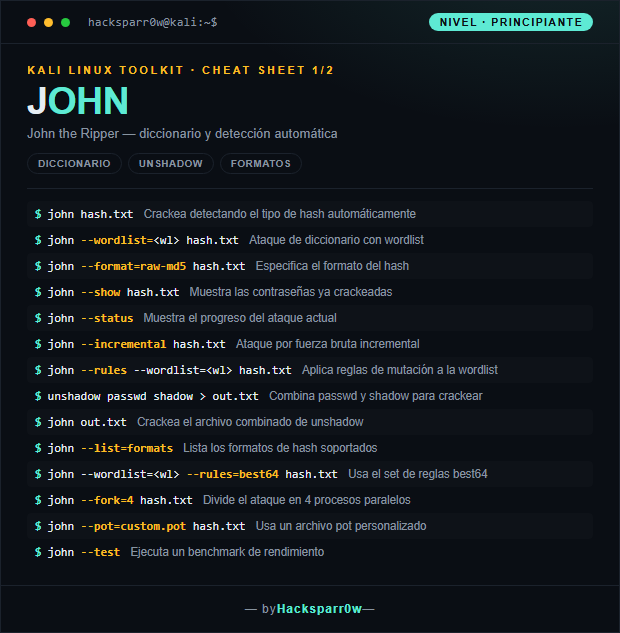
| Command | What it does |
|---|---|
john hash.txt | Cracks by detecting the hash type automatically |
john --wordlist=<wl> hash.txt | Dictionary attack with a wordlist |
john --format=raw-md5 hash.txt | Specifies the hash format |
john --show hash.txt | Shows the already cracked passwords |
john --status | Shows the progress of the current attack |
john --incremental hash.txt | Incremental brute-force attack |
john --rules --wordlist=<wl> hash.txt | Applies mutation rules to the wordlist |
unshadow passwd shadow > out.txt | Combines passwd and shadow to crack |
john out.txt | Cracks the combined file from unshadow |
john --list=formats | Lists the supported hash formats |
john --wordlist=<wl> --rules=best64 hash.txt | Uses the best64 rule set |
john --fork=4 hash.txt | Splits the attack into 4 parallel processes |
john --pot=custom.pot hash.txt | Uses a custom pot file |
john --test | Runs a performance benchmark |
2. Advanced level — Kerberos and extraction
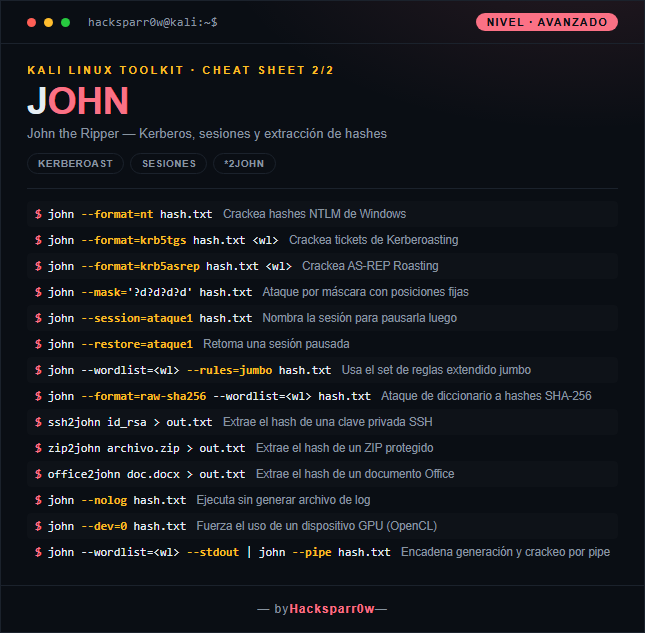
| Command | What it does |
|---|---|
john --format=nt hash.txt | Cracks Windows NTLM hashes |
john --format=krb5tgs hash.txt <wl> | Cracks Kerberoasting tickets |
john --format=krb5asrep hash.txt <wl> | Cracks AS-REP Roasting |
john --mask='?d?d?d?d' hash.txt | Mask attack with fixed positions |
john --session=ataque1 hash.txt | Names the session to pause it later |
john --restore=ataque1 | Resumes a paused session |
john --wordlist=<wl> --rules=jumbo hash.txt | Uses the extended jumbo rule set |
john --format=raw-sha256 --wordlist=<wl> hash.txt | Dictionary attack against SHA-256 hashes |
ssh2john id_rsa > out.txt | Extracts the hash from an SSH private key |
zip2john archivo.zip > out.txt | Extracts the hash from a protected ZIP |
office2john doc.docx > out.txt | Extracts the hash from an Office document |
john --nolog hash.txt | Runs without generating a log file |
john --dev=0 hash.txt | Forces the use of a GPU device (OpenCL) |
john --wordlist=<wl> --stdout | john --pipe hash.txt | Chains generation and cracking through a pipe |
3. Details people miss
- Automatic format detection is convenient but can fail on ambiguous hashes (for example raw-md5 versus other 32-character ones); if you doubt the result, set
--formatexplicitly. - John stores already cracked passwords in the
.potfile (~/.john/john.pot) and will not try them again; if you repeat an attack and nothing shows up, use--showor delete the pot to retry. - For
unshadowand to read/etc/shadowyou need root privileges; remember to combinepasswdandshadowwithunshadowbefore passing the result to John. - Kali usually ships the jumbo build, which is the one that provides the Kerberos formats (
krb5tgs,krb5asrep) and the*2johnutilities; the core build does not include them. --forkuses several CPU processes, but to really speed up slow hashes you want OpenCL properly set up; John is not as strong on GPU as Hashcat, so split the work depending on the case.
zip2john — extracting the hash from an encrypted ZIP
zip2john turns a password-protected ZIP into a hash John can crack:
zip2john archive.zip > hash.txtWith a wordlist:
john --wordlist=/usr/share/wordlists/rockyou.txt hash.txtIf John doesn't auto-detect the format:
john --format=zip hash.txtView the already-cracked password:
john --show hash.txtResponsible use
These commands are for systems you own or have explicit written authorisation to test (labs, CTFs, contracted engagements). Using them against third-party infrastructure without permission is illegal in most countries.
John the Ripper es una de las herramientas de cracking de contraseñas más veteranas y usadas. A partir de un fichero con hashes, intenta recuperar las contraseñas en claro mediante diccionario, reglas de mutación o fuerza bruta. Su gran baza es que detecta el formato del hash automáticamente y funciona bien sin GPU.
El matiz que de verdad importa es que John no solo crackea hashes: su ecosistema de utilidades *2john (ssh2john, zip2john, office2john) convierte ficheros protegidos en hashes que John puede atacar. Además, la detección automática es cómoda pero no siempre acierta: en formatos ambiguos conviene fijar --format a mano para no perder tiempo probando el algoritmo equivocado.
1. Nivel principiante — diccionario y detección
| Comando | Qué hace |
|---|---|
john hash.txt | Crackea detectando el tipo de hash automáticamente |
john --wordlist=<wl> hash.txt | Ataque de diccionario con wordlist |
john --format=raw-md5 hash.txt | Especifica el formato del hash |
john --show hash.txt | Muestra las contraseñas ya crackeadas |
john --status | Muestra el progreso del ataque actual |
john --incremental hash.txt | Ataque por fuerza bruta incremental |
john --rules --wordlist=<wl> hash.txt | Aplica reglas de mutación a la wordlist |
unshadow passwd shadow > out.txt | Combina passwd y shadow para crackear |
john out.txt | Crackea el archivo combinado de unshadow |
john --list=formats | Lista los formatos de hash soportados |
john --wordlist=<wl> --rules=best64 hash.txt | Usa el set de reglas best64 |
john --fork=4 hash.txt | Divide el ataque en 4 procesos paralelos |
john --pot=custom.pot hash.txt | Usa un archivo pot personalizado |
john --test | Ejecuta un benchmark de rendimiento |
2. Nivel avanzado — Kerberos y extracción
| Comando | Qué hace |
|---|---|
john --format=nt hash.txt | Crackea hashes NTLM de Windows |
john --format=krb5tgs hash.txt <wl> | Crackea tickets de Kerberoasting |
john --format=krb5asrep hash.txt <wl> | Crackea AS-REP Roasting |
john --mask='?d?d?d?d' hash.txt | Ataque por máscara con posiciones fijas |
john --session=ataque1 hash.txt | Nombra la sesión para pausarla luego |
john --restore=ataque1 | Retoma una sesión pausada |
john --wordlist=<wl> --rules=jumbo hash.txt | Usa el set de reglas extendido jumbo |
john --format=raw-sha256 --wordlist=<wl> hash.txt | Ataque de diccionario a hashes SHA-256 |
ssh2john id_rsa > out.txt | Extrae el hash de una clave privada SSH |
zip2john archivo.zip > out.txt | Extrae el hash de un ZIP protegido |
office2john doc.docx > out.txt | Extrae el hash de un documento Office |
john --nolog hash.txt | Ejecuta sin generar archivo de log |
john --dev=0 hash.txt | Fuerza el uso de un dispositivo GPU (OpenCL) |
john --wordlist=<wl> --stdout | john --pipe hash.txt | Encadena generación y crackeo por pipe |
3. Detalles que se pasan por alto
- La detección automática de formato es cómoda pero puede fallar en hashes ambiguos (por ejemplo raw-md5 frente a otros de 32 caracteres); si sospechas del resultado, fija
--formatexplícitamente. - John guarda las contraseñas ya crackeadas en el fichero
.pot(~/.john/john.pot) y no vuelve a probarlas; si repites un ataque y no aparece nada, usa--showo borra el pot para reintentar. - Para
unshadowy para leer/etc/shadownecesitas privilegios de root; recuerda combinarpasswdyshadowconunshadowantes de pasar el resultado a John. - En Kali suele venir la versión jumbo, que es la que trae los formatos de Kerberos (
krb5tgs,krb5asrep) y las utilidades*2john; la versión core no los incluye. --forkusa varios procesos de CPU, pero para acelerar de verdad hashes lentos conviene tener OpenCL bien configurado; John no es tan fuerte en GPU como Hashcat, así que reparte el trabajo según el caso.
zip2john — extraer el hash de un ZIP cifrado
zip2john convierte un ZIP protegido con contraseña en un hash que John puede crackear:
zip2john archivo.zip > hash.txtCon wordlist:
john --wordlist=/usr/share/wordlists/rockyou.txt hash.txtSi John no detecta el formato automáticamente:
john --format=zip hash.txtVer la contraseña ya crackeada:
john --show hash.txtUso responsable
Estos comandos son para entornos propios o con autorización explícita por escrito (laboratorios, CTF, auditorías contratadas). Usarlos contra infraestructura ajena sin permiso es ilegal en la mayoría de países.