hashid is a tool that identifies the hash type from its shape, matching it against more than 200 known algorithm patterns. It is the logical first step before cracking: without knowing whether a hash is MD5, bcrypt or a Kerberos ticket, you cannot pick the right Hashcat mode or John format.
The key nuance is that hashidguesses, it does not confirm: hashes of the same length (for example MD5, NTLM and MD4) are indistinguishable by shape alone, so it returns several possibilities ordered by likelihood. Unix-style prefixes such as $1$, $2y$ or $6$ are deterministic; raw hashes with no prefix are not. That is why its real value is handing you the ready-to-copy Hashcat mode (-m) or John format (-j).
1. Beginner level — identify and map to crackers
Command
What it does
hashid <hash>
Identifies the hash type
hashid -m <hash>
Shows the Hashcat mode
hashid -j <hash>
Shows the John format
hashid hashes.txt
Identifies a file of hashes
echo <hash> | hashid
Via stdin
hashid -e <hash>
Includes extended algorithms
hashid -mj <hash>
Hashcat mode + John format at once
hashid -o out.txt <hash>
Saves the result
hashid --help
Shows the help
hashid --version
Shows the version
hash-identifier
Alternative interactive tool
hashid '$1$abc$...'
Identifies a Unix-format hash (md5crypt)
hashid -mje <hash>
Everything: Hashcat, John and extended
hashid '$2y$10$...'
Identifies bcrypt
2. Advanced level — batches, Kerberos and alternatives
hashid guesses by pattern, it does not confirm: hashes of equal length (MD5, NTLM, MD4) all come back as possible. Cross-check against where you obtained the hash before spending hours cracking.
Always use -m or -j to get the Hashcat mode or John format directly; it saves you looking it up by hand in --example-hashes.
For prefixed hashes ($1$, $2y$, $6$, $krb5tgs$) always single-quote them: the shell reads the $ as a variable and would pass an empty string.
-e enables extended algorithms (LDAP SSHA, etc.); without it, less common hashes may not be identified. In exchange, it adds more false positives.
When hashid falls short, try name-that-hash (nth) or haiti: they add context and sometimes pin down modern hashes more accurately.
Responsible use
These commands are for systems you own or have explicit written authorisation to test (labs, CTFs, contracted engagements). Using them against third-party infrastructure without permission is illegal in most countries.
hashid es una herramienta que identifica el tipo de hash a partir de su forma, comparándolo con más de 200 patrones de algoritmos conocidos. Es el primer paso lógico antes de crackear: sin saber si un hash es MD5, bcrypt o un ticket de Kerberos, no puedes elegir el modo correcto de Hashcat ni el formato de John.
El matiz clave es que hashidadivina, no confirma: hashes de la misma longitud (por ejemplo MD5, NTLM y MD4) son indistinguibles solo por su forma, así que devuelve varias posibilidades ordenadas por probabilidad. Los prefijos con formato Unix como $1$, $2y$ o $6$ sí son deterministas; los hashes crudos sin prefijo, no. Por eso su valor real está en darte el modo de Hashcat (-m) o el formato de John (-j) listos para copiar.
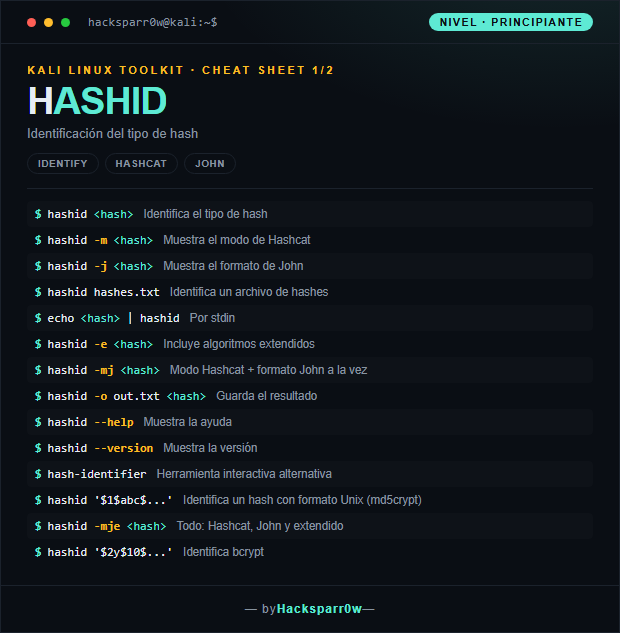
1. Nivel principiante — identificar y mapear a crackers
Comando
Qué hace
hashid <hash>
Identifica el tipo de hash
hashid -m <hash>
Muestra el modo de Hashcat
hashid -j <hash>
Muestra el formato de John
hashid hashes.txt
Identifica un archivo de hashes
echo <hash> | hashid
Por stdin
hashid -e <hash>
Incluye algoritmos extendidos
hashid -mj <hash>
Modo Hashcat + formato John a la vez
hashid -o out.txt <hash>
Guarda el resultado
hashid --help
Muestra la ayuda
hashid --version
Muestra la versión
hash-identifier
Herramienta interactiva alternativa
hashid '$1$abc$...'
Identifica un hash con formato Unix (md5crypt)
hashid -mje <hash>
Todo: Hashcat, John y extendido
hashid '$2y$10$...'
Identifica bcrypt
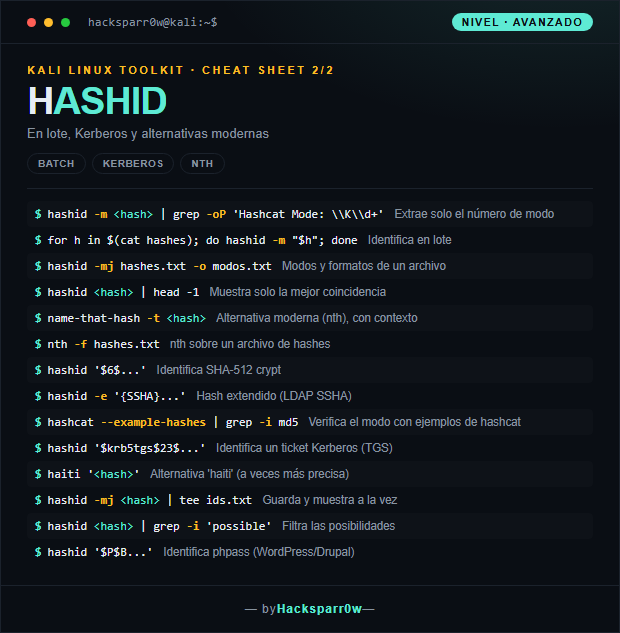
2. Nivel avanzado — lotes, Kerberos y alternativas
hashid adivina por patrón, no confirma: hashes de igual longitud (MD5, NTLM, MD4) salen todos como posibles. Contrasta con el contexto de dónde sacaste el hash antes de gastar horas de cracking.
Usa siempre -m o -j para obtener el modo de Hashcat o el formato de John directamente; te ahorra buscar a mano en --example-hashes.
Para hashes con prefijo ($1$, $2y$, $6$, $krb5tgs$) entrecomíllalos siempre: el shell interpreta el $ como variable y te pasaría una cadena vacía.
-e activa algoritmos extendidos (LDAP SSHA, etc.); sin él, hashes menos comunes pueden no identificarse. A cambio, añade más falsos positivos.
Cuando hashid se queda corto, prueba name-that-hash (nth) o haiti: aportan contexto y a veces afinan más en hashes modernos.
Uso responsable
Estos comandos son para entornos propios o con autorización explícita por escrito (laboratorios, CTF, auditorías contratadas). Usarlos contra infraestructura ajena sin permiso es ilegal en la mayoría de países.