root@sparrow:~/writeups$ cat cewl.md
// cracking
CeWL
21 Jul 2026
· 6 min read
CeWL (Custom Word List generator) is a Ruby spider that crawls a website and returns a list of the words it contains. It is used to build target-tailored wordlists, far more effective against passwords based on the organization's jargon, products or proper names than generic dictionaries.
The point is not the volume of words but their relevance: a small wordlist scraped from the target itself often beats rockyou.txt because users recycle terms they see every day. Tuning -d (depth) and -m (minimum length) filters noise, and the real potential shows when you chain the output into john or hashcat with mutation rules.
1. Beginner level — crawling and basic wordlist
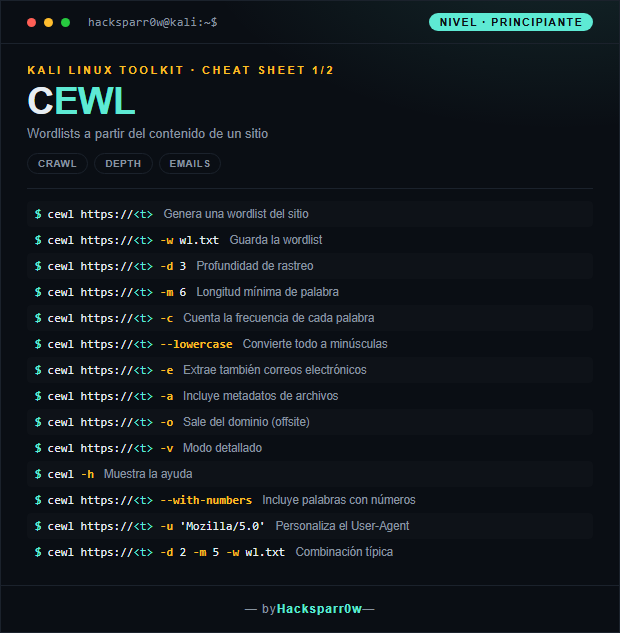
| Command | What it does |
|---|---|
cewl https://<t> | Generates a wordlist from the site |
cewl https://<t> -w wl.txt | Saves the wordlist |
cewl https://<t> -d 3 | Crawl depth |
cewl https://<t> -m 6 | Minimum word length |
cewl https://<t> -c | Counts the frequency of each word |
cewl https://<t> --lowercase | Converts everything to lowercase |
cewl https://<t> -e | Also extracts email addresses |
cewl https://<t> -a | Includes file metadata |
cewl https://<t> -o | Leaves the domain (offsite) |
cewl https://<t> -v | Verbose mode |
cewl -h | Shows the help |
cewl https://<t> --with-numbers | Includes words containing numbers |
cewl https://<t> -u 'Mozilla/5.0' | Customizes the User-Agent |
cewl https://<t> -d 2 -m 5 -w wl.txt | Typical combination |
2. Advanced level — metadata, auth and chaining
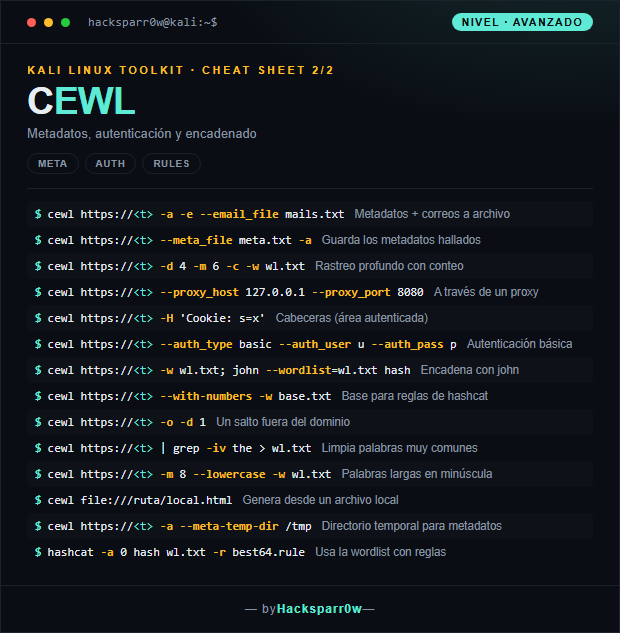
| Command | What it does |
|---|---|
cewl https://<t> -a -e --email_file mails.txt | Metadata + emails to a file |
cewl https://<t> --meta_file meta.txt -a | Saves the metadata found |
cewl https://<t> -d 4 -m 6 -c -w wl.txt | Deep crawl with counting |
cewl https://<t> --proxy_host 127.0.0.1 --proxy_port 8080 | Through a proxy |
cewl https://<t> -H 'Cookie: s=x' | Headers (authenticated area) |
cewl https://<t> --auth_type basic --auth_user u --auth_pass p | Basic authentication |
cewl https://<t> -w wl.txt; john --wordlist=wl.txt hash | Chains with john |
cewl https://<t> --with-numbers -w base.txt | Base for hashcat rules |
cewl https://<t> -o -d 1 | One hop outside the domain |
cewl https://<t> | grep -iv the > wl.txt | Strips very common words |
cewl https://<t> -m 8 --lowercase -w wl.txt | Long words in lowercase |
cewl file:///ruta/local.html | Generates from a local file |
cewl https://<t> -a --meta-temp-dir /tmp | Temporary directory for metadata |
hashcat -a 0 hash wl.txt -r best64.rule | Uses the wordlist with rules |
3. Details people miss
- CeWL honours the domain scope by default: without
-oit never leaves the starting host, which keeps you from crawling half the internet, but if the useful content lives on a subdomain or CDN you must point at it explicitly. - Raise the depth carefully: each
-dlevel multiplies requests and time. On large sites a-d 4can take ages or generate detectable noise; start low and only increase it if the wordlist comes out thin. - Metadata extraction (
-a) needs theexifrgem and only pays off when the site publishes documents (PDF, DOCX, images) with embedded author or software fields; on sites without office files you will get nothing. - CeWL builds the wordlist, it does not crack: its output is raw material. Always chain it into
johnorhashcatand apply rules (best64.rule) to cover the uppercase, numbers and symbols the raw list omits. - Mind TLS: sites with self-signed certificates or broken chains can make the crawl fail; also make sure the URL carries the scheme (
https://), because CeWL does not assume it.
Responsible use
These commands are for systems you own or have explicit written authorisation to test (labs, CTFs, contracted engagements). Using them against third-party infrastructure without permission is illegal in most countries.
CeWL (Custom Word List generator) es un spider en Ruby que rastrea un sitio web y devuelve una lista de las palabras que aparecen en él. Sirve para construir wordlists a medida del objetivo, mucho más eficaces contra contraseñas basadas en la jerga, productos o nombres propios de la organización que los diccionarios genéricos.
La clave no es el volumen de palabras sino su relevancia: una wordlist pequeña extraída del propio objetivo suele batir a rockyou.txt porque los usuarios reciclan términos que ven a diario. Ajustar -d (profundidad) y -m (longitud mínima) filtra ruido, y el verdadero potencial aparece al encadenar la salida con john o hashcat aplicando reglas de mutación.
1. Nivel principiante — rastreo y wordlist básica
| Comando | Qué hace |
|---|---|
cewl https://<t> | Genera una wordlist del sitio |
cewl https://<t> -w wl.txt | Guarda la wordlist |
cewl https://<t> -d 3 | Profundidad de rastreo |
cewl https://<t> -m 6 | Longitud mínima de palabra |
cewl https://<t> -c | Cuenta la frecuencia de cada palabra |
cewl https://<t> --lowercase | Convierte todo a minúsculas |
cewl https://<t> -e | Extrae también correos electrónicos |
cewl https://<t> -a | Incluye metadatos de archivos |
cewl https://<t> -o | Sale del dominio (offsite) |
cewl https://<t> -v | Modo detallado |
cewl -h | Muestra la ayuda |
cewl https://<t> --with-numbers | Incluye palabras con números |
cewl https://<t> -u 'Mozilla/5.0' | Personaliza el User-Agent |
cewl https://<t> -d 2 -m 5 -w wl.txt | Combinación típica |
2. Nivel avanzado — metadatos, auth y encadenado
| Comando | Qué hace |
|---|---|
cewl https://<t> -a -e --email_file mails.txt | Metadatos + correos a archivo |
cewl https://<t> --meta_file meta.txt -a | Guarda los metadatos hallados |
cewl https://<t> -d 4 -m 6 -c -w wl.txt | Rastreo profundo con conteo |
cewl https://<t> --proxy_host 127.0.0.1 --proxy_port 8080 | A través de un proxy |
cewl https://<t> -H 'Cookie: s=x' | Cabeceras (área autenticada) |
cewl https://<t> --auth_type basic --auth_user u --auth_pass p | Autenticación básica |
cewl https://<t> -w wl.txt; john --wordlist=wl.txt hash | Encadena con john |
cewl https://<t> --with-numbers -w base.txt | Base para reglas de hashcat |
cewl https://<t> -o -d 1 | Un salto fuera del dominio |
cewl https://<t> | grep -iv the > wl.txt | Limpia palabras muy comunes |
cewl https://<t> -m 8 --lowercase -w wl.txt | Palabras largas en minúscula |
cewl file:///ruta/local.html | Genera desde un archivo local |
cewl https://<t> -a --meta-temp-dir /tmp | Directorio temporal para metadatos |
hashcat -a 0 hash wl.txt -r best64.rule | Usa la wordlist con reglas |
3. Detalles que se pasan por alto
- CeWL respeta el alcance del dominio por defecto: sin
-ono sale del host de partida, así evitas rastrear medio internet, pero si el contenido útil vive en un subdominio o CDN tendrás que apuntarlo explícitamente. - Sube la profundidad con cuidado: cada nivel de
-dmultiplica las peticiones y el tiempo. En sitios grandes un-d 4puede tardar muchísimo o hacer ruido detectable; empieza bajo y sube solo si la wordlist queda pobre. - La extracción de metadatos (
-a) necesita la gemaexifry solo rinde si el sitio publica documentos (PDF, DOCX, imágenes) con autor o software embebido; en webs sin ficheros ofimáticos no obtendrás nada. - CeWL genera la wordlist, no crackea: su salida es materia prima. Encadénala siempre con
johnohashcaty aplica reglas (best64.rule) para cubrir mayúsculas, números y símbolos que la lista cruda no incluye. - Cuidado con el TLS: sitios con certificados autofirmados o cadenas rotas pueden hacer fallar el rastreo; verifica también que la URL lleva el esquema (
https://), porque CeWL no lo asume.
Uso responsable
Estos comandos son para entornos propios o con autorización explícita por escrito (laboratorios, CTF, auditorías contratadas). Usarlos contra infraestructura ajena sin permiso es ilegal en la mayoría de países.