root@sparrow:~/writeups$ cat hydra.md
// cracking
Hydra
21 Jul 2026
· 7 min read
Hydra (often thc-hydra) is an online credential cracker that tests usernames and passwords against a live service. It supports dozens of protocols —SSH, FTP, HTTP, RDP, SMB, MySQL and more— with fast, parallel attacks. It is the go-to tool for demonstrating the real impact of a weak password.Hydra is online: every attempt is a real connection to the service, so network latency and server-side limits —not your CPU— set the pace. Raising threads with -t speeds things up, but too many trigger lockouts, false negatives or a service crash. The trick is choosing the right module, wordlist and parallelism, not blind brute force.
1. Beginner level — per-service attacks
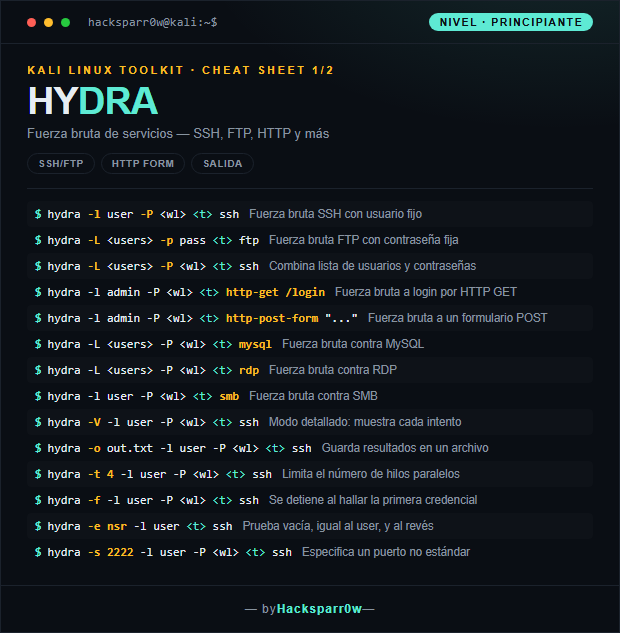
| Command | What it does |
|---|---|
hydra -l user -P <wl> <t> ssh | SSH brute force with a fixed username |
hydra -L <users> -p pass <t> ftp | FTP brute force with a fixed password |
hydra -L <users> -P <wl> <t> ssh | Combines a username list and a password list |
hydra -l admin -P <wl> <t> http-get /login | Brute force against an HTTP GET login |
hydra -l admin -P <wl> <t> http-post-form "..." | Brute force against a POST form |
hydra -L <users> -P <wl> <t> mysql | Brute force against MySQL |
hydra -L <users> -P <wl> <t> rdp | Brute force against RDP |
hydra -l user -P <wl> <t> smb | Brute force against SMB |
hydra -V -l user -P <wl> <t> ssh | Verbose mode: shows every attempt |
hydra -o out.txt -l user -P <wl> <t> ssh | Saves results to a file |
hydra -t 4 -l user -P <wl> <t> ssh | Limits the number of parallel threads |
hydra -f -l user -P <wl> <t> ssh | Stops on finding the first credential |
hydra -e nsr -l user <t> ssh | Tries empty, same as user, and reversed |
hydra -s 2222 -l user -P <wl> <t> ssh | Specifies a non-standard port |
2. Advanced level — multi-target and fine control
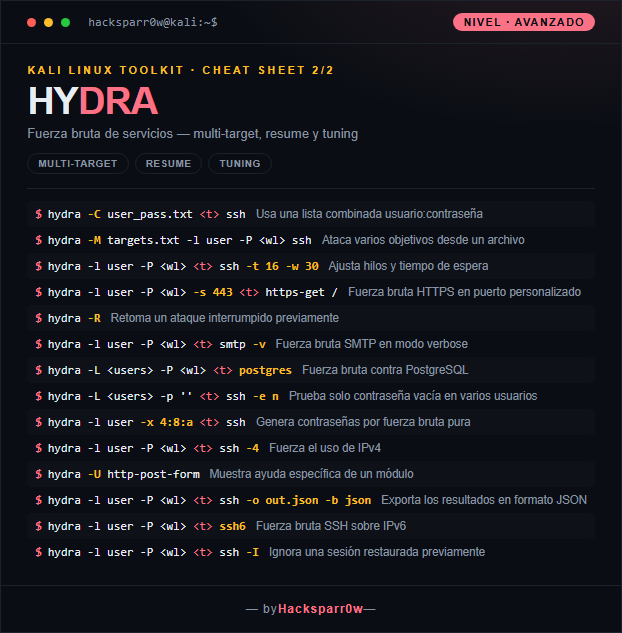
| Command | What it does |
|---|---|
hydra -C user_pass.txt <t> ssh | Uses a combined username:password list |
hydra -M targets.txt -l user -P <wl> ssh | Attacks several targets from a file |
hydra -l user -P <wl> <t> ssh -t 16 -w 30 | Tunes threads and wait time |
hydra -l user -P <wl> -s 443 <t> https-get / | HTTPS brute force on a custom port |
hydra -R | Resumes a previously interrupted attack |
hydra -l user -P <wl> <t> smtp -v | SMTP brute force in verbose mode |
hydra -L <users> -P <wl> <t> postgres | Brute force against PostgreSQL |
hydra -L <users> -p '' <t> ssh -e n | Tests only an empty password across several users |
hydra -l user -x 4:8:a <t> ssh | Generates passwords by pure brute force |
hydra -l user -P <wl> <t> ssh -4 | Forces the use of IPv4 |
hydra -U http-post-form | Shows the specific help for a module |
hydra -l user -P <wl> <t> ssh -o out.json -b json | Exports the results in JSON format |
hydra -l user -P <wl> <t> ssh6 | SSH brute force over IPv6 |
hydra -l user -P <wl> <t> ssh -I | Ignores a previously restored session |
3. Details people miss
- The service module ALWAYS goes at the end of the line (
ssh,ftp,http-post-form): it is a positional argument, not a flag. - In
http-post-formthe three-part string (path:parameters:failure-condition) is the trickiest bit; use^USER^and^PASS^plus a failure marker that appears in the wrong-login response. - More threads is not always better: SSH often breaks above
-t 4due to server limits (MaxStartups), and aggressive parallelism triggers account lockouts and false negatives. - Use
-fto stop at the first valid credential and-oto save the output; on real targets, check lockout policies first so you don't take accounts out of service. - Mind the case:
-l/-ptake a single value, while-L/-Pexpect a list file.
Responsible use
These commands are for systems you own or have explicit written authorisation to test (labs, CTFs, contracted engagements). Using them against third-party infrastructure without permission is illegal in most countries.
Hydra (a menudo thc-hydra) es un cracker de credenciales en línea que prueba usuarios y contraseñas contra un servicio en vivo. Soporta decenas de protocolos —SSH, FTP, HTTP, RDP, SMB, MySQL y más— con ataques paralelos y de alta velocidad. Es la herramienta de referencia para demostrar el impacto real de una contraseña débil.Hydra es online: cada intento es una conexión real al servicio, así que la latencia de red y los límites del servidor —no tu CPU— marcan la velocidad. Subir hilos con -t acelera, pero demasiados provocan bloqueos, falsos negativos o caídas del servicio. La clave está en elegir bien módulo, wordlist y paralelismo, no en fuerza bruta ciega.
1. Nivel principiante — ataques por servicio
| Comando | Qué hace |
|---|---|
hydra -l user -P <wl> <t> ssh | Fuerza bruta SSH con usuario fijo |
hydra -L <users> -p pass <t> ftp | Fuerza bruta FTP con contraseña fija |
hydra -L <users> -P <wl> <t> ssh | Combina lista de usuarios y contraseñas |
hydra -l admin -P <wl> <t> http-get /login | Fuerza bruta a login por HTTP GET |
hydra -l admin -P <wl> <t> http-post-form "..." | Fuerza bruta a un formulario POST |
hydra -L <users> -P <wl> <t> mysql | Fuerza bruta contra MySQL |
hydra -L <users> -P <wl> <t> rdp | Fuerza bruta contra RDP |
hydra -l user -P <wl> <t> smb | Fuerza bruta contra SMB |
hydra -V -l user -P <wl> <t> ssh | Modo detallado: muestra cada intento |
hydra -o out.txt -l user -P <wl> <t> ssh | Guarda resultados en un archivo |
hydra -t 4 -l user -P <wl> <t> ssh | Limita el número de hilos paralelos |
hydra -f -l user -P <wl> <t> ssh | Se detiene al hallar la primera credencial |
hydra -e nsr -l user <t> ssh | Prueba vacía, igual al user, y al revés |
hydra -s 2222 -l user -P <wl> <t> ssh | Especifica un puerto no estándar |
2. Nivel avanzado — multi-target y control fino
| Comando | Qué hace |
|---|---|
hydra -C user_pass.txt <t> ssh | Usa una lista combinada usuario:contraseña |
hydra -M targets.txt -l user -P <wl> ssh | Ataca varios objetivos desde un archivo |
hydra -l user -P <wl> <t> ssh -t 16 -w 30 | Ajusta hilos y tiempo de espera |
hydra -l user -P <wl> -s 443 <t> https-get / | Fuerza bruta HTTPS en puerto personalizado |
hydra -R | Retoma un ataque interrumpido previamente |
hydra -l user -P <wl> <t> smtp -v | Fuerza bruta SMTP en modo verbose |
hydra -L <users> -P <wl> <t> postgres | Fuerza bruta contra PostgreSQL |
hydra -L <users> -p '' <t> ssh -e n | Prueba solo contraseña vacía en varios usuarios |
hydra -l user -x 4:8:a <t> ssh | Genera contraseñas por fuerza bruta pura |
hydra -l user -P <wl> <t> ssh -4 | Fuerza el uso de IPv4 |
hydra -U http-post-form | Muestra ayuda específica de un módulo |
hydra -l user -P <wl> <t> ssh -o out.json -b json | Exporta los resultados en formato JSON |
hydra -l user -P <wl> <t> ssh6 | Fuerza bruta SSH sobre IPv6 |
hydra -l user -P <wl> <t> ssh -I | Ignora una sesión restaurada previamente |
3. Detalles que se pasan por alto
- El módulo del servicio va SIEMPRE al final de la línea (
ssh,ftp,http-post-form): es un argumento posicional, no una flag. - En
http-post-formla cadena de tres partes (ruta:parámetros:condición-de-fallo) es lo más delicado; usa^USER^y^PASS^y una marca de fallo que aparezca en la respuesta de login incorrecto. - Más hilos no siempre es mejor: SSH suele fallar por encima de
-t 4por límites del servidor (MaxStartups), y un paralelismo agresivo dispara bloqueos de cuenta y falsos negativos. - Usa
-fpara parar en la primera credencial válida y-opara guardar la salida; en objetivos reales revisa antes las políticas de bloqueo para no dejar cuentas fuera de servicio. - Distingue mayúsculas:
-l/-pson un valor único, mientras que-L/-Pesperan un archivo de lista.
Uso responsable
Estos comandos son para entornos propios o con autorización explícita por escrito (laboratorios, CTF, auditorías contratadas). Usarlos contra infraestructura ajena sin permiso es ilegal en la mayoría de países.