root@sparrow:~/writeups$ cat hashcat.md
// cracking
Hashcat
21 Jul 2026
· 6 min read
hashcat is the fastest GPU-based password cracker available: it takes captured hashes and tries candidates until it recovers the original password. It supports hundreds of algorithms (MD5,NTLM,SHA, Kerberos, WPA…) selected by their-mmode. It is a core tool in Active Directory audits and in validating password policies.
What really decides the outcome is not the flags but picking the right hash mode (-m) and attack type (-a): a wrong mode will never crack anything, and a blind dictionary yields far less than one well combined with rules or masks. hashcat stores every result in its potfile, so --show and --left rely on that state instead of repeating work.
1. Beginner level — dictionary, masks and rules
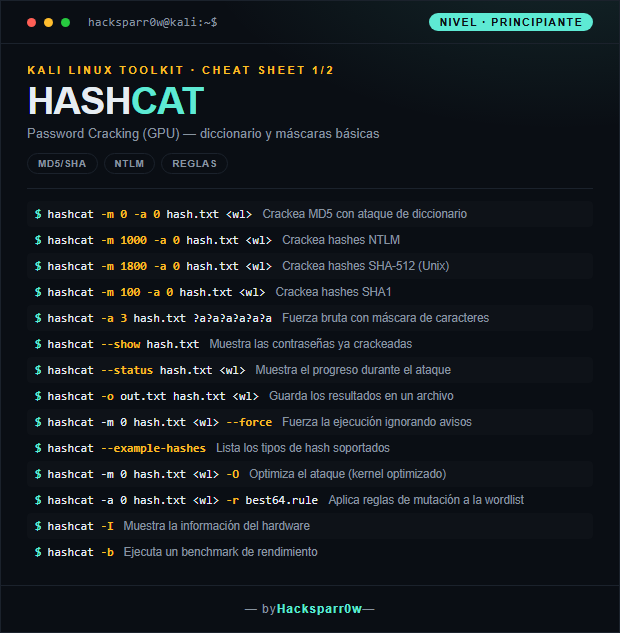
| Command | What it does |
|---|---|
hashcat -m 0 -a 0 hash.txt <wl> | Cracks MD5 with a dictionary attack |
hashcat -m 1000 -a 0 hash.txt <wl> | Cracks NTLM hashes |
hashcat -m 1800 -a 0 hash.txt <wl> | Cracks SHA-512 hashes (Unix) |
hashcat -m 100 -a 0 hash.txt <wl> | Cracks SHA1 hashes |
hashcat -a 3 hash.txt ?a?a?a?a?a?a | Brute force with a character mask |
hashcat --show hash.txt | Shows the passwords already cracked |
hashcat --status hash.txt <wl> | Shows progress during the attack |
hashcat -o out.txt hash.txt <wl> | Saves the results to a file |
hashcat -m 0 hash.txt <wl> --force | Forces execution ignoring warnings |
hashcat --example-hashes | Lists the supported hash types |
hashcat -m 0 hash.txt <wl> -O | Optimizes the attack (optimized kernel) |
hashcat -a 0 hash.txt <wl> -r best64.rule | Applies mutation rules to the wordlist |
hashcat -I | Shows the hardware information |
hashcat -b | Runs a performance benchmark |
2. Advanced level — Kerberoasting, sessions and tuning
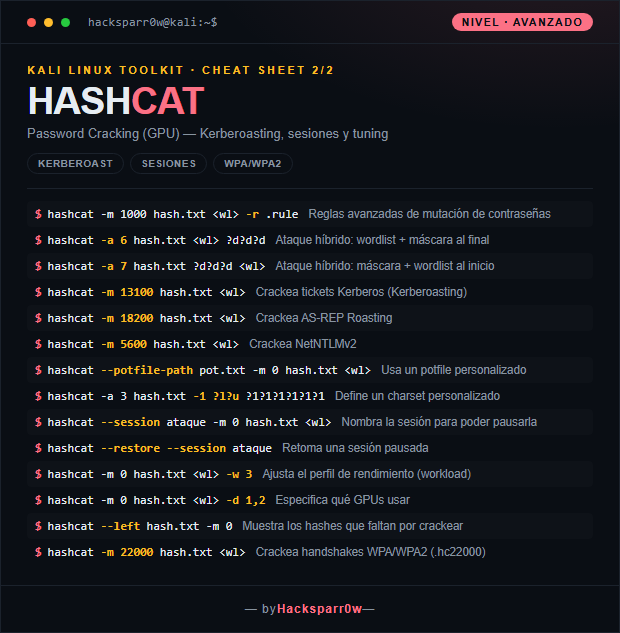
| Command | What it does |
|---|---|
hashcat -m 1000 hash.txt <wl> -r .rule | Advanced password mutation rules |
hashcat -a 6 hash.txt <wl> ?d?d?d | Hybrid attack: wordlist + mask at the end |
hashcat -a 7 hash.txt ?d?d?d <wl> | Hybrid attack: mask + wordlist at the start |
hashcat -m 13100 hash.txt <wl> | Cracks Kerberos tickets (Kerberoasting) |
hashcat -m 18200 hash.txt <wl> | Cracks AS-REP Roasting |
hashcat -m 5600 hash.txt <wl> | Cracks NetNTLMv2 |
hashcat --potfile-path pot.txt -m 0 hash.txt <wl> | Uses a custom potfile |
hashcat -a 3 hash.txt -1 ?l?u ?1?1?1?1?1?1 | Defines a custom charset |
hashcat --session ataque -m 0 hash.txt <wl> | Names the session so it can be paused |
hashcat --restore --session ataque | Resumes a paused session |
hashcat -m 0 hash.txt <wl> -w 3 | Adjusts the performance profile (workload) |
hashcat -m 0 hash.txt <wl> -d 1,2 | Specifies which GPUs to use |
hashcat --left hash.txt -m 0 | Shows the hashes still left to crack |
hashcat -m 22000 hash.txt <wl> | Cracks WPA/WPA2 handshakes (.hc22000) |
3. Details people miss
- The most common mistake is getting the
-mmode wrong: check--example-hashesto confirm the exact format before launching the attack. -Oenables optimized kernels and is much faster, but it caps the maximum candidate password length; if you find nothing long, try again without-O.- hashcat caches everything cracked in the potfile: if you rerun an already-broken hash it won't show it again unless you use
--showor delete/change the potfile. --forcebypasses the driver's safety checks; use it only for testing, as it can produce corrupt results or false negatives.- Always name long sessions with
--session: without a name you won't be able to resume them with--restoreif they are interrupted.
Responsible use
These commands are for systems you own or have explicit written authorisation to test (labs, CTFs, contracted engagements). Using them against third-party infrastructure without permission is illegal in most countries.
hashcat es el crackeador de contraseñas por fuerza sobre GPU más rápido que existe: recibe hashes capturados y prueba candidatos hasta recuperar la contraseña original. Soporta cientos de algoritmos (MD5,NTLM,SHA, Kerberos, WPA…) identificados por su modo-m. Es una pieza central en auditorías de Active Directory y en la validación de políticas de contraseñas.
Lo que de verdad decide el resultado no son los flags sino elegir bien el modo de hash (-m) y el tipo de ataque (-a): un modo equivocado nunca crackeará nada, y un diccionario ciego rinde mucho menos que uno bien combinado con reglas o máscaras. hashcat guarda cada resultado en su potfile, así que --show y --left se apoyan en ese estado en lugar de repetir trabajo.
1. Nivel principiante — diccionario, máscaras y reglas
| Comando | Qué hace |
|---|---|
hashcat -m 0 -a 0 hash.txt <wl> | Crackea MD5 con ataque de diccionario |
hashcat -m 1000 -a 0 hash.txt <wl> | Crackea hashes NTLM |
hashcat -m 1800 -a 0 hash.txt <wl> | Crackea hashes SHA-512 (Unix) |
hashcat -m 100 -a 0 hash.txt <wl> | Crackea hashes SHA1 |
hashcat -a 3 hash.txt ?a?a?a?a?a?a | Fuerza bruta con máscara de caracteres |
hashcat --show hash.txt | Muestra las contraseñas ya crackeadas |
hashcat --status hash.txt <wl> | Muestra el progreso durante el ataque |
hashcat -o out.txt hash.txt <wl> | Guarda los resultados en un archivo |
hashcat -m 0 hash.txt <wl> --force | Fuerza la ejecución ignorando avisos |
hashcat --example-hashes | Lista los tipos de hash soportados |
hashcat -m 0 hash.txt <wl> -O | Optimiza el ataque (kernel optimizado) |
hashcat -a 0 hash.txt <wl> -r best64.rule | Aplica reglas de mutación a la wordlist |
hashcat -I | Muestra la información del hardware |
hashcat -b | Ejecuta un benchmark de rendimiento |
2. Nivel avanzado — Kerberoasting, sesiones y tuning
| Comando | Qué hace |
|---|---|
hashcat -m 1000 hash.txt <wl> -r .rule | Reglas avanzadas de mutación de contraseñas |
hashcat -a 6 hash.txt <wl> ?d?d?d | Ataque híbrido: wordlist + máscara al final |
hashcat -a 7 hash.txt ?d?d?d <wl> | Ataque híbrido: máscara + wordlist al inicio |
hashcat -m 13100 hash.txt <wl> | Crackea tickets Kerberos (Kerberoasting) |
hashcat -m 18200 hash.txt <wl> | Crackea AS-REP Roasting |
hashcat -m 5600 hash.txt <wl> | Crackea NetNTLMv2 |
hashcat --potfile-path pot.txt -m 0 hash.txt <wl> | Usa un potfile personalizado |
hashcat -a 3 hash.txt -1 ?l?u ?1?1?1?1?1?1 | Define un charset personalizado |
hashcat --session ataque -m 0 hash.txt <wl> | Nombra la sesión para poder pausarla |
hashcat --restore --session ataque | Retoma una sesión pausada |
hashcat -m 0 hash.txt <wl> -w 3 | Ajusta el perfil de rendimiento (workload) |
hashcat -m 0 hash.txt <wl> -d 1,2 | Especifica qué GPUs usar |
hashcat --left hash.txt -m 0 | Muestra los hashes que faltan por crackear |
hashcat -m 22000 hash.txt <wl> | Crackea handshakes WPA/WPA2 (.hc22000) |
3. Detalles que se pasan por alto
- El error más común es equivocar el modo
-m: revisa--example-hashespara confirmar el formato exacto antes de lanzar el ataque. -Oactiva kernels optimizados y acelera mucho, pero limita la longitud máxima de la contraseña candidata; si no encuentras nada largo, prueba sin-O.- hashcat cachea todo lo crackeado en el potfile: si repites un hash ya roto no volverá a mostrarlo salvo que uses
--showo borres/cambies el potfile. --forceignora los chequeos de seguridad del driver; úsalo solo para pruebas, ya que puede dar resultados corruptos o falsos negativos.- Nombra siempre las sesiones largas con
--session: sin nombre no podrás retomarlas con--restoresi se interrumpen.
Uso responsable
Estos comandos son para entornos propios o con autorización explícita por escrito (laboratorios, CTF, auditorías contratadas). Usarlos contra infraestructura ajena sin permiso es ilegal en la mayoría de países.