root@sparrow:~/writeups$ cat wpscan.md
// web
WPScan
21 Jul 2026
· 6 min read
WPScan is a WordPress-focused security scanner written in Ruby. It enumerates the core version, the installed plugins and themes, the registered users, and cross-checks everything against a database of known vulnerabilities. It is the go-to tool for auditing any site built on WordPress, which powers a huge slice of the web.
The key nuance is that WPScan only correlates its findings with real CVEs if you supply an --api-token: without one it detects versions but won't tell you what is vulnerable. On top of that, plugin detection defaults to passive (it only sees what is linked in the HTML); to uncover hidden plugins you must switch to aggressive mode, at the cost of far more noise.
1. Beginner level — enumeration and login
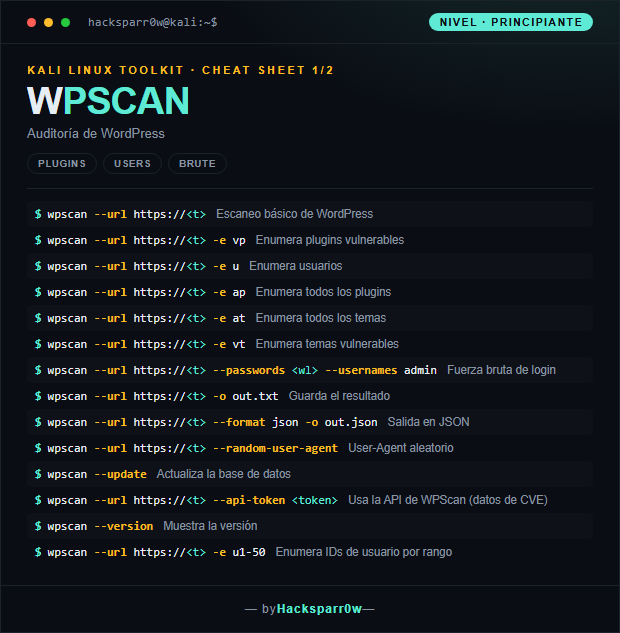
| Command | What it does |
|---|---|
wpscan --url https://<t> | Basic WordPress scan |
wpscan --url https://<t> -e vp | Enumerate vulnerable plugins |
wpscan --url https://<t> -e u | Enumerate users |
wpscan --url https://<t> -e ap | Enumerate all plugins |
wpscan --url https://<t> -e at | Enumerate all themes |
wpscan --url https://<t> -e vt | Enumerate vulnerable themes |
wpscan --url https://<t> --passwords <wl> --usernames admin | Login brute force |
wpscan --url https://<t> -o out.txt | Save the output |
wpscan --url https://<t> --format json -o out.json | JSON output |
wpscan --url https://<t> --random-user-agent | Random User-Agent |
wpscan --update | Update the database |
wpscan --url https://<t> --api-token <token> | Uses the WPScan API (CVE data) |
wpscan --version | Show the version |
wpscan --url https://<t> -e u1-50 | Enumerate user IDs by range |
2. Advanced level — stealth and efficient brute force
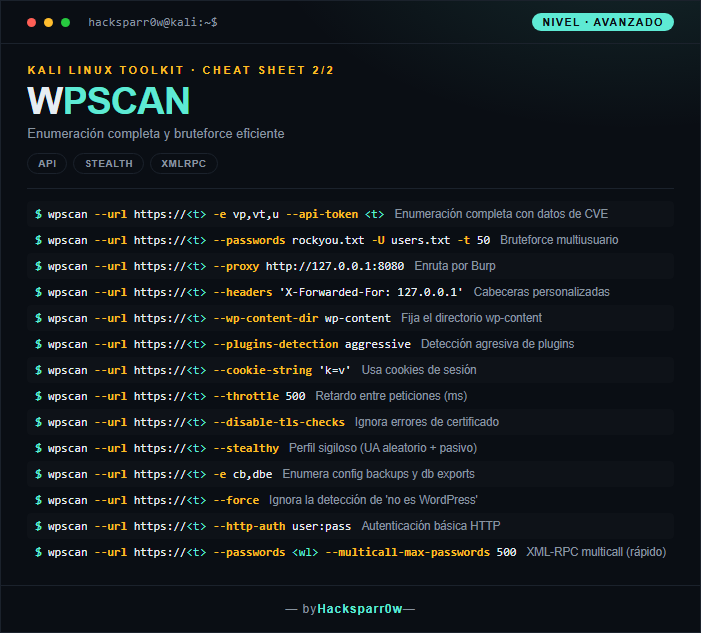
| Command | What it does |
|---|---|
wpscan --url https://<t> -e vp,vt,u --api-token <t> | Full enumeration with CVE data |
wpscan --url https://<t> --passwords rockyou.txt -U users.txt -t 50 | Multi-user brute force |
wpscan --url https://<t> --proxy http://127.0.0.1:8080 | Route through Burp |
wpscan --url https://<t> --headers 'X-Forwarded-For: 127.0.0.1' | Custom headers |
wpscan --url https://<t> --wp-content-dir wp-content | Set the wp-content directory |
wpscan --url https://<t> --plugins-detection aggressive | Aggressive plugin detection |
wpscan --url https://<t> --cookie-string 'k=v' | Use session cookies |
wpscan --url https://<t> --throttle 500 | Delay between requests (ms) |
wpscan --url https://<t> --disable-tls-checks | Ignore certificate errors |
wpscan --url https://<t> --stealthy | Stealthy profile (random UA + passive) |
wpscan --url https://<t> -e cb,dbe | Enumerate config backups and db exports |
wpscan --url https://<t> --force | Ignore the 'not WordPress' detection |
wpscan --url https://<t> --http-auth user:pass | HTTP basic authentication |
wpscan --url https://<t> --passwords <wl> --multicall-max-passwords 500 | XML-RPC multicall (fast) |
3. Details people miss
- Without
--api-tokenWPScan detects versions but won't show the associated CVEs; sign up at wpscan.com for the free token (capped at 25 requests per day on the free plan). - Default plugin detection is passive and misses almost everything not linked in the HTML; use
--plugins-detection aggressiveto force path discovery, but be ready for hundreds of requests and possible WAF blocks. - Brute force uses
xmlrpc.phpby default because its multicall is far faster; if XML-RPC is disabled it falls back towp-login.php, which is slower and more likely to trip lockout plugins on failed attempts. - User enumeration (
-e u) relies on author archives and the REST API; many sites lock these down, so an empty result does not mean there are no users. - If the target blocks or filters your requests, combine
--random-user-agentor--stealthywith--throttleto lower your footprint before giving up.
Responsible use
These commands are for systems you own or have explicit written authorisation to test (labs, CTFs, contracted engagements). Using them against third-party infrastructure without permission is illegal in most countries.
WPScan es un escáner de seguridad especializado en WordPress escrito en Ruby. Enumera la versión del core, los plugins y temas instalados, los usuarios registrados y contrasta todo contra una base de datos de vulnerabilidades conocidas. Es la herramienta de referencia para auditar cualquier sitio montado sobre WordPress, que representa una parte enorme de la web.
El matiz clave es que WPScan solo correlaciona lo que encuentra con CVEs reales si le pasas un --api-token: sin él detecta versiones pero no te dice qué es vulnerable. Además la detección de plugins por defecto es pasiva (solo ve lo enlazado en el HTML); para descubrir plugins ocultos necesitas subir a modo agresivo, a costa de mucho más ruido.
1. Nivel principiante — enumeración y login
| Comando | Qué hace |
|---|---|
wpscan --url https://<t> | Escaneo básico de WordPress |
wpscan --url https://<t> -e vp | Enumera plugins vulnerables |
wpscan --url https://<t> -e u | Enumera usuarios |
wpscan --url https://<t> -e ap | Enumera todos los plugins |
wpscan --url https://<t> -e at | Enumera todos los temas |
wpscan --url https://<t> -e vt | Enumera temas vulnerables |
wpscan --url https://<t> --passwords <wl> --usernames admin | Fuerza bruta de login |
wpscan --url https://<t> -o out.txt | Guarda el resultado |
wpscan --url https://<t> --format json -o out.json | Salida en JSON |
wpscan --url https://<t> --random-user-agent | User-Agent aleatorio |
wpscan --update | Actualiza la base de datos |
wpscan --url https://<t> --api-token <token> | Usa la API de WPScan (datos de CVE) |
wpscan --version | Muestra la versión |
wpscan --url https://<t> -e u1-50 | Enumera IDs de usuario por rango |
2. Nivel avanzado — sigilo y bruteforce eficiente
| Comando | Qué hace |
|---|---|
wpscan --url https://<t> -e vp,vt,u --api-token <t> | Enumeración completa con datos de CVE |
wpscan --url https://<t> --passwords rockyou.txt -U users.txt -t 50 | Bruteforce multiusuario |
wpscan --url https://<t> --proxy http://127.0.0.1:8080 | Enruta por Burp |
wpscan --url https://<t> --headers 'X-Forwarded-For: 127.0.0.1' | Cabeceras personalizadas |
wpscan --url https://<t> --wp-content-dir wp-content | Fija el directorio wp-content |
wpscan --url https://<t> --plugins-detection aggressive | Detección agresiva de plugins |
wpscan --url https://<t> --cookie-string 'k=v' | Usa cookies de sesión |
wpscan --url https://<t> --throttle 500 | Retardo entre peticiones (ms) |
wpscan --url https://<t> --disable-tls-checks | Ignora errores de certificado |
wpscan --url https://<t> --stealthy | Perfil sigiloso (UA aleatorio + pasivo) |
wpscan --url https://<t> -e cb,dbe | Enumera config backups y db exports |
wpscan --url https://<t> --force | Ignora la detección de 'no es WordPress' |
wpscan --url https://<t> --http-auth user:pass | Autenticación básica HTTP |
wpscan --url https://<t> --passwords <wl> --multicall-max-passwords 500 | XML-RPC multicall (rápido) |
3. Detalles que se pasan por alto
- Sin
--api-tokenWPScan detecta versiones pero no muestra los CVEs asociados; regístrate en wpscan.com para obtener el token gratuito (limitado a 25 peticiones al día en el plan free). - La detección de plugins por defecto es pasiva y se pierde casi todo lo que no esté enlazado en el HTML; usa
--plugins-detection aggressivepara forzar la búsqueda de rutas, pero prepárate para cientos de peticiones y posibles bloqueos del WAF. - El bruteforce usa
xmlrpc.phppor defecto porque su multicall es mucho más rápido; si el XML-RPC está deshabilitado cae awp-login.php, más lento y con más riesgo de disparar plugins de bloqueo por intentos fallidos. - La enumeración de usuarios (
-e u) depende de los author archives y la REST API; muchos sitios los capan, así que un resultado vacío no significa que no existan usuarios. - Si el objetivo bloquea o filtra tus peticiones, combina
--random-user-agento--stealthycon--throttlepara reducir la huella antes de rendirte.
Uso responsable
Estos comandos son para entornos propios o con autorización explícita por escrito (laboratorios, CTF, auditorías contratadas). Usarlos contra infraestructura ajena sin permiso es ilegal en la mayoría de países.