root@sparrow:~/writeups$ cat whatweb.md
// web
WhatWeb
21 Jul 2026
· 5 min read
WhatWeb is a web technology identifier: it sends requests to a site and, from the headers, cookies, HTML and response patterns, infers which CMS, framework, server and libraries it runs. It is the first stop in web recon because in seconds it tells you which stack you are up against.
The key to WhatWeb is the aggression level (-a): in passive mode (-a 1) it makes a single request and only reads what the server offers, while in aggressive mode (-a 3 or -a 4) it fires extra requests to confirm or guess versions. More aggression means better detection, but also more noise and footprint in the target's logs.
1. Beginner level — fingerprinting and batches
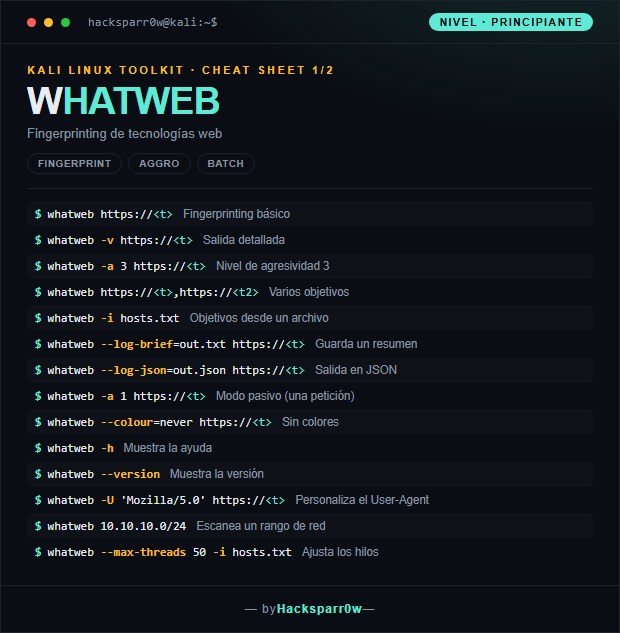
| Command | What it does |
|---|---|
whatweb https://<t> | Basic fingerprinting |
whatweb -v https://<t> | Detailed output |
whatweb -a 3 https://<t> | Aggression level 3 |
whatweb https://<t>,https://<t2> | Multiple targets |
whatweb -i hosts.txt | Targets from a file |
whatweb --log-brief=out.txt https://<t> | Saves a brief summary |
whatweb --log-json=out.json https://<t> | JSON output |
whatweb -a 1 https://<t> | Passive mode (single request) |
whatweb --colour=never https://<t> | No colors |
whatweb -h | Shows the help |
whatweb --version | Shows the version |
whatweb -U 'Mozilla/5.0' https://<t> | Customizes the User-Agent |
whatweb 10.10.10.0/24 | Scans a network range |
whatweb --max-threads 50 -i hosts.txt | Adjusts the threads |
2. Advanced level — aggression, proxy and outputs
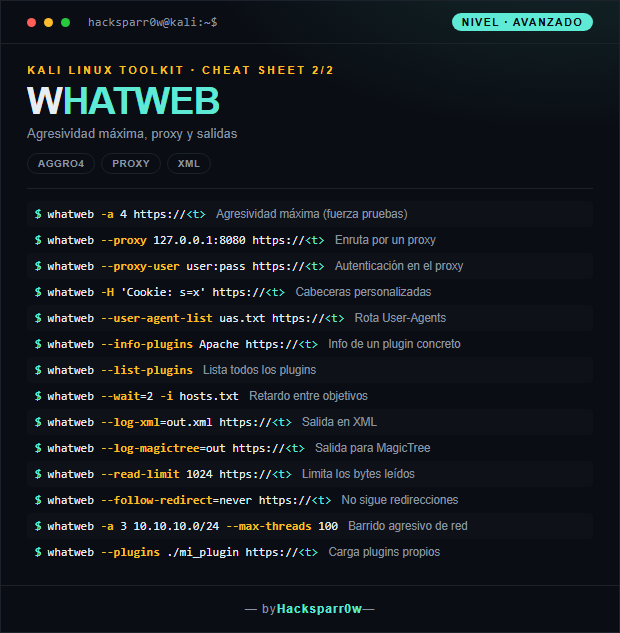
| Command | What it does |
|---|---|
whatweb -a 4 https://<t> | Maximum aggression (forces tests) |
whatweb --proxy 127.0.0.1:8080 https://<t> | Routes through a proxy |
whatweb --proxy-user user:pass https://<t> | Proxy authentication |
whatweb -H 'Cookie: s=x' https://<t> | Custom headers |
whatweb --user-agent-list uas.txt https://<t> | Rotates User-Agents |
whatweb --info-plugins Apache https://<t> | Info on a specific plugin |
whatweb --list-plugins | Lists all plugins |
whatweb --wait=2 -i hosts.txt | Delay between targets |
whatweb --log-xml=out.xml https://<t> | XML output |
whatweb --log-magictree=out https://<t> | MagicTree output |
whatweb --read-limit 1024 https://<t> | Limits the bytes read |
whatweb --follow-redirect=never https://<t> | Does not follow redirects |
whatweb -a 3 10.10.10.0/24 --max-threads 100 | Aggressive network sweep |
whatweb --plugins ./mi_plugin https://<t> | Loads custom plugins |
3. Details people miss
- The default aggression level is
-a 1(passive, a single request). If you get no concrete versions, bump it to-a 3; keep-a 4in reserve because it forces noisy tests and can trigger alerts. - To scan network ranges (
10.10.10.0/24) raise--max-threads, but bear in mind that too many threads saturate the network and cause false negatives from timeouts. - Combine
--log-jsonor--log-xmlwith lists from-ito process results later with scripts or import them into other tools; plain-text output is hard to parse. - Behind a proxy like Burp (
--proxy 127.0.0.1:8080) you can review exactly which requests WhatWeb sends and reuse the authenticated session via-H 'Cookie: ...'. - WhatWeb identifies what the server declares: headers and banners can be spoofed, so treat its results as leads, not absolute truths, and confirm them manually.
Responsible use
These commands are for systems you own or have explicit written authorisation to test (labs, CTFs, contracted engagements). Using them against third-party infrastructure without permission is illegal in most countries.
WhatWeb es un identificador de tecnologías web: envía peticiones a un sitio y, a partir de las cabeceras, cookies, HTML y patrones de respuesta, deduce qué CMS, framework, servidor y librerías corre. Es la primera parada del reconocimiento web porque en segundos te dice contra qué stack estás jugando.
La clave de WhatWeb es el nivel de agresividad (-a): en modo pasivo (-a 1) hace una sola petición y solo lee lo que el servidor ofrece, mientras que en agresivo (-a 3 o -a 4) lanza peticiones extra para confirmar o adivinar versiones. Más agresividad significa mejor detección, pero también más ruido y huella en los logs del objetivo.
1. Nivel principiante — fingerprinting y lotes
| Comando | Qué hace |
|---|---|
whatweb https://<t> | Fingerprinting básico |
whatweb -v https://<t> | Salida detallada |
whatweb -a 3 https://<t> | Nivel de agresividad 3 |
whatweb https://<t>,https://<t2> | Varios objetivos |
whatweb -i hosts.txt | Objetivos desde un archivo |
whatweb --log-brief=out.txt https://<t> | Guarda un resumen |
whatweb --log-json=out.json https://<t> | Salida en JSON |
whatweb -a 1 https://<t> | Modo pasivo (una petición) |
whatweb --colour=never https://<t> | Sin colores |
whatweb -h | Muestra la ayuda |
whatweb --version | Muestra la versión |
whatweb -U 'Mozilla/5.0' https://<t> | Personaliza el User-Agent |
whatweb 10.10.10.0/24 | Escanea un rango de red |
whatweb --max-threads 50 -i hosts.txt | Ajusta los hilos |
2. Nivel avanzado — agresividad, proxy y salidas
| Comando | Qué hace |
|---|---|
whatweb -a 4 https://<t> | Agresividad máxima (fuerza pruebas) |
whatweb --proxy 127.0.0.1:8080 https://<t> | Enruta por un proxy |
whatweb --proxy-user user:pass https://<t> | Autenticación en el proxy |
whatweb -H 'Cookie: s=x' https://<t> | Cabeceras personalizadas |
whatweb --user-agent-list uas.txt https://<t> | Rota User-Agents |
whatweb --info-plugins Apache https://<t> | Info de un plugin concreto |
whatweb --list-plugins | Lista todos los plugins |
whatweb --wait=2 -i hosts.txt | Retardo entre objetivos |
whatweb --log-xml=out.xml https://<t> | Salida en XML |
whatweb --log-magictree=out https://<t> | Salida para MagicTree |
whatweb --read-limit 1024 https://<t> | Limita los bytes leídos |
whatweb --follow-redirect=never https://<t> | No sigue redirecciones |
whatweb -a 3 10.10.10.0/24 --max-threads 100 | Barrido agresivo de red |
whatweb --plugins ./mi_plugin https://<t> | Carga plugins propios |
3. Detalles que se pasan por alto
- El nivel de agresividad por defecto es
-a 1(pasivo, una sola petición). Si no obtienes versiones concretas, sube a-a 3; reserva-a 4porque fuerza pruebas ruidosas y puede disparar alertas. - Para escanear rangos de red (
10.10.10.0/24) sube--max-threads, pero ten en cuenta que demasiados hilos saturan la red y provocan falsos negativos por timeouts. - Combina
--log-jsono--log-xmlcon listas desde-ipara procesar los resultados después con scripts o importarlos a otras herramientas; el output en texto plano es difícil de parsear. - Detrás de un proxy como Burp (
--proxy 127.0.0.1:8080) puedes revisar exactamente qué peticiones lanza WhatWeb y reutilizar la sesión autenticada mediante-H 'Cookie: ...'. - WhatWeb identifica lo que el servidor declara: cabeceras y banners se pueden falsear, así que trata sus resultados como pistas, no como verdades absolutas, y confírmalos manualmente.
Uso responsable
Estos comandos son para entornos propios o con autorización explícita por escrito (laboratorios, CTF, auditorías contratadas). Usarlos contra infraestructura ajena sin permiso es ilegal en la mayoría de países.