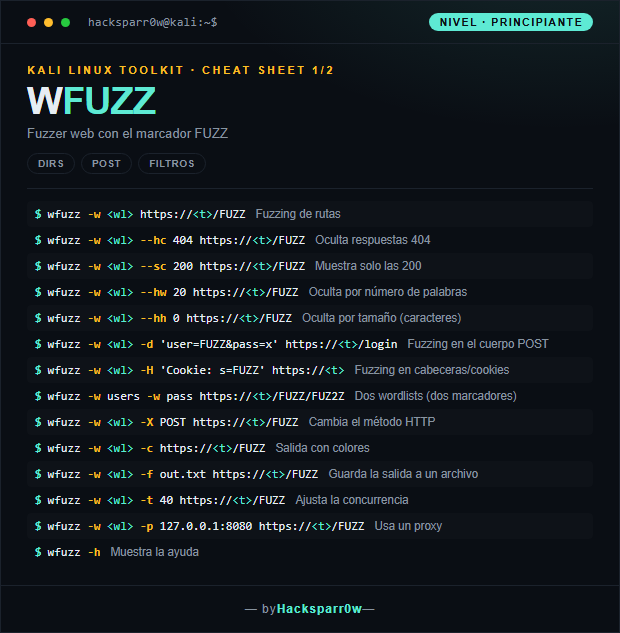
wfuzz is a Python web fuzzer that replaces the FUZZ keyword anywhere in an HTTP request with each line of a wordlist. It is used to discover paths, parameters, headers or credentials by automatically testing thousands of values. Its strength lies in its filters: you decide which responses to show or hide based on status code, size, word count or content.
The key to wfuzz is not firing requests but knowing how to read the noise. A server usually answers with a constant size or word count for things that do not exist; you spot that pattern and hide it with --hc, --hw or --hh so only the anomalies stand out. You can also place FUZZ at several points at once and combine it with encoders, which makes it far more flexible than a plain directory buster.
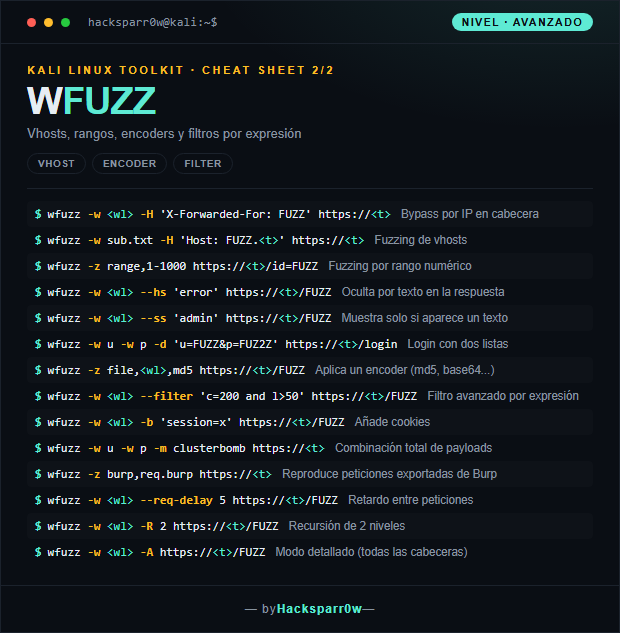
wfuzz -w u -w p -d 'u=FUZZ&p=FUZ2Z' https://<t>/login
Login with two lists
wfuzz -z file,<wl>,md5 https://<t>/FUZZ
Applies an encoder (md5, base64...)
wfuzz -w <wl> --filter 'c=200 and l>50' https://<t>/FUZZ
Advanced filter by expression
wfuzz -w <wl> -b 'session=x' https://<t>/FUZZ
Adds cookies
wfuzz -w u -w p -m clusterbomb https://<t>
Full payload combination
wfuzz -z burp,req.burp https://<t>
Replays requests exported from Burp
wfuzz -w <wl> --req-delay 5 https://<t>/FUZZ
Delay between requests
wfuzz -w <wl> -R 2 https://<t>/FUZZ
Recursion of 2 levels
wfuzz -w <wl> -A https://<t>/FUZZ
Verbose mode (all headers)
3. Details people miss
Default filtering hides nothing: always start with --hc 404, or measure a baseline request and hide its size with --hh or its word count with --hw, or you will drown in false positives.
--hc, --hw and --hh are the counterparts of --sc, --sw, --ss: use the hide ones to discard known noise and the show ones once you know what you are after, but do not mix both logics in the same scan.
With multiple wordlists the markers are FUZZ, FUZ2Z, FUZ3Z… in that order; forgetting the second marker or the mode (-m clusterbomb) is the most common mistake in login attacks.
To fuzz vhosts with Host: FUZZ.domain you must filter by size, because the server returns 200 for everything; the real vhost gives itself away through a different size or word count, not through the status code.
wfuzz is discontinued and barely maintained; on recent Kali it may break due to pycurl dependencies. If you need something modern, ffuf or feroxbuster cover almost all of its use cases.
Responsible use
These commands are for systems you own or have explicit written authorisation to test (labs, CTFs, contracted engagements). Using them against third-party infrastructure without permission is illegal in most countries.
wfuzz es un fuzzer web escrito en Python que sustituye la palabra clave FUZZ en cualquier parte de una petición HTTP por cada línea de un diccionario. Sirve para descubrir rutas, parámetros, cabeceras o credenciales probando miles de valores de forma automática. Su fuerza está en los filtros: decides qué respuestas ver u ocultar según código, tamaño, palabras o contenido.
La clave de wfuzz no es lanzar peticiones, sino saber leer el ruido. Un servidor suele responder con un tamaño o número de palabras constante para lo que no existe; identificas ese patrón y lo ocultas con --hc, --hw o --hh para que solo destaque lo anómalo. Además puedes colocar FUZZ en varios puntos a la vez y combinarlo con encoders, lo que lo hace más flexible que un simple buscador de directorios.
wfuzz -w u -w p -d 'u=FUZZ&p=FUZ2Z' https://<t>/login
Login con dos listas
wfuzz -z file,<wl>,md5 https://<t>/FUZZ
Aplica un encoder (md5, base64...)
wfuzz -w <wl> --filter 'c=200 and l>50' https://<t>/FUZZ
Filtro avanzado por expresión
wfuzz -w <wl> -b 'session=x' https://<t>/FUZZ
Añade cookies
wfuzz -w u -w p -m clusterbomb https://<t>
Combinación total de payloads
wfuzz -z burp,req.burp https://<t>
Reproduce peticiones exportadas de Burp
wfuzz -w <wl> --req-delay 5 https://<t>/FUZZ
Retardo entre peticiones
wfuzz -w <wl> -R 2 https://<t>/FUZZ
Recursión de 2 niveles
wfuzz -w <wl> -A https://<t>/FUZZ
Modo detallado (todas las cabeceras)
3. Detalles que se pasan por alto
El filtrado por defecto no oculta nada: empieza siempre por --hc 404 o mide una petición base y oculta su tamaño con --hh o su número de palabras con --hw, o te ahogarás en falsos positivos.
--hc, --hw y --hh son excluyentes con sus versiones --sc, --sw, --ss: usa las hide para descartar ruido conocido y las show cuando ya sabes qué buscas, pero no mezcles ambas lógicas en el mismo escaneo.
Con varias wordlists los marcadores son FUZZ, FUZ2Z, FUZ3Z… en ese orden; olvidar el segundo marcador o el modo (-m clusterbomb) es el error más común en ataques de login.
Para fuzzear vhosts con Host: FUZZ.dominio necesitas filtrar por tamaño, porque el servidor devuelve 200 para todo; el vhost real se delata por un tamaño o número de palabras distinto, no por el código de estado.
wfuzz está descontinuado y apenas recibe mantenimiento; en Kali reciente puede fallar por dependencias de pycurl. Si lo necesitas moderno, ffuf o feroxbuster cubren casi todo su uso.
Uso responsable
Estos comandos son para entornos propios o con autorización explícita por escrito (laboratorios, CTF, auditorías contratadas). Usarlos contra infraestructura ajena sin permiso es ilegal en la mayoría de países.