ldapsearch is OpenLDAP's command-line client for firing LDAP queries against a directory. In Active Directory pentesting it is the swiss army knife for enumerating the domain: users, groups, computers, policies and attributes, whether anonymously or authenticated.
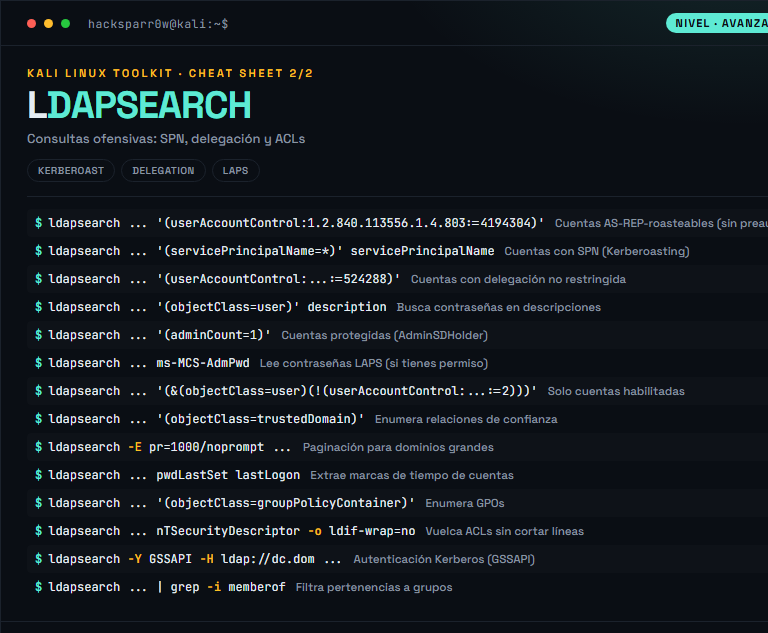
The power of ldapsearch is not in the tool but in the LDAP filter you feed it: every query is an RFC 4515 filter over the domain tree. Mastering matching rules like 1.2.840.113556.1.4.803 (bitwise AND over userAccountControl) is what turns an innocent enumeration into the precise location of Kerberoastable accounts, accounts with delegation or without pre-authentication.
1. Beginner level — directory enumeration
Command
What it does
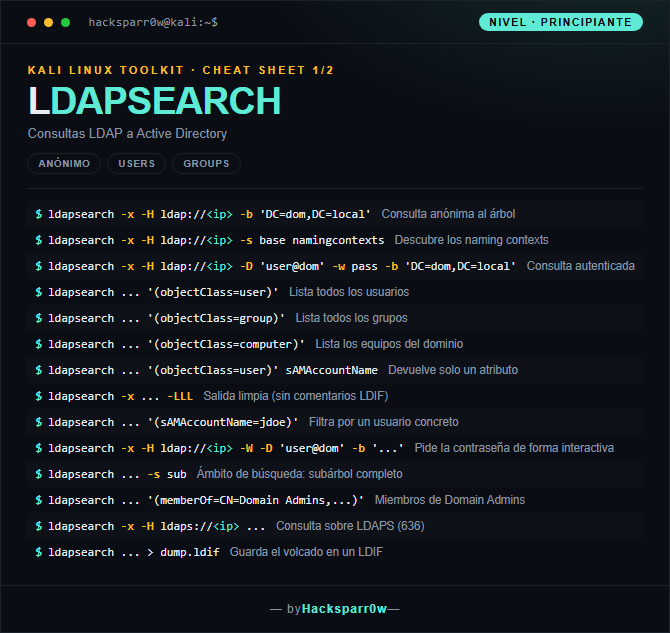
ldapsearch -x -H ldap://<ip> -b 'DC=dom,DC=local'
Anonymous query of the tree
ldapsearch -x -H ldap://<ip> -s base namingcontexts
Many DCs block anonymous binds: if -x without credentials returns an Operations error or empty results, you need a valid domain account with -D and -w/-W.
Avoid -w pass on the command line: the password ends up in your shell history and in ps. Use -W so it prompts you interactively.
Active Directory caps responses at 1000 objects by default (MaxPageSize); on large domains use paging with -E pr=1000/noprompt or you will silently lose results.
Timestamps like pwdLastSet and lastLogon come as Windows FILETIME (100 ns since 1601), not Unix time: convert them before interpreting.
For Kerberos authentication with -Y GSSAPI you need a valid ticket (kinit) and must resolve the DC by name, not by IP, or the SASL exchange will fail.
Responsible use
These commands are for systems you own or have explicit written authorisation to test (labs, CTFs, contracted engagements). Using them against third-party infrastructure without permission is illegal in most countries.
ldapsearch es el cliente de línea de comandos de OpenLDAP para lanzar consultas LDAP contra un directorio. En pentesting de Active Directory es la navaja suiza para enumerar el dominio: usuarios, grupos, equipos, políticas y atributos, ya sea de forma anónima o autenticada.
La potencia de ldapsearch no está en la herramienta sino en el filtro LDAP que le pasas: cada consulta es un filtro RFC 4515 sobre el árbol del dominio. Dominar los matching rules como 1.2.840.113556.1.4.803 (bitwise AND sobre userAccountControl) es lo que convierte una enumeración inocente en la localización precisa de cuentas Kerberoasteables, con delegación o sin preautenticación.
1. Nivel principiante — enumeración del directorio
Comando
Qué hace
ldapsearch -x -H ldap://<ip> -b 'DC=dom,DC=local'
Consulta anónima al árbol
ldapsearch -x -H ldap://<ip> -s base namingcontexts
Muchos DCs bloquean el bind anónimo: si -x sin credenciales devuelve Operations error o resultados vacíos, necesitas una cuenta de dominio válida con -D y -w/-W.
Evita -w pass en la línea de comandos: la contraseña queda en el historial y en ps. Usa -W para que te la pida de forma interactiva.
Active Directory limita las respuestas a 1000 objetos por defecto (MaxPageSize); en dominios grandes usa paginación con -E pr=1000/noprompt o perderás resultados sin avisar.
Los timestamps como pwdLastSet y lastLogon vienen en formato FILETIME de Windows (100 ns desde 1601), no en Unix: hay que convertirlos antes de interpretarlos.
Para autenticación Kerberos con -Y GSSAPI necesitas un ticket válido (kinit) y resolver el DC por su nombre, no por IP, o el intercambio SASL fallará.
Uso responsable
Estos comandos son para entornos propios o con autorización explícita por escrito (laboratorios, CTF, auditorías contratadas). Usarlos contra infraestructura ajena sin permiso es ilegal en la mayoría de países.