root@sparrow:~/writeups$ cat gobuster.md
// web
Gobuster
21 Jul 2026
· 6 min read
Gobuster is a brute-forcing tool written in Go, designed to discover hidden content in web applications and infrastructure. It enumerates directories, files, DNS subdomains and virtual hosts starting from a wordlist. Its speed and concurrency model make it a must-have in the reconnaissance phase.
What really matters about Gobuster is that it works by mode (dir, dns, vhost, fuzz, s3) and each mode accepts different flags; mixing them up is the most common mistake. It also does not crawl recursively by default: every interesting directory has to be relaunched by hand. The quality of your findings depends more on the wordlist you pick than on the number of threads.
1. Beginner level — directories, DNS and filters
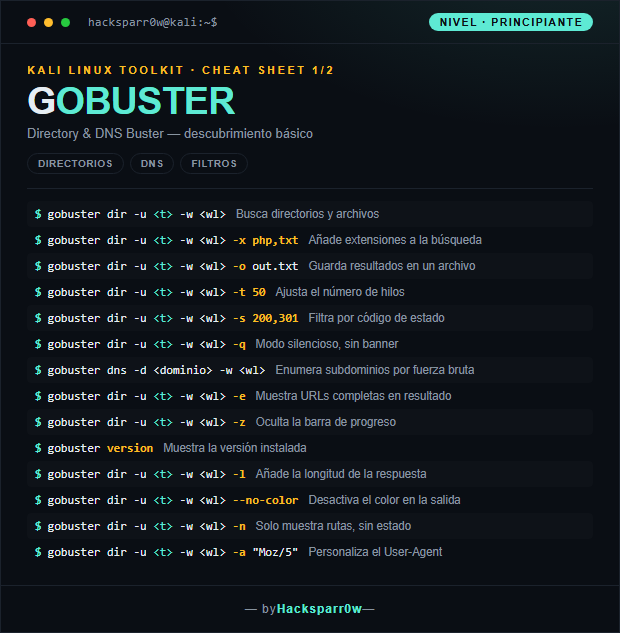
| Command | What it does |
|---|---|
gobuster dir -u <t> -w <wl> | Searches for directories and files |
gobuster dir -u <t> -w <wl> -x php,txt | Adds extensions to the search |
gobuster dir -u <t> -w <wl> -o out.txt | Saves results to a file |
gobuster dir -u <t> -w <wl> -t 50 | Adjusts the number of threads |
gobuster dir -u <t> -w <wl> -s 200,301 | Filters by status code |
gobuster dir -u <t> -w <wl> -q | Quiet mode, no banner |
gobuster dns -d <dominio> -w <wl> | Enumerates subdomains by brute force |
gobuster dir -u <t> -w <wl> -e | Shows full URLs in the output |
gobuster dir -u <t> -w <wl> -z | Hides the progress bar |
gobuster version | Shows the installed version |
gobuster dir -u <t> -w <wl> -l | Adds the response length |
gobuster dir -u <t> -w <wl> --no-color | Disables color in the output |
gobuster dir -u <t> -w <wl> -n | Shows paths only, without status |
gobuster dir -u <t> -w <wl> -a "Moz/5" | Customizes the User-Agent |
2. Advanced level — vhosts, auth and proxy
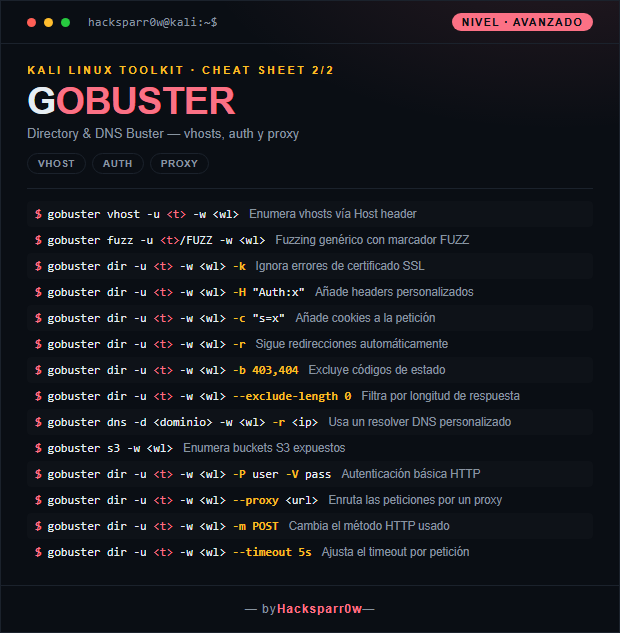
| Command | What it does |
|---|---|
gobuster vhost -u <t> -w <wl> | Enumerates vhosts via the Host header |
gobuster fuzz -u <t>/FUZZ -w <wl> | Generic fuzzing with the FUZZ marker |
gobuster dir -u <t> -w <wl> -k | Ignores SSL certificate errors |
gobuster dir -u <t> -w <wl> -H "Auth:x" | Adds custom headers |
gobuster dir -u <t> -w <wl> -c "s=x" | Adds cookies to the request |
gobuster dir -u <t> -w <wl> -r | Follows redirects automatically |
gobuster dir -u <t> -w <wl> -b 403,404 | Excludes status codes |
gobuster dir -u <t> -w <wl> --exclude-length 0 | Filters by response length |
gobuster dns -d <dominio> -w <wl> -r <ip> | Uses a custom DNS resolver |
gobuster s3 -w <wl> | Enumerates exposed S3 buckets |
gobuster dir -u <t> -w <wl> -P user -V pass | HTTP basic authentication |
gobuster dir -u <t> -w <wl> --proxy <url> | Routes requests through a proxy |
gobuster dir -u <t> -w <wl> -m POST | Changes the HTTP method used |
gobuster dir -u <t> -w <wl> --timeout 5s | Adjusts the timeout per request |
3. Details people miss
- Gobuster is not recursive: when you find an interesting directory, relaunch it pointing the URL at that path to keep digging deeper.
- Each mode (
dir,dns,vhost,fuzz) has its own flags; manydiroptions do not exist indnsand vice versa. - The output is only as good as the wordlist: raising
-tspeeds things up, but it won't find paths that aren't in the dictionary. - On HTTPS with self-signed certificates use
-kto avoid failing on TLS validation errors. - When the server answers 200 to everything, lean on
--exclude-lengthor-bto discard false positives by size or status code.
Responsible use
These commands are for systems you own or have explicit written authorisation to test (labs, CTFs, contracted engagements). Using them against third-party infrastructure without permission is illegal in most countries.
Gobuster es una herramienta de fuerza bruta escrita en Go, diseñada para descubrir contenido oculto en aplicaciones web e infraestructura. Enumera directorios, archivos, subdominios DNS y virtual hosts partiendo de una lista de palabras. Su velocidad y su modelo de concurrencia lo hacen un imprescindible en la fase de reconocimiento.
Lo que de verdad importa de Gobuster es que trabaja por modo (dir, dns, vhost, fuzz, s3) y cada modo acepta flags distintas; mezclarlas es el error más común. Además no rastrea recursivamente por defecto: cada directorio interesante hay que relanzarlo a mano. La calidad de tus hallazgos depende más de la wordlist que eliges que del número de hilos.
1. Nivel principiante — directorios, DNS y filtros
| Comando | Qué hace |
|---|---|
gobuster dir -u <t> -w <wl> | Busca directorios y archivos |
gobuster dir -u <t> -w <wl> -x php,txt | Añade extensiones a la búsqueda |
gobuster dir -u <t> -w <wl> -o out.txt | Guarda resultados en un archivo |
gobuster dir -u <t> -w <wl> -t 50 | Ajusta el número de hilos |
gobuster dir -u <t> -w <wl> -s 200,301 | Filtra por código de estado |
gobuster dir -u <t> -w <wl> -q | Modo silencioso, sin banner |
gobuster dns -d <dominio> -w <wl> | Enumera subdominios por fuerza bruta |
gobuster dir -u <t> -w <wl> -e | Muestra URLs completas en resultado |
gobuster dir -u <t> -w <wl> -z | Oculta la barra de progreso |
gobuster version | Muestra la versión instalada |
gobuster dir -u <t> -w <wl> -l | Añade la longitud de la respuesta |
gobuster dir -u <t> -w <wl> --no-color | Desactiva el color en la salida |
gobuster dir -u <t> -w <wl> -n | Solo muestra rutas, sin estado |
gobuster dir -u <t> -w <wl> -a "Moz/5" | Personaliza el User-Agent |
2. Nivel avanzado — vhosts, auth y proxy
| Comando | Qué hace |
|---|---|
gobuster vhost -u <t> -w <wl> | Enumera vhosts vía Host header |
gobuster fuzz -u <t>/FUZZ -w <wl> | Fuzzing genérico con marcador FUZZ |
gobuster dir -u <t> -w <wl> -k | Ignora errores de certificado SSL |
gobuster dir -u <t> -w <wl> -H "Auth:x" | Añade headers personalizados |
gobuster dir -u <t> -w <wl> -c "s=x" | Añade cookies a la petición |
gobuster dir -u <t> -w <wl> -r | Sigue redirecciones automáticamente |
gobuster dir -u <t> -w <wl> -b 403,404 | Excluye códigos de estado |
gobuster dir -u <t> -w <wl> --exclude-length 0 | Filtra por longitud de respuesta |
gobuster dns -d <dominio> -w <wl> -r <ip> | Usa un resolver DNS personalizado |
gobuster s3 -w <wl> | Enumera buckets S3 expuestos |
gobuster dir -u <t> -w <wl> -P user -V pass | Autenticación básica HTTP |
gobuster dir -u <t> -w <wl> --proxy <url> | Enruta las peticiones por un proxy |
gobuster dir -u <t> -w <wl> -m POST | Cambia el método HTTP usado |
gobuster dir -u <t> -w <wl> --timeout 5s | Ajusta el timeout por petición |
3. Detalles que se pasan por alto
- Gobuster no es recursivo: cuando encuentres un directorio interesante, relánzalo apuntando la URL a esa ruta para seguir profundizando.
- Cada modo (
dir,dns,vhost,fuzz) tiene sus propias flags; muchas opciones dedirno existen endnsy viceversa. - El resultado sólo vale lo que vale la wordlist: subir
-tacelera, pero no encuentra rutas que no estén en el diccionario. - En HTTPS con certificados autofirmados usa
-kpara no fallar por errores de validación TLS. - Cuando el servidor responde 200 a todo, apóyate en
--exclude-lengtho-bpara descartar los falsos positivos por tamaño o código.
Uso responsable
Estos comandos son para entornos propios o con autorización explícita por escrito (laboratorios, CTF, auditorías contratadas). Usarlos contra infraestructura ajena sin permiso es ilegal en la mayoría de países.