FFUF (Fuzz Faster U Fool) is a web fuzzer written in Go, designed to fire thousands of requests per second by replacing the FUZZ keyword with each entry of a wordlist. It is used to discover directories, files, subdomains, parameters and hidden values in an application. Its strength lies in the fact that FUZZ can go anywhere in the request: URL, headers, cookies or POST body.
The key to ffuf is not the discoveries themselves, but knowing how to filter out the noise: a server that responds 200 to everything, or with fixed-size error pages, generates hundreds of false positives. That is why mastering -mc, -fc, -fs, -fw and above all auto-calibration -ac makes the difference between a useless list and real findings. Speed comes for free; a clean signal is what you have to work for.
1. Beginner level — path fuzzing and filters
Command
What it does
ffuf -u <t>/FUZZ -w <wl>
Basic directory fuzzing
ffuf -u <t>/FUZZ -w <wl> -mc 200
Matches only 200 responses
ffuf -u <t>/FUZZ -w <wl> -fc 404
Excludes status code 404
ffuf -u <t>/FUZZ -w <wl> -e .php,.txt
Adds extensions to try
ffuf -u <t>/FUZZ -w <wl> -o out.json
Saves results to a file
ffuf -u <t>/FUZZ -w <wl> -t 40
Adjusts the number of threads
ffuf -u <t>/FUZZ -w <wl> -fs 0
Excludes responses of size 0
ffuf -u <t>/FUZZ -w <wl> -recursion
Recursive fuzzing into subdirectories
ffuf -u <t>/FUZZ -w <wl> -c
Colored output
ffuf -u https://FUZZ.dom.com -w <wl>
Enumerates subdomains
ffuf -u <t>/FUZZ -w <wl> -v
Verbose mode
ffuf -u <t>/FUZZ -w <wl> -s
Silent mode
ffuf -u <t>/FUZZ -w <wl> -of json
Sets the output format
ffuf -u <t>/FUZZ -w <wl> -p 0.1
Adds a pause between requests
2. Advanced level — POST, multi-wordlist and calibration
Command
What it does
ffuf -u <t> -w <wl> -X POST -d "u=FUZZ"
Fuzzing in the POST body
ffuf -u <t>/FUZZ -w <wl> -H "Cookie:x=FUZZ"
Fuzzing in headers or cookies
ffuf -u <t>/FUZZ -w w1:FUZ1,w2:FUZ2
Fuzzing with multiple wordlists
ffuf -u <t>/FUZZ -w <wl> -fw 5
Excludes responses by number of words
ffuf -u <t>/FUZZ -w <wl> -fr "error"
Excludes responses by regex
ffuf ... -mode clusterbomb
Combines several wordlists with each other
ffuf -u <t>/FUZZ -w <wl> -rate 100
Limits requests per second
ffuf ... -replay-proxy <burp>
Replays hits to Burp Suite
ffuf -u <t>/FUZZ -w <wl> -ac
Auto-calibrates false positives
ffuf -u <t>/FUZZ -w <wl> -config <f>
Loads configuration from a file
ffuf ... -recursion-depth 2
Limits the recursion depth
ffuf -u <t>/FUZZ -w <wl> -timeout 5
Adjusts the timeout per request
ffuf -u <t>/FUZZ -w <wl> -sa
Stops the scan on too many errors
ffuf -u <t>/FUZZ -w <wl> -se
Stops only that job, not all of ffuf
3. Details people miss
The FUZZ keyword is just a convention: you can rename it (e.g. FUZ1, FUZ2) and place it in the URL, in a header with -H, in a cookie or in the body with -d; ffuf substitutes wherever it appears.
Without filters you will see a lot of noise. Start by sending one request to check the size/words of a typical 404 response and filter with -fs or -fw; auto-calibration -ac automates exactly that by sending random inputs at the start.
Filters (-fc, -fs, -fw) and matchers (-mc) are not the same: matchers define what is accepted and filters what is discarded; if you combine both, the filter is applied on top of what has already been accepted.
For subdomain fuzzing (FUZZ.domain.com) remember you depend on the server using virtual hosts; often you will need to fuzz the Host header with -H instead of the URL.
Raise the threads with -t sensibly: too much concurrency against a fragile target triggers errors and false negatives; combine -rate, -timeout and -p to avoid taking down the service or getting banned.
Responsible use
These commands are for systems you own or have explicit written authorisation to test (labs, CTFs, contracted engagements). Using them against third-party infrastructure without permission is illegal in most countries.
FFUF (Fuzz Faster U Fool) es un fuzzer web escrito en Go, pensado para lanzar miles de peticiones por segundo sustituyendo la palabra clave FUZZ por cada entrada de una wordlist. Sirve para descubrir directorios, ficheros, subdominios, parámetros y valores ocultos en una aplicación. Su fuerza está en que FUZZ puede ir en cualquier parte de la petición: URL, headers, cookies o cuerpo POST.
La clave de ffuf no son los descubrimientos en sí, sino saber filtrar el ruido: un servidor que responde 200 a todo o con páginas de error de tamaño fijo genera cientos de falsos positivos. Por eso dominar -mc, -fc, -fs, -fw y sobre todo el auto-calibrado -ac marca la diferencia entre una lista inútil y hallazgos reales. La velocidad es gratis; la señal limpia es lo que hay que trabajar.
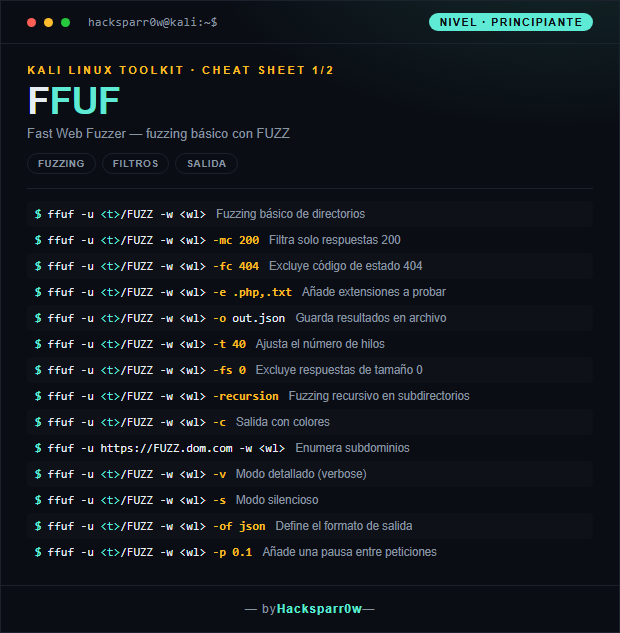
1. Nivel principiante — fuzzing de rutas y filtros
Comando
Qué hace
ffuf -u <t>/FUZZ -w <wl>
Fuzzing básico de directorios
ffuf -u <t>/FUZZ -w <wl> -mc 200
Filtra solo respuestas 200
ffuf -u <t>/FUZZ -w <wl> -fc 404
Excluye código de estado 404
ffuf -u <t>/FUZZ -w <wl> -e .php,.txt
Añade extensiones a probar
ffuf -u <t>/FUZZ -w <wl> -o out.json
Guarda resultados en archivo
ffuf -u <t>/FUZZ -w <wl> -t 40
Ajusta el número de hilos
ffuf -u <t>/FUZZ -w <wl> -fs 0
Excluye respuestas de tamaño 0
ffuf -u <t>/FUZZ -w <wl> -recursion
Fuzzing recursivo en subdirectorios
ffuf -u <t>/FUZZ -w <wl> -c
Salida con colores
ffuf -u https://FUZZ.dom.com -w <wl>
Enumera subdominios
ffuf -u <t>/FUZZ -w <wl> -v
Modo detallado (verbose)
ffuf -u <t>/FUZZ -w <wl> -s
Modo silencioso
ffuf -u <t>/FUZZ -w <wl> -of json
Define el formato de salida
ffuf -u <t>/FUZZ -w <wl> -p 0.1
Añade una pausa entre peticiones
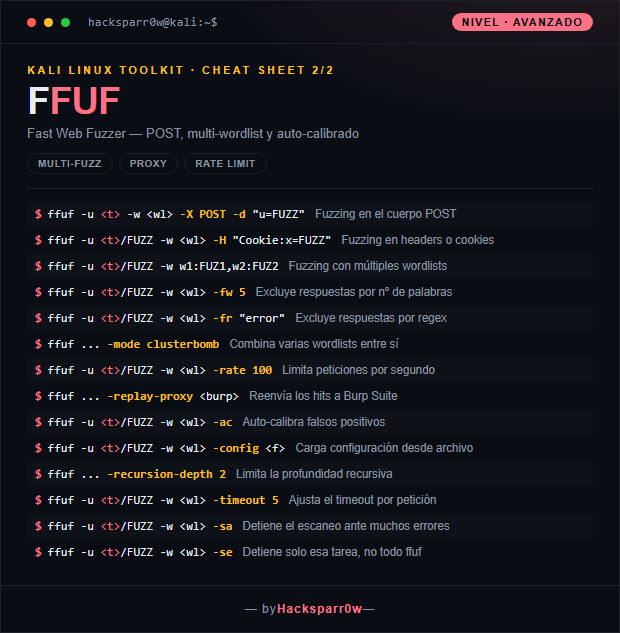
2. Nivel avanzado — POST, multi-wordlist y calibrado
Comando
Qué hace
ffuf -u <t> -w <wl> -X POST -d "u=FUZZ"
Fuzzing en el cuerpo POST
ffuf -u <t>/FUZZ -w <wl> -H "Cookie:x=FUZZ"
Fuzzing en headers o cookies
ffuf -u <t>/FUZZ -w w1:FUZ1,w2:FUZ2
Fuzzing con múltiples wordlists
ffuf -u <t>/FUZZ -w <wl> -fw 5
Excluye respuestas por nº de palabras
ffuf -u <t>/FUZZ -w <wl> -fr "error"
Excluye respuestas por regex
ffuf ... -mode clusterbomb
Combina varias wordlists entre sí
ffuf -u <t>/FUZZ -w <wl> -rate 100
Limita peticiones por segundo
ffuf ... -replay-proxy <burp>
Reenvía los hits a Burp Suite
ffuf -u <t>/FUZZ -w <wl> -ac
Auto-calibra falsos positivos
ffuf -u <t>/FUZZ -w <wl> -config <f>
Carga configuración desde archivo
ffuf ... -recursion-depth 2
Limita la profundidad recursiva
ffuf -u <t>/FUZZ -w <wl> -timeout 5
Ajusta el timeout por petición
ffuf -u <t>/FUZZ -w <wl> -sa
Detiene el escaneo ante muchos errores
ffuf -u <t>/FUZZ -w <wl> -se
Detiene solo esa tarea, no todo ffuf
3. Detalles que se pasan por alto
El marcador FUZZ es solo una convención: puedes renombrarlo (p. ej. FUZ1, FUZ2) y colocarlo en la URL, en un header con -H, en una cookie o en el cuerpo con -d; ffuf sustituye donde aparezca.
Sin filtros verás mucho ruido. Empieza lanzando una petición para ver el tamaño/palabras de una respuesta 404 típica y filtra con -fs o -fw; el auto-calibrado -ac automatiza justo eso enviando entradas aleatorias al inicio.
Filtros (-fc, -fs, -fw) y matchers (-mc) no son lo mismo: los matchers definen qué se acepta y los filtros qué se descarta; si combinas ambos, el filtro se aplica sobre lo ya aceptado.
Para fuzzing de subdominios (FUZZ.dominio.com) recuerda que dependes de que el servidor use virtual hosts; muchas veces necesitarás fuzzear la cabecera Host con -H en lugar de la URL.
Sube los hilos con -t con cabeza: demasiada concurrencia contra un objetivo frágil dispara errores y falsos negativos; combina -rate, -timeout y -p para no tumbar el servicio ni que te baneen.
Uso responsable
Estos comandos son para entornos propios o con autorización explícita por escrito (laboratorios, CTF, auditorías contratadas). Usarlos contra infraestructura ajena sin permiso es ilegal en la mayoría de países.