feroxbuster is a web content discovery tool written in Rust, designed to brute-force hidden paths and files on an HTTP server. Its defining trait is that it recurses by default: every new directory it finds is scanned again, with no need to launch manual passes.
Automatic recursion is at once its greatest strength and its greatest hazard: on a large site it can blow up depth and request volume out of control. That is why the flags that really matter are not the discovery ones but the containment ones — -d to cap depth, --scan-limit for concurrent scans and --rate-limit to avoid overwhelming the server. Mastering the status, size, word and line filters is what separates a clean listing from a wall of noise.
1. Beginner level — recursive discovery and basic filters
Recursion is on by default: on a large site this multiplies requests very fast. Use -d to cap depth, or --no-recursion/-n if you only want the first level.
Don't confuse the status-code filters: -s includes only those codes, while -C excludes them. Mixing them up drops valid findings.
Against HTTPS targets with a self-signed certificate (common in labs) the scan fails until you add -k to ignore certificate errors.
If a directory always returns the same size or word count for non-existent pages, filter it with -S, -W or -X instead of by status; many servers answer 200 to everything (soft-404).
feroxbuster saves state automatically on Ctrl+C: you can pick a long scan back up with --resume-from state.json instead of starting over.
Responsible use
These commands are for systems you own or have explicit written authorisation to test (labs, CTFs, contracted engagements). Using them against third-party infrastructure without permission is illegal in most countries.
feroxbuster es una herramienta de descubrimiento de contenido web escrita en Rust, pensada para forzar por fuerza bruta rutas y ficheros ocultos en un servidor HTTP. Su rasgo distintivo es que recorre de forma recursiva por defecto: cada directorio nuevo que encuentra lo vuelve a escanear, sin que tengas que lanzar pasadas manuales.
La recursión automática es a la vez su mayor virtud y su mayor peligro: en un sitio grande puede disparar la profundidad y el número de peticiones sin control. Por eso los flags que de verdad importan no son los de descubrimiento, sino los de contención — -d para acotar profundidad, --scan-limit para escaneos concurrentes y --rate-limit para no tumbar el servidor. Dominar los filtros de estado, tamaño, palabras y líneas es lo que separa un listado limpio de un muro de ruido.
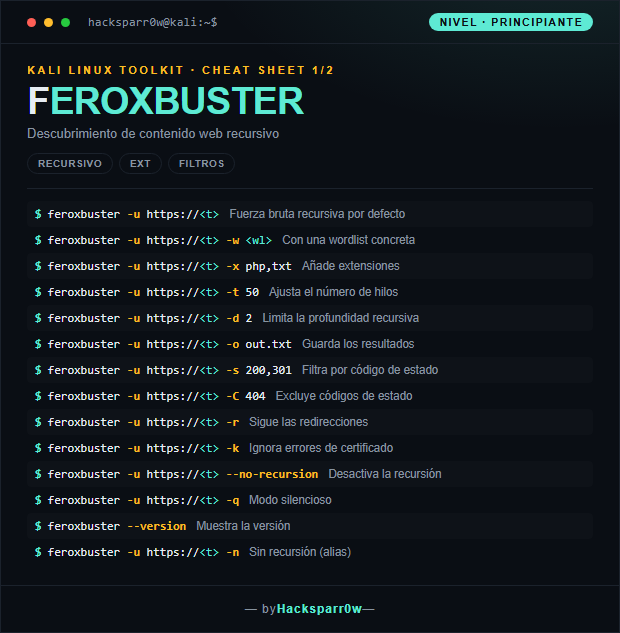
1. Nivel principiante — descubrimiento recursivo y filtros básicos
Comando
Qué hace
feroxbuster -u https://<t>
Fuerza bruta recursiva por defecto
feroxbuster -u https://<t> -w <wl>
Con una wordlist concreta
feroxbuster -u https://<t> -x php,txt
Añade extensiones
feroxbuster -u https://<t> -t 50
Ajusta el número de hilos
feroxbuster -u https://<t> -d 2
Limita la profundidad recursiva
feroxbuster -u https://<t> -o out.txt
Guarda los resultados
feroxbuster -u https://<t> -s 200,301
Filtra por código de estado
feroxbuster -u https://<t> -C 404
Excluye códigos de estado
feroxbuster -u https://<t> -r
Sigue las redirecciones
feroxbuster -u https://<t> -k
Ignora errores de certificado
feroxbuster -u https://<t> --no-recursion
Desactiva la recursión
feroxbuster -u https://<t> -q
Modo silencioso
feroxbuster --version
Muestra la versión
feroxbuster -u https://<t> -n
Sin recursión (alias)
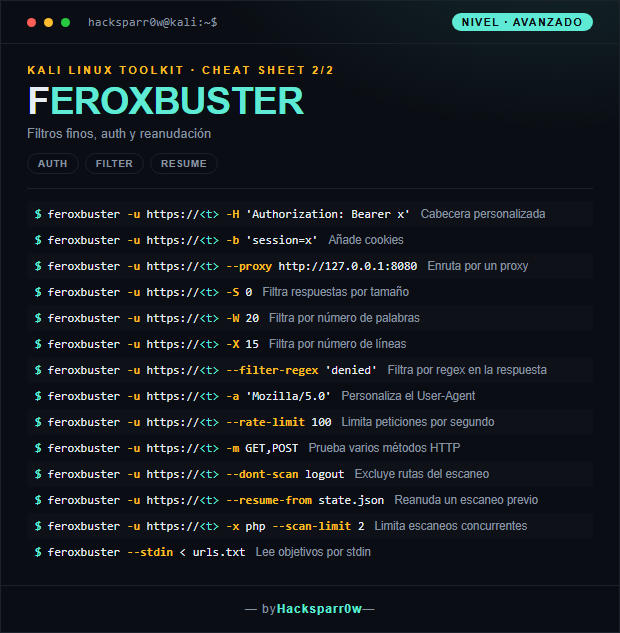
2. Nivel avanzado — auth, filtros finos y reanudación
La recursión está activada por defecto: en un sitio grande esto multiplica las peticiones muy rápido. Usa -d para acotar la profundidad o --no-recursion/-n si solo quieres el primer nivel.
No confundas los filtros por código de estado: -s incluye solo esos códigos, mientras que -C los excluye. Combinarlos mal deja fuera hallazgos válidos.
En objetivos HTTPS con certificado autofirmado (típico en labs) el escaneo falla hasta que añades -k para ignorar los errores de certificado.
Si un directorio devuelve siempre el mismo tamaño o número de palabras para páginas inexistentes, fíltralo con -S, -W o -X en lugar de por estado; muchos servidores responden 200 a todo (soft-404).
feroxbuster guarda estado automáticamente al recibir Ctrl+C: puedes retomar un escaneo largo con --resume-from state.json sin empezar de cero.
Uso responsable
Estos comandos son para entornos propios o con autorización explícita por escrito (laboratorios, CTF, auditorías contratadas). Usarlos contra infraestructura ajena sin permiso es ilegal en la mayoría de países.