DIRB is a web content scanner that discovers hidden directories and files through dictionary-based brute force. It fires HTTP requests at the target URL, testing each wordlist entry and reporting the responses that exist. It is a classic, simple and stable tool, ideal for the enumeration phase of a web audit.
The key to DIRB is understanding that the quality of its results depends entirely on the wordlist and on how it tells what exists from what does not. By default it treats anything other than a 404 as valid, so against applications that return 200 on non-existent pages you should tune detection with -N or -f. Its automatic recursion can explode the request count, something to control with -r and -z.
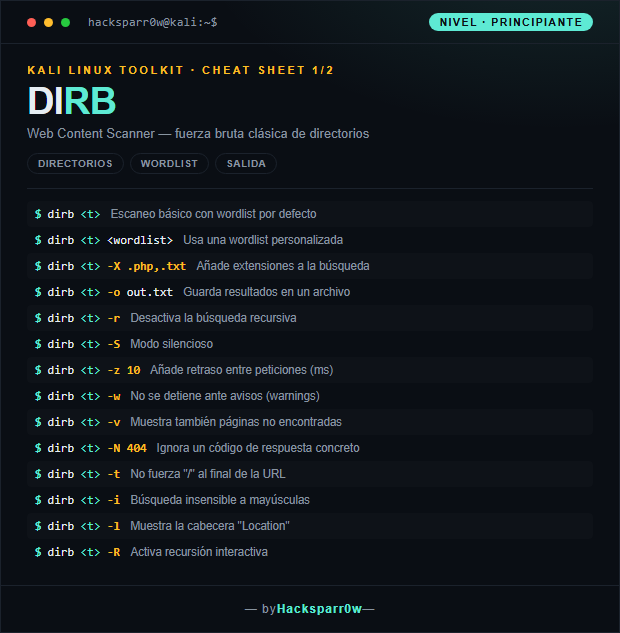
1. Beginner level — wordlists, extensions and output
Command
What it does
dirb <t>
Basic scan with the default wordlist
dirb <t> <wordlist>
Use a custom wordlist
dirb <t> -X .php,.txt
Add extensions to the search
dirb <t> -o out.txt
Save results to a file
dirb <t> -r
Disable recursive scanning
dirb <t> -S
Silent mode
dirb <t> -z 10
Add a delay between requests (ms)
dirb <t> -w
Do not stop on warnings
dirb <t> -v
Also show not-found pages
dirb <t> -N 404
Ignore a specific response code
dirb <t> -t
Do not force a trailing "/" on the URL
dirb <t> -i
Case-insensitive search
dirb <t> -l
Show the "Location" header
dirb <t> -R
Enable interactive recursion
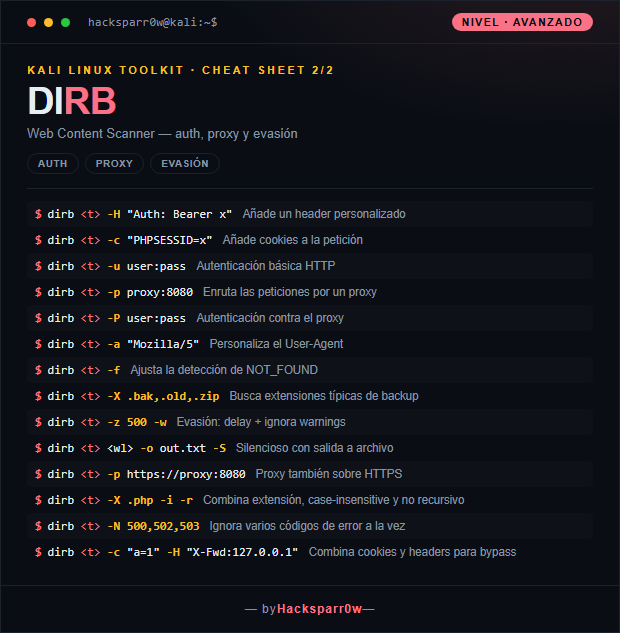
2. Advanced level — auth, proxy and evasion
Command
What it does
dirb <t> -H "Auth: Bearer x"
Add a custom header
dirb <t> -c "PHPSESSID=x"
Add cookies to the request
dirb <t> -u user:pass
HTTP basic authentication
dirb <t> -p proxy:8080
Route requests through a proxy
dirb <t> -P user:pass
Authenticate against the proxy
dirb <t> -a "Mozilla/5"
Customize the User-Agent
dirb <t> -f
Tune NOT_FOUND detection
dirb <t> -X .bak,.old,.zip
Search typical backup extensions
dirb <t> -z 500 -w
Evasion: delay + ignore warnings
dirb <t> <wl> -o out.txt -S
Silent with output to a file
dirb <t> -p https://proxy:8080
Proxy over HTTPS too
dirb <t> -X .php -i -r
Combine extension, case-insensitive and non-recursive
dirb <t> -N 500,502,503
Ignore several error codes at once
dirb <t> -c "a=1" -H "X-Fwd:127.0.0.1"
Combine cookies and headers for bypass
3. Details people miss
DIRB only ships small wordlists; for serious results point it at dictionaries such as those in SecLists under /usr/share/wordlists instead of the default list.
By default it flags as "found" anything that does not return a 404. If the app answers 200 on non-existent paths (custom error pages), use -N to ignore codes or -f to fine-tune NOT_FOUND detection and avoid hundreds of false positives.
Recursion is on by default: DIRB descends into every directory it finds and multiplies requests. On large targets disable it with -r and add -z so you don't hammer the server or trip the WAF.
-X appends specific extensions (.php,.txt) and is different from -x, which reads a list of extensions from a file. Mixing them up is a common mistake.
DIRB is single-threaded with no concurrency, so it is noticeably slower than gobuster or ffuf. Use it when stability and simplicity matter more than speed.
Responsible use
These commands are for systems you own or have explicit written authorisation to test (labs, CTFs, contracted engagements). Using them against third-party infrastructure without permission is illegal in most countries.
DIRB es un escáner de contenido web que descubre directorios y ficheros ocultos mediante fuerza bruta basada en diccionario. Lanza peticiones HTTP contra la URL objetivo probando cada entrada de una wordlist y reporta las respuestas que existen. Es una herramienta clásica, simple y estable, ideal para la fase de enumeración de una auditoría web.
La clave de DIRB está en entender que la calidad de sus resultados depende por completo de la wordlist y de cómo distinga lo que existe de lo que no. Por defecto trata como válido todo lo que no sea un 404, así que ante aplicaciones que devuelven 200 en páginas inexistentes conviene ajustar la detección con -N o -f. Su recursión automática puede disparar el número de peticiones, algo a controlar con -r y -z.
1. Nivel principiante — wordlists, extensiones y salida
Comando
Qué hace
dirb <t>
Escaneo básico con wordlist por defecto
dirb <t> <wordlist>
Usa una wordlist personalizada
dirb <t> -X .php,.txt
Añade extensiones a la búsqueda
dirb <t> -o out.txt
Guarda resultados en un archivo
dirb <t> -r
Desactiva la búsqueda recursiva
dirb <t> -S
Modo silencioso
dirb <t> -z 10
Añade retraso entre peticiones (ms)
dirb <t> -w
No se detiene ante avisos (warnings)
dirb <t> -v
Muestra también páginas no encontradas
dirb <t> -N 404
Ignora un código de respuesta concreto
dirb <t> -t
No fuerza "/" al final de la URL
dirb <t> -i
Búsqueda insensible a mayúsculas
dirb <t> -l
Muestra la cabecera "Location"
dirb <t> -R
Activa recursión interactiva
2. Nivel avanzado — auth, proxy y evasión
Comando
Qué hace
dirb <t> -H "Auth: Bearer x"
Añade un header personalizado
dirb <t> -c "PHPSESSID=x"
Añade cookies a la petición
dirb <t> -u user:pass
Autenticación básica HTTP
dirb <t> -p proxy:8080
Enruta las peticiones por un proxy
dirb <t> -P user:pass
Autenticación contra el proxy
dirb <t> -a "Mozilla/5"
Personaliza el User-Agent
dirb <t> -f
Ajusta la detección de NOT_FOUND
dirb <t> -X .bak,.old,.zip
Busca extensiones típicas de backup
dirb <t> -z 500 -w
Evasión: delay + ignora warnings
dirb <t> <wl> -o out.txt -S
Silencioso con salida a archivo
dirb <t> -p https://proxy:8080
Proxy también sobre HTTPS
dirb <t> -X .php -i -r
Combina extensión, case-insensitive y no recursivo
dirb <t> -N 500,502,503
Ignora varios códigos de error a la vez
dirb <t> -c "a=1" -H "X-Fwd:127.0.0.1"
Combina cookies y headers para bypass
3. Detalles que se pasan por alto
DIRB solo trae wordlists pequeñas; para resultados serios apunta a diccionarios como los de SecLists en /usr/share/wordlists en vez de la lista por defecto.
Por defecto marca como "encontrado" todo lo que no devuelva un 404. Si la app responde 200 a rutas inexistentes (páginas de error personalizadas), usa -N para ignorar códigos o -f para afinar la detección de NOT_FOUND y evitar cientos de falsos positivos.
La recursión está activada por defecto: DIRB entra en cada directorio que encuentra y multiplica las peticiones. En objetivos grandes desactívala con -r y añade -z para no saturar el servidor ni disparar el WAF.
-X añade extensiones concretas (.php,.txt) y es distinto de -x, que lee una lista de extensiones desde un fichero. Confundirlos es un error común.
DIRB es de un solo hilo y sin concurrencia, por lo que es notablemente más lento que gobuster o ffuf. Úsalo cuando prime la estabilidad y la simplicidad, no la velocidad.
Uso responsable
Estos comandos son para entornos propios o con autorización explícita por escrito (laboratorios, CTF, auditorías contratadas). Usarlos contra infraestructura ajena sin permiso es ilegal en la mayoría de países.