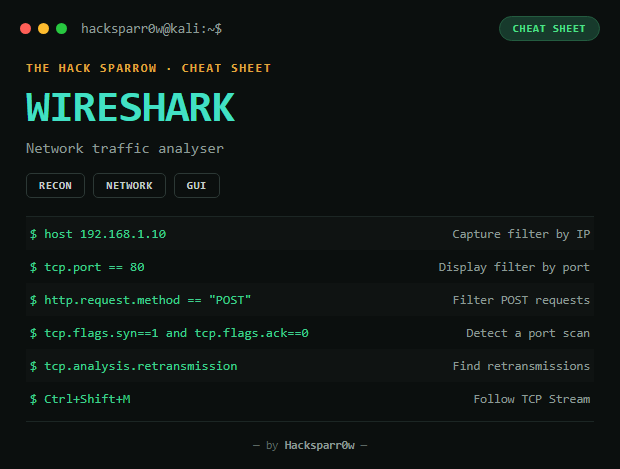
Wireshark is a network traffic analyser that lets you capture, inspect and filter packets in real time. A fundamental tool in cybersecurity, networking, and forensic analysis.
Type
GUI
Platform
Kali / Linux / Windows / macOS
1. Capture filters (BPF, before capturing)
Filter
What it does
host 192.168.1.10
Filter by IP
src host 192.168.1.10
Source traffic only
dst host 192.168.1.10
Destination traffic only
net 192.168.1.0/24
By network range
port 80
By port
tcp / udp / icmp
By protocol
src port 53 / dst port 443
Source/destination port
2. Display filters (after capturing, more powerful)
Filter
What it shows
ip.addr == 192.168.1.10
Traffic to/from that IP
tcp.port == 80 / udp.port == 53
By port
tcp.flags.syn == 1
SYN packets
http / http.request / http.response
HTTP traffic
http.request.method == "POST"
POST requests only
http.host == "google.com"
By HTTP host
dns.qry.name == "example.com"
DNS queries for a domain
arp.opcode == 1 / == 2
ARP who-has / is-at
icmp.type == 8 / == 0
Ping request / reply
tls.handshake
TLS/SSL handshake
3. Key shortcuts
Shortcut
Action
Ctrl + E
Start/stop capture
Ctrl + F
Find
Ctrl + /
Clear filters
Ctrl + R
Restart
Ctrl + Shift + M
Follow TCP Stream
4. Finding plaintext passwords
http.request.method == "POST"
Or search directly for password, login, passwd in the content — only works if the protocol isn't encrypted (HTTP, FTP, Telnet).
5. Statistics — the essentials
Tool
What it's for
Protocol Hierarchy
See which protocols dominate traffic and spot unusual ones (Telnet, SMBv1, FTP...)
Conversations
Identify suspicious IPs and abnormally long connections
Endpoints
See every device that generated traffic
IO Graphs
Detect traffic spikes, DDoS, scans
Flow Graph
Visualise the full TCP handshake (SYN → SYN/ACK → ACK)
Service Response Time
See if a service (DNS, SMB, HTTP) is slow or saturated
Detecting an Nmap-style scan:tcp.flags.syn == 1 and tcp.flags.ack == 0. Detecting retransmissions:tcp.analysis.retransmission.
Responsible use
These commands are for systems you own or have explicit written authorisation to test (labs, CTFs, contracted engagements). Using them against third-party infrastructure without permission is illegal in most countries.
Wireshark es un analizador de tráfico de red que permite capturar, inspeccionar y filtrar paquetes en tiempo real. Herramienta fundamental en ciberseguridad, redes y análisis forense.
Tipo
GUI
Plataforma
Kali / Linux / Windows / macOS
1. Filtros de captura (BPF, antes de capturar)
Filtro
Qué hace
host 192.168.1.10
Filtrar por IP
src host 192.168.1.10
Solo tráfico de origen
dst host 192.168.1.10
Solo tráfico destino
net 192.168.1.0/24
Por rango de red
port 80
Por puerto
tcp / udp / icmp
Por protocolo
src port 53 / dst port 443
Puerto origen/destino
2. Filtros de visualización (después de capturar, más potentes)
Filtro
Qué muestra
ip.addr == 192.168.1.10
Tráfico de/hacia esa IP
tcp.port == 80 / udp.port == 53
Por puerto
tcp.flags.syn == 1
Paquetes SYN
http / http.request / http.response
Tráfico HTTP
http.request.method == "POST"
Solo peticiones POST
http.host == "google.com"
Por host HTTP
dns.qry.name == "example.com"
Consultas DNS a un dominio
arp.opcode == 1 / == 2
ARP who-has / is-at
icmp.type == 8 / == 0
Ping request / reply
tls.handshake
Handshake TLS/SSL
3. Atajos clave
Atajo
Acción
Ctrl + E
Iniciar/detener captura
Ctrl + F
Buscar
Ctrl + /
Limpiar filtros
Ctrl + R
Reiniciar
Ctrl + Shift + M
Seguir flujo TCP (Follow TCP Stream)
4. Encontrar contraseñas en texto plano
http.request.method == "POST"
O busca directamente password, login, passwd en el contenido — solo funciona si el protocolo no está cifrado (HTTP, FTP, Telnet).
5. Statistics — lo esencial
Herramienta
Para qué sirve
Protocol Hierarchy
Ver qué protocolos consumen más tráfico y detectar protocolos raros (Telnet, SMBv1, FTP...)
Conversations
Identificar IPs sospechosas y conexiones anormalmente largas
Endpoints
Ver todos los dispositivos que han generado tráfico
IO Graphs
Detectar picos de tráfico, DDoS, escaneos
Flow Graph
Visualizar el handshake TCP completo (SYN → SYN/ACK → ACK)
Service Response Time
Ver si un servicio (DNS, SMB, HTTP) está lento o saturado
Detectar un escaneo tipo Nmap:tcp.flags.syn == 1 and tcp.flags.ack == 0. Detectar retransmisiones:tcp.analysis.retransmission.
Uso responsable
Estos comandos son para entornos propios o con autorización explícita por escrito (laboratorios, CTF, auditorías contratadas). Usarlos contra infraestructura ajena sin permiso es ilegal en la mayoría de países.