theHarvester is an OSINT tool that collects emails, employee names, hosts and subdomains for a domain by querying public sources such as search engines, certificates and third-party APIs. It is one of the first pieces of the reconnaissance phase, because it maps out an organization's external attack surface without directly touching its systems. It is run with -d for the domain and -b to pick the sources.
The key nuance is the difference between passive and active collection. With -b you query third-party sources and leave no trace on the target, but options like -c (DNS brute force) or -p (port scanning) do generate direct traffic against the infrastructure. On top of that, many sources (Shodan, Censys, SecurityTrails, Intelligence X, GitHub) require an API key configured in api-keys.yaml: without one, those sources return little or nothing.
1. Beginner level — sources and basic collection
Command
What it does
theHarvester -d dom.com -b all
OSINT from all sources
theHarvester -d dom.com -b google
Google only
theHarvester -d dom.com -b bing
Bing only
theHarvester -d dom.com -b linkedin
Employees on LinkedIn
theHarvester -d dom.com -b crtsh
Subdomains via crt.sh
theHarvester -d dom.com -l 500 -b google
Limit the results
theHarvester -d dom.com -b all -f out
Save to HTML/XML
theHarvester -d dom.com -b all -S 100
Start at result N
theHarvester -d dom.com -b dnsdumpster
Subdomains via DNSdumpster
theHarvester -h
Show the help
theHarvester -d dom.com -b hackertarget
HackerTarget source
theHarvester -d dom.com -b otx
AlienVault OTX
theHarvester -d dom.com -b duckduckgo
DuckDuckGo source
theHarvester -d dom.com -b all -v
Verify the hosts (resolve)
2. Advanced level — active DNS and APIs
Command
What it does
theHarvester -d dom.com -b all -f report
Full report (JSON/XML)
theHarvester -d dom.com -b all -n
Reverse DNS lookup of the range
theHarvester -d dom.com -b all -c
DNS brute force
theHarvester -d dom.com -b all -t
Detect typo domains (TLD)
theHarvester -d dom.com -b shodan
Enrichment with Shodan (API)
theHarvester -d dom.com -b censys
Data from Censys (API)
theHarvester -d dom.com -b all -p
Port scan of the found hosts
theHarvester -d dom.com -b securitytrails
SecurityTrails source (API)
theHarvester -d dom.com -b all -r
DNS resolution of the results
cat ~/.theHarvester/api-keys.yaml
Configure the API keys
theHarvester -d dom.com -b github-code
Search in GitHub code
theHarvester -d dom.com -b all -e 8.8.8.8
Specific DNS server
theHarvester -d dom.com -b all | tee harvest.txt
Save all the output
theHarvester -d dom.com -b intelx
Intelligence X source (API)
3. Details people miss
-b all is slow and noisy: it walks through every source and some fail on timeout or rate limit. For quick recon, pick specific sources (-b crtsh,bing,otx) instead of all of them.
Paid sources (Shodan, Censys, SecurityTrails, Intelligence X, GitHub) need an API key in ~/.theHarvester/api-keys.yaml. If you don't set it, those sources are silently skipped and you'll think there's no data.
-b is passive (it queries third parties), but -c, -p and -n directly touch the target's infrastructure. Don't use them without explicit authorization if you need to stay off the radar.
Always verify subdomains with -v or -r: many sources return historical or non-existent hosts, and resolving them via DNS leaves you only the ones that are live.
The binary name has an internal capital letter: it's theHarvester, not theharvester. It's a very common typo that makes the command fail.
Responsible use
These commands are for systems you own or have explicit written authorisation to test (labs, CTFs, contracted engagements). Using them against third-party infrastructure without permission is illegal in most countries.
theHarvester es una herramienta de OSINT que recopila correos, nombres de empleados, hosts y subdominios de un dominio consultando fuentes públicas como buscadores, certificados y APIs de terceros. Es una de las primeras piezas de la fase de reconocimiento, porque dibuja la superficie de ataque externa de una organización sin tocar directamente sus sistemas. Se invoca con -d para el dominio y -b para elegir las fuentes.
El matiz clave es la diferencia entre recolección pasiva y activa. Con -b consultas fuentes de terceros y no dejas rastro en el objetivo, pero opciones como -c (fuerza bruta de DNS) o -p (escaneo de puertos) sí generan tráfico directo contra la infraestructura. Además, muchas fuentes (Shodan, Censys, SecurityTrails, Intelligence X, GitHub) requieren una API key configurada en api-keys.yaml: sin ella, esas fuentes devuelven poco o nada.
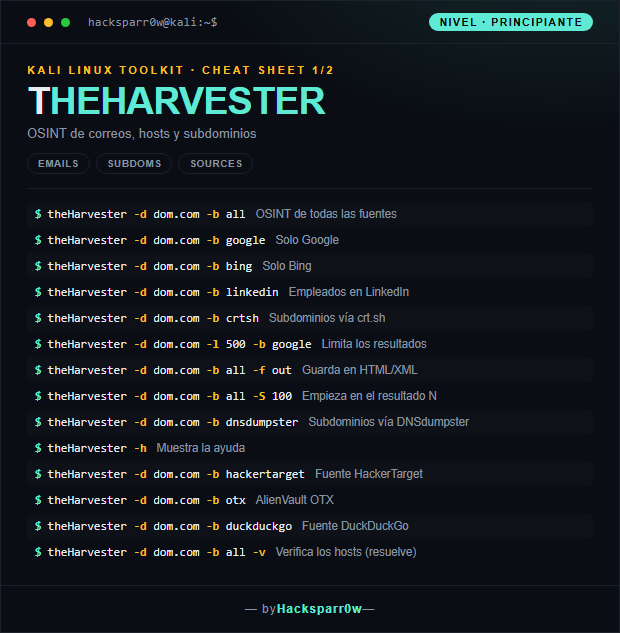
1. Nivel principiante — fuentes y recolección básica
Comando
Qué hace
theHarvester -d dom.com -b all
OSINT de todas las fuentes
theHarvester -d dom.com -b google
Solo Google
theHarvester -d dom.com -b bing
Solo Bing
theHarvester -d dom.com -b linkedin
Empleados en LinkedIn
theHarvester -d dom.com -b crtsh
Subdominios vía crt.sh
theHarvester -d dom.com -l 500 -b google
Limita los resultados
theHarvester -d dom.com -b all -f out
Guarda en HTML/XML
theHarvester -d dom.com -b all -S 100
Empieza en el resultado N
theHarvester -d dom.com -b dnsdumpster
Subdominios vía DNSdumpster
theHarvester -h
Muestra la ayuda
theHarvester -d dom.com -b hackertarget
Fuente HackerTarget
theHarvester -d dom.com -b otx
AlienVault OTX
theHarvester -d dom.com -b duckduckgo
Fuente DuckDuckGo
theHarvester -d dom.com -b all -v
Verifica los hosts (resuelve)
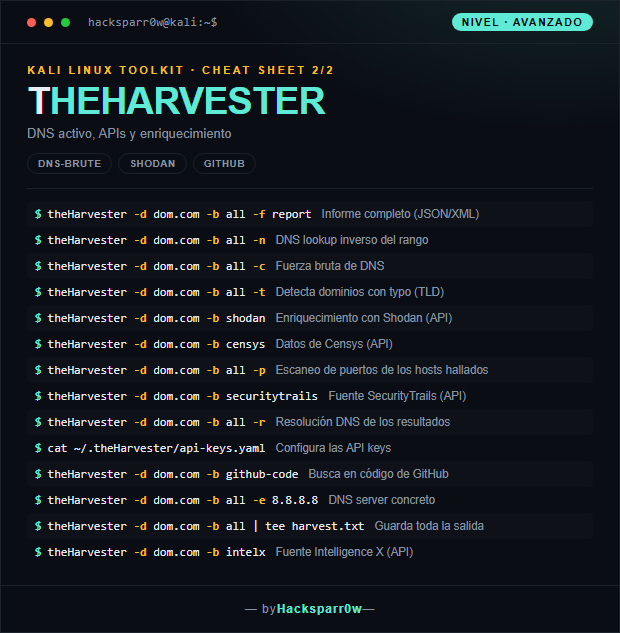
2. Nivel avanzado — DNS activo y APIs
Comando
Qué hace
theHarvester -d dom.com -b all -f report
Informe completo (JSON/XML)
theHarvester -d dom.com -b all -n
DNS lookup inverso del rango
theHarvester -d dom.com -b all -c
Fuerza bruta de DNS
theHarvester -d dom.com -b all -t
Detecta dominios con typo (TLD)
theHarvester -d dom.com -b shodan
Enriquecimiento con Shodan (API)
theHarvester -d dom.com -b censys
Datos de Censys (API)
theHarvester -d dom.com -b all -p
Escaneo de puertos de los hosts hallados
theHarvester -d dom.com -b securitytrails
Fuente SecurityTrails (API)
theHarvester -d dom.com -b all -r
Resolución DNS de los resultados
cat ~/.theHarvester/api-keys.yaml
Configura las API keys
theHarvester -d dom.com -b github-code
Busca en código de GitHub
theHarvester -d dom.com -b all -e 8.8.8.8
DNS server concreto
theHarvester -d dom.com -b all | tee harvest.txt
Guarda toda la salida
theHarvester -d dom.com -b intelx
Fuente Intelligence X (API)
3. Detalles que se pasan por alto
-b all es lento y ruidoso: recorre todas las fuentes y algunas fallan por timeout o rate limit. Para reconocimiento rápido, elige fuentes concretas (-b crtsh,bing,otx) en vez de todas.
Las fuentes de pago (Shodan, Censys, SecurityTrails, Intelligence X, GitHub) necesitan una API key en ~/.theHarvester/api-keys.yaml. Si no la configuras, esas fuentes se saltan en silencio y creerás que no hay datos.
-b es pasivo (consulta terceros), pero -c, -p y -n tocan directamente la infraestructura del objetivo. No los uses sin autorización explícita si necesitas mantenerte fuera del radar.
Verifica siempre los subdominios con -v o -r: muchas fuentes devuelven hosts históricos o inexistentes, y resolverlos por DNS te deja solo los que están vivos.
El nombre del binario lleva mayúscula intercalada: es theHarvester, no theharvester. Es un error de tipeo muy común que hace fallar el comando.
Uso responsable
Estos comandos son para entornos propios o con autorización explícita por escrito (laboratorios, CTF, auditorías contratadas). Usarlos contra infraestructura ajena sin permiso es ilegal en la mayoría de países.