subfinder is a passive subdomain enumerator from the ProjectDiscovery arsenal: it queries dozens of public sources (certificates, search engines, DNS databases) without sending direct traffic against the target. It is built for the reconnaissance phase, where it widens the attack surface by discovering hosts that are not visible at first glance.
The key point is that passive does not mean complete: by default subfinder only uses sources that need no key, so the result depends directly on the API keys you configure in config.yaml and on whether you enable -all. It also does not confirm that the subdomains exist: it returns candidates you must later resolve or validate (which is why it fits so well chained with dnsx, httpx, or naabu).
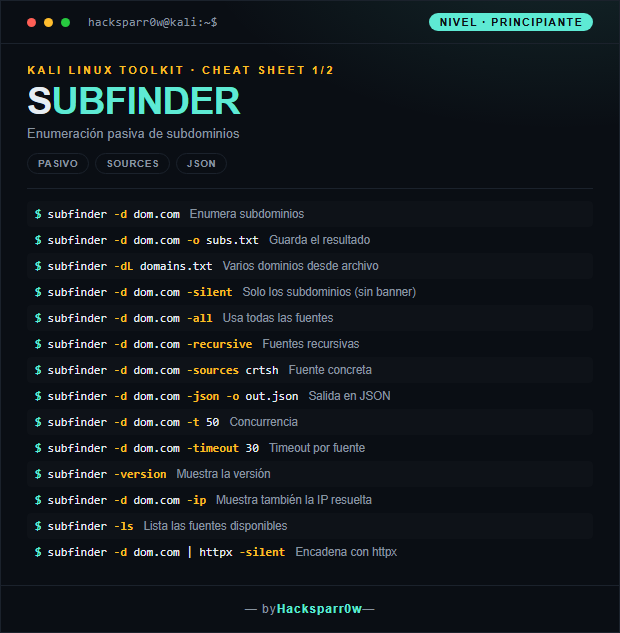
1. Beginner level — basic passive enumeration
Command
What it does
subfinder -d dom.com
Enumerates subdomains
subfinder -d dom.com -o subs.txt
Saves the output
subfinder -dL domains.txt
Multiple domains from a file
subfinder -d dom.com -silent
Only the subdomains (no banner)
subfinder -d dom.com -all
Uses all sources
subfinder -d dom.com -recursive
Recursive sources
subfinder -d dom.com -sources crtsh
Specific source
subfinder -d dom.com -json -o out.json
Output in JSON
subfinder -d dom.com -t 50
Concurrency
subfinder -d dom.com -timeout 30
Timeout per source
subfinder -version
Shows the version
subfinder -d dom.com -ip
Also shows the resolved IP
subfinder -ls
Lists the available sources
subfinder -d dom.com | httpx -silent
Chains with httpx
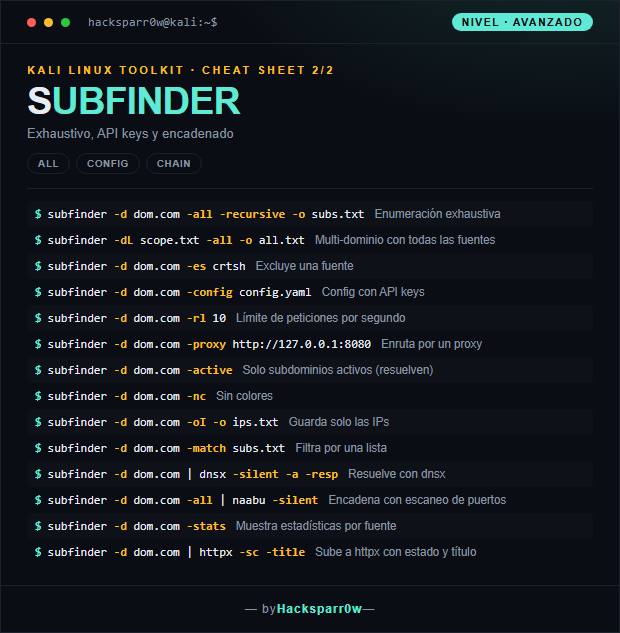
2. Advanced level — exhaustiveness and chaining
Command
What it does
subfinder -d dom.com -all -recursive -o subs.txt
Exhaustive enumeration
subfinder -dL scope.txt -all -o all.txt
Multi-domain with all sources
subfinder -d dom.com -es crtsh
Excludes a source
subfinder -d dom.com -config config.yaml
Config with API keys
subfinder -d dom.com -rl 10
Requests-per-second limit
subfinder -d dom.com -proxy http://127.0.0.1:8080
Routes through a proxy
subfinder -d dom.com -active
Only active subdomains (that resolve)
subfinder -d dom.com -nc
No colors
subfinder -d dom.com -oI -o ips.txt
Saves only the IPs
subfinder -d dom.com -match subs.txt
Filters by a list
subfinder -d dom.com | dnsx -silent -a -resp
Resolves with dnsx
subfinder -d dom.com -all | naabu -silent
Chains with port scanning
subfinder -d dom.com -stats
Shows statistics per source
subfinder -d dom.com | httpx -sc -title
Feeds into httpx with status and title
3. Details people miss
subfinder's real potential is unlocked with API keys: without configuring them in ~/.config/subfinder/provider-config.yaml, sources like SecurityTrails, Censys, or Shodan stay silent and you lose many subdomains.
-all enables every source, including the slow ones and those requiring a key; it is more complete but also noisier and slower, so save it for deep reconnaissance rather than quick sweeps.
subfinder only returns passive candidates: it does not check that they resolve. Use -active or chain with dnsx to keep only the live subdomains before attacking them.
To avoid blowing through API limits and getting blocked, control the pace with -rl (requests per second) rather than just raising concurrency with -t.
When integrating it into pipelines or scripts, use -silent to get only the subdomains (no banner or colors), or -json if you are going to parse the output with another tool.
Responsible use
These commands are for systems you own or have explicit written authorisation to test (labs, CTFs, contracted engagements). Using them against third-party infrastructure without permission is illegal in most countries.
subfinder es un enumerador de subdominios pasivo del arsenal de ProjectDiscovery: consulta decenas de fuentes públicas (certificados, motores, bases de datos DNS) sin lanzar tráfico directo contra el objetivo. Está pensado para la fase de reconocimiento, donde amplía la superficie de ataque descubriendo hosts que no aparecen a simple vista.
La clave es que pasivo no significa completo: por defecto subfinder solo usa las fuentes que no requieren clave, así que el resultado depende directamente de las API keys que configures en config.yaml y de si activas -all. Además no confirma que los subdominios existan: entrega candidatos que luego debes resolver o validar (por eso encaja tan bien encadenado con dnsx, httpx o naabu).
1. Nivel principiante — enumeración pasiva básica
Comando
Qué hace
subfinder -d dom.com
Enumera subdominios
subfinder -d dom.com -o subs.txt
Guarda el resultado
subfinder -dL domains.txt
Varios dominios desde archivo
subfinder -d dom.com -silent
Solo los subdominios (sin banner)
subfinder -d dom.com -all
Usa todas las fuentes
subfinder -d dom.com -recursive
Fuentes recursivas
subfinder -d dom.com -sources crtsh
Fuente concreta
subfinder -d dom.com -json -o out.json
Salida en JSON
subfinder -d dom.com -t 50
Concurrencia
subfinder -d dom.com -timeout 30
Timeout por fuente
subfinder -version
Muestra la versión
subfinder -d dom.com -ip
Muestra también la IP resuelta
subfinder -ls
Lista las fuentes disponibles
subfinder -d dom.com | httpx -silent
Encadena con httpx
2. Nivel avanzado — exhaustividad y encadenado
Comando
Qué hace
subfinder -d dom.com -all -recursive -o subs.txt
Enumeración exhaustiva
subfinder -dL scope.txt -all -o all.txt
Multi-dominio con todas las fuentes
subfinder -d dom.com -es crtsh
Excluye una fuente
subfinder -d dom.com -config config.yaml
Config con API keys
subfinder -d dom.com -rl 10
Límite de peticiones por segundo
subfinder -d dom.com -proxy http://127.0.0.1:8080
Enruta por un proxy
subfinder -d dom.com -active
Solo subdominios activos (resuelven)
subfinder -d dom.com -nc
Sin colores
subfinder -d dom.com -oI -o ips.txt
Guarda solo las IPs
subfinder -d dom.com -match subs.txt
Filtra por una lista
subfinder -d dom.com | dnsx -silent -a -resp
Resuelve con dnsx
subfinder -d dom.com -all | naabu -silent
Encadena con escaneo de puertos
subfinder -d dom.com -stats
Muestra estadísticas por fuente
subfinder -d dom.com | httpx -sc -title
Sube a httpx con estado y título
3. Detalles que se pasan por alto
El potencial real de subfinder se desbloquea con API keys: sin configurarlas en ~/.config/subfinder/provider-config.yaml, fuentes como SecurityTrails, Censys o Shodan quedan mudas y pierdes muchos subdominios.
-all activa todas las fuentes, incluidas las lentas y las que necesitan clave; es más completo pero también más ruidoso y tardado, así que resérvalo para reconocimiento a fondo, no para barridos rápidos.
subfinder solo devuelve candidatos pasivos: no comprueba que resuelvan. Usa -active o encadena con dnsx para quedarte únicamente con los subdominios vivos antes de atacarlos.
Para no reventar los límites de las APIs y evitar bloqueos, controla el ritmo con -rl (peticiones por segundo) en lugar de subir solo la concurrencia con -t.
Cuando lo integres en pipelines o scripts, usa -silent para obtener únicamente los subdominios (sin banner ni colores), o -json si vas a parsear el resultado con otra herramienta.
Uso responsable
Estos comandos son para entornos propios o con autorización explícita por escrito (laboratorios, CTF, auditorías contratadas). Usarlos contra infraestructura ajena sin permiso es ilegal en la mayoría de países.