root@sparrow:~/writeups$ cat nmap.md
// recon
Nmap
21 Jul 2026
· 5 min read
Before you exploit anything, you need to know what is out there. Nmap is the first tool anyone picks up when getting into offensive security, and it is still in use in advanced engagements. This cheat sheet covers it at two levels: beginner (host discovery, port scanning and service/OS detection) and advanced (stealth scans, IP/MAC spoofing and IDS evasion).
Nmap is not just «seeing open ports». What really makes the difference is understanding how it asks: a SYN scan never completes the handshake, an ACK scan looks for firewall rules rather than services, and timing (-T) decides whether the IDS sees you.
1. Beginner level — discovery and scanning
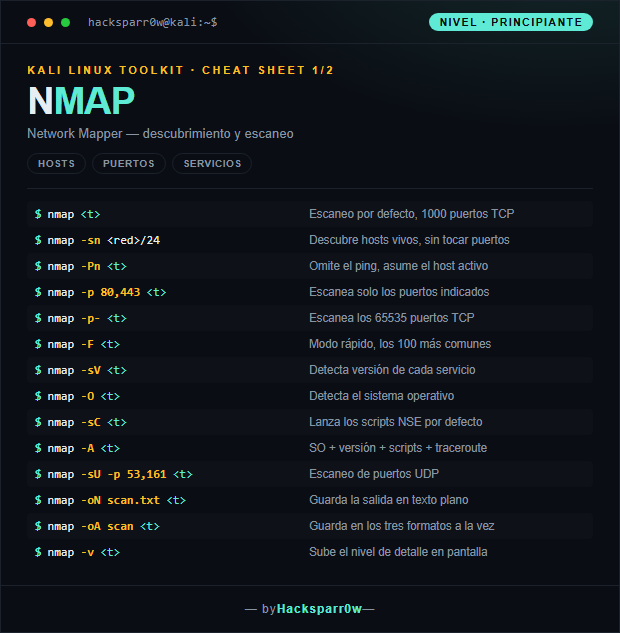
| Command | What it does |
|---|---|
nmap <objetivo> | Default scan, top 1000 TCP ports |
nmap -sn 10.10.10.0/24 | Discover live hosts, no port scan |
nmap -Pn <objetivo> | Skip host discovery, assume host is up |
nmap -p 80,443 <objetivo> | Scan only the given ports |
nmap -p- <objetivo> | Scan all 65535 TCP ports |
nmap -F <objetivo> | Fast mode, top 100 ports |
nmap -sV <objetivo> | Detect the version of each service |
nmap -O <objetivo> | Detect the operating system |
nmap -sC <objetivo> | Run the default NSE scripts |
nmap -A <objetivo> | OS + version + scripts + traceroute |
nmap -sU -p 53,161 <objetivo> | UDP port scan |
nmap -oN scan.txt <objetivo> | Save output in plain text |
nmap -oA scan <objetivo> | Save in all three formats at once |
nmap -v <objetivo> | Increase output verbosity |
2. Advanced level — stealth, spoofing and evasion
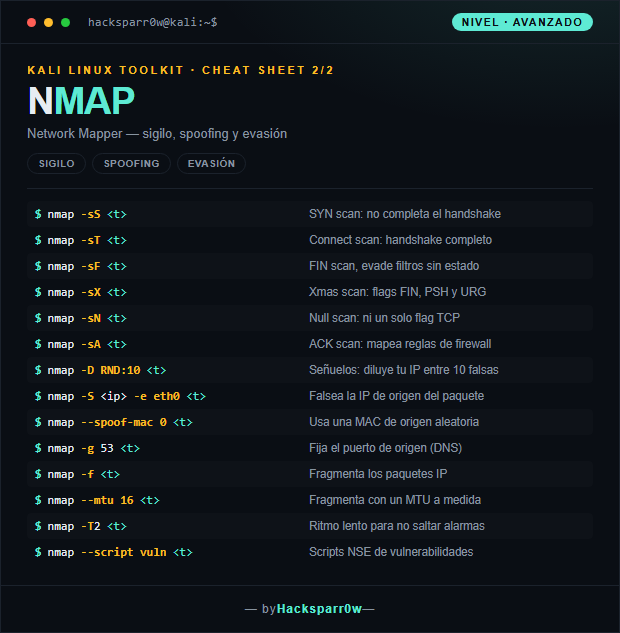
| Command | What it does |
|---|---|
nmap -sS <objetivo> | SYN scan: never completes the handshake |
nmap -sT <objetivo> | Connect scan: full TCP handshake |
nmap -sF <objetivo> | FIN scan, evades stateless filters |
nmap -sX <objetivo> | Xmas scan: FIN, PSH and URG flags |
nmap -sN <objetivo> | Null scan: no TCP flags at all |
nmap -sA <objetivo> | ACK scan: maps firewall rules |
nmap -D RND:10 <objetivo> | Decoys: hides your IP among 10 fake ones |
nmap -S <ip> -e eth0 <objetivo> | Spoof the packet source IP |
nmap --spoof-mac 0 <objetivo> | Use a random source MAC address |
nmap -g 53 <objetivo> | Set a fixed source port (DNS) |
nmap -f <objetivo> | Fragment the IP packets |
nmap --mtu 16 <objetivo> | Fragment using a custom MTU |
nmap -T2 <objetivo> | Slow timing to stay under alarms |
nmap --script vuln <objetivo> | NSE vulnerability scripts |
3. Details people miss
-sSrequires root; without privileges Nmap silently falls back to-sT.- FIN, Xmas and Null scans do not work against Windows: its TCP stack always replies RST, so everything looks «closed».
-p-across a whole network is painfully slow. Scan fast first, then go deep only on hosts with open ports.- With
-S(spoofed IP) you will not see the replies: they go back to the address you spoofed, not to you. - Using
-oAfrom the start saves you re-scanning: normal, greppable and XML output in a single pass.
Responsible use
These commands are for systems you own or have explicit written authorisation to test (labs, CTFs, contracted engagements). Scanning third-party infrastructure without permission is illegal in most countries.
Antes de explotar nada hay que saber qué hay ahí fuera. Nmap es la primera herramienta que toca cualquiera que empieza en seguridad ofensiva, y la que se sigue usando en auditorías avanzadas. Esta cheat sheet la recorre en dos niveles: principiante (descubrimiento de hosts, escaneo de puertos y detección de servicios y SO) y avanzado (escaneos sigilosos, spoofing de IP/MAC y evasión de IDS).
Nmap no es solo «ver puertos abiertos». Lo que de verdad marca la diferencia es entender cómo pregunta: un SYN scan nunca completa el handshake, un ACK scan no busca servicios sino reglas de firewall, y el ritmo (-T) decide si el IDS te ve o no.
1. Nivel principiante — descubrimiento y escaneo
| Comando | Qué hace |
|---|---|
nmap <objetivo> | Escaneo por defecto, 1000 puertos TCP |
nmap -sn 10.10.10.0/24 | Descubre hosts vivos, sin tocar puertos |
nmap -Pn <objetivo> | Omite el ping, asume el host activo |
nmap -p 80,443 <objetivo> | Escanea solo los puertos indicados |
nmap -p- <objetivo> | Escanea los 65535 puertos TCP |
nmap -F <objetivo> | Modo rápido, los 100 más comunes |
nmap -sV <objetivo> | Detecta versión de cada servicio |
nmap -O <objetivo> | Detecta el sistema operativo |
nmap -sC <objetivo> | Lanza los scripts NSE por defecto |
nmap -A <objetivo> | SO + versión + scripts + traceroute |
nmap -sU -p 53,161 <objetivo> | Escaneo de puertos UDP |
nmap -oN scan.txt <objetivo> | Guarda la salida en texto plano |
nmap -oA scan <objetivo> | Guarda en los tres formatos a la vez |
nmap -v <objetivo> | Sube el nivel de detalle en pantalla |
2. Nivel avanzado — sigilo, spoofing y evasión
| Comando | Qué hace |
|---|---|
nmap -sS <objetivo> | SYN scan: no completa el handshake |
nmap -sT <objetivo> | Connect scan: handshake completo |
nmap -sF <objetivo> | FIN scan, evade filtros sin estado |
nmap -sX <objetivo> | Xmas scan: flags FIN, PSH y URG |
nmap -sN <objetivo> | Null scan: ni un solo flag TCP |
nmap -sA <objetivo> | ACK scan: mapea reglas de firewall |
nmap -D RND:10 <objetivo> | Señuelos: diluye tu IP entre 10 falsas |
nmap -S <ip> -e eth0 <objetivo> | Falsea la IP de origen del paquete |
nmap --spoof-mac 0 <objetivo> | Usa una MAC de origen aleatoria |
nmap -g 53 <objetivo> | Fija el puerto de origen (DNS) |
nmap -f <objetivo> | Fragmenta los paquetes IP |
nmap --mtu 16 <objetivo> | Fragmenta con un MTU a medida |
nmap -T2 <objetivo> | Ritmo lento para no saltar alarmas |
nmap --script vuln <objetivo> | Scripts NSE de vulnerabilidades |
3. Detalles que se pasan por alto
-sSnecesita root; sin privilegios Nmap cae solo a-sT.- Los escaneos FIN, Xmas y Null no funcionan contra Windows: su pila TCP responde RST siempre, así que todo sale «cerrado».
-p-sobre toda una red es lentísimo. Escanea primero rápido y luego a fondo solo lo que tenga puertos abiertos.- Con
-S(IP falsa) no verás la respuesta: el paquete vuelve a la IP que has falseado, no a la tuya. -oAdesde el principio te ahorra repetir escaneos: guarda normal, grepable y XML de una sola pasada.
Uso responsable
Estos comandos son para entornos propios o con autorización explícita por escrito (laboratorios, CTF, auditorías contratadas). Escanear infraestructura ajena sin permiso es ilegal en la mayoría de países.