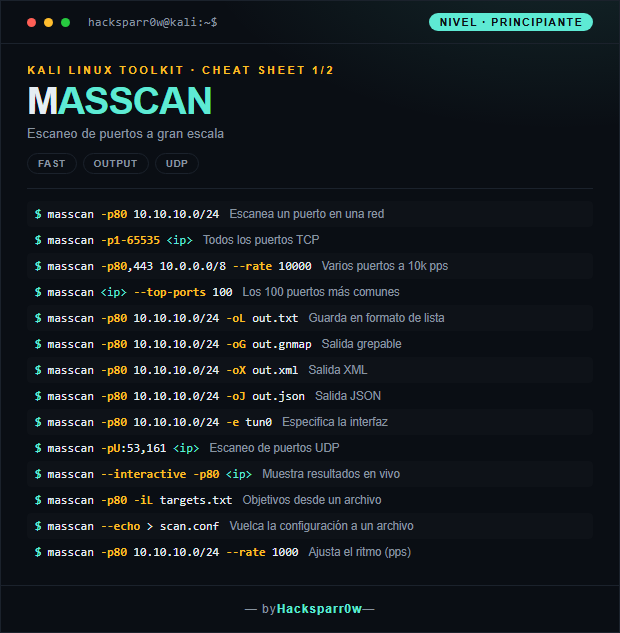
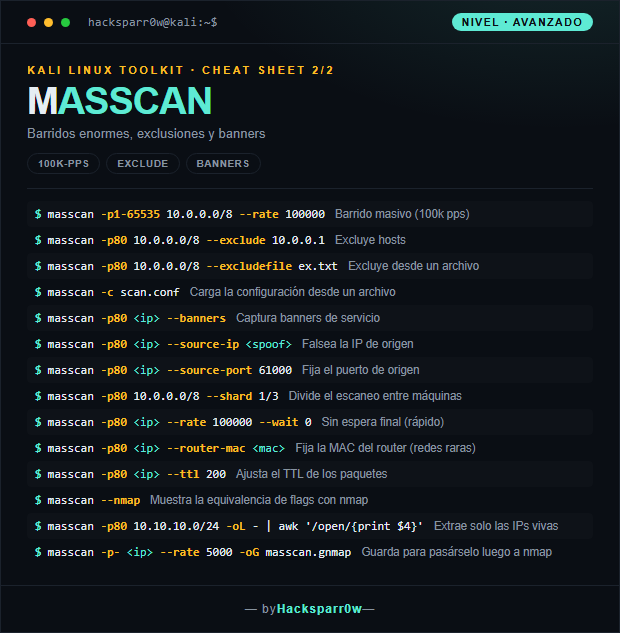
masscan is an asynchronous TCP port scanner able to sweep the entire Internet in minutes, with a syntax deliberately similar to nmap. Its strength is speed: it transmits packets using its own user-space TCP/IP stack, without waiting for a reply before sending the next one. It is used to quickly discover which ports are open across huge ranges before moving on to finer analysis.
What really matters is understanding that masscan does not use the operating system's stack: it transmits and receives with its own stack, which is why it reaches hundreds of thousands of packets per second, but also why --rate is a double-edged sword. A rate that is too high saturates your own link or VPN tunnel and produces false negatives: open ports you never see because the replies get dropped. On a VPN lab, moderate rates are more reliable than theoretical maximums.
masscan needs root privileges (or the CAP_NET_RAW capability) because it opens raw sockets; without them it won't start.
The default --rate is very conservative. Pushing it too high on an HTB/lab VPN causes false negatives: lower the rate if a port you know is open doesn't show up.
Its output formats are not identical to nmap's. Use -oG/-oX to find live hosts fast, then feed those IPs and ports to nmap -sV for real fingerprinting.
UDP scanning is requested with -pU: (for example -pU:53,161), not with -p; mixing the TCP and UDP syntax is a common mistake.
--banners makes masscan complete the TCP handshake with its own stack; this can clash with the kernel stack (which sends a RST), so it's wise to set --source-port and block that port in the local firewall.
Responsible use
These commands are for systems you own or have explicit written authorisation to test (labs, CTFs, contracted engagements). Using them against third-party infrastructure without permission is illegal in most countries.
masscan es un escáner de puertos TCP asíncrono capaz de barrer Internet entero en minutos, con una sintaxis deliberadamente parecida a la de nmap. Su fuerza está en la velocidad: transmite paquetes usando su propia pila TCP/IP en espacio de usuario, sin esperar respuesta antes de enviar el siguiente. Se usa para descubrir rápidamente qué puertos están abiertos en rangos enormes antes de pasar a un análisis más fino.
Lo que de verdad importa entender es que masscan no usa la pila del sistema operativo: transmite y recibe con su propia pila, por eso alcanza cientos de miles de paquetes por segundo pero por eso mismo el --rate es un arma de doble filo. Un ritmo demasiado alto satura tu propia línea o el enlace VPN y provoca falsos negativos: puertos abiertos que nunca ves porque las respuestas se pierden. En un lab con VPN, ritmos moderados son más fiables que máximos teóricos.
1. Nivel principiante — escaneos y formatos de salida
masscan necesita privilegios de root (o la capability CAP_NET_RAW) porque abre sockets raw; sin ellos no arranca.
El --rate por defecto es muy conservador. Subirlo demasiado en una VPN de HTB/lab causa falsos negativos: baja el ritmo si un puerto que sabes abierto no aparece.
Sus formatos de salida no son idénticos a los de nmap. Usa -oG/-oX para descubrir vivos rápido y luego pasa esas IPs y puertos a nmap -sV para el fingerprinting real.
El escaneo UDP se pide con -pU: (por ejemplo -pU:53,161), no con -p; es un error común mezclar la sintaxis TCP y UDP.
--banners obliga a masscan a completar el handshake TCP con su propia pila; puede chocar con la pila del kernel (envía RST), así que conviene fijar --source-port y bloquear ese puerto en el firewall local.
Uso responsable
Estos comandos son para entornos propios o con autorización explícita por escrito (laboratorios, CTF, auditorías contratadas). Usarlos contra infraestructura ajena sin permiso es ilegal en la mayoría de países.