root@sparrow:~/writeups$ cat httpx.md
// recon
httpx
21 Jul 2026
· 5 min read
httpx is the HTTP toolkit from ProjectDiscovery: it takes a list of hosts or URLs and tells you, fast and in parallel, which ones respond over HTTP/HTTPS. Not to be confused with the Python library of the same name. It is the standard tool for turning a list of subdomains into a set of live web endpoints you can keep working on.The point of httpx is that a single pass can probe each host and enrich it at the same time with status code, title, technologies, IP and more, without running separate tools. Understanding its filters (-mc, -fc, -mr) is what turns thousands of results into a short, actionable list, which is why it fits so well chained after subfinder.
1. Beginner level — probing and status
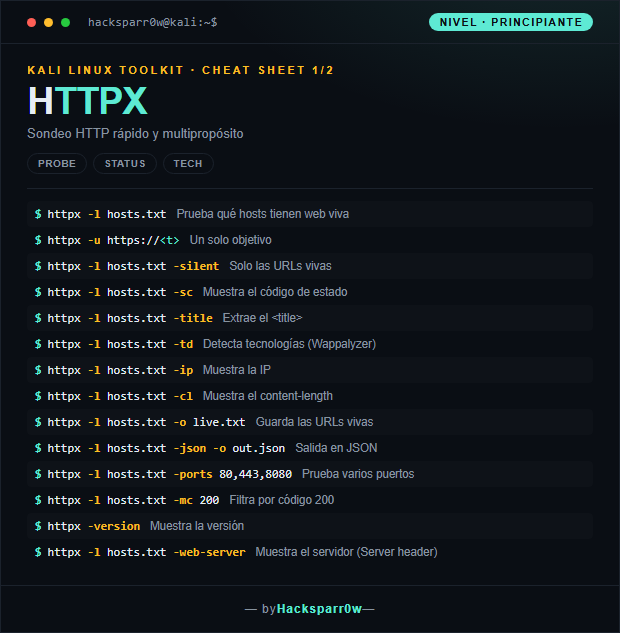
| Command | What it does |
|---|---|
httpx -l hosts.txt | Tests which hosts have a live website |
httpx -u https://<t> | A single target |
httpx -l hosts.txt -silent | Only the live URLs |
httpx -l hosts.txt -sc | Shows the status code |
httpx -l hosts.txt -title | Extracts the <title> |
httpx -l hosts.txt -td | Detects technologies (Wappalyzer) |
httpx -l hosts.txt -ip | Shows the IP |
httpx -l hosts.txt -cl | Shows the content-length |
httpx -l hosts.txt -o live.txt | Saves the live URLs |
httpx -l hosts.txt -json -o out.json | Output in JSON |
httpx -l hosts.txt -ports 80,443,8080 | Tests several ports |
httpx -l hosts.txt -mc 200 | Filters by code 200 |
httpx -version | Shows the version |
httpx -l hosts.txt -web-server | Shows the server (Server header) |
2. Advanced level — recon, favicon and screenshots
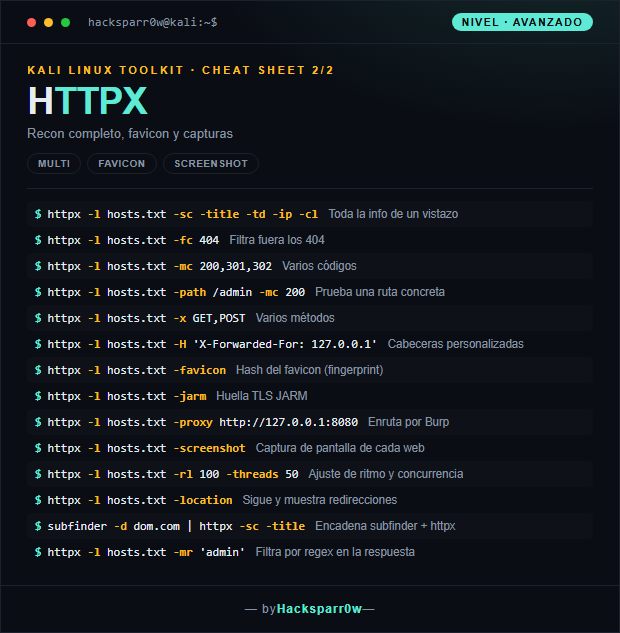
| Command | What it does |
|---|---|
httpx -l hosts.txt -sc -title -td -ip -cl | All the info at a glance |
httpx -l hosts.txt -fc 404 | Filters out the 404s |
httpx -l hosts.txt -mc 200,301,302 | Several codes |
httpx -l hosts.txt -path /admin -mc 200 | Tests a specific path |
httpx -l hosts.txt -x GET,POST | Several methods |
httpx -l hosts.txt -H 'X-Forwarded-For: 127.0.0.1' | Custom headers |
httpx -l hosts.txt -favicon | Favicon hash (fingerprint) |
httpx -l hosts.txt -jarm | JARM TLS fingerprint |
httpx -l hosts.txt -proxy http://127.0.0.1:8080 | Routes through Burp |
httpx -l hosts.txt -screenshot | Screenshot of each website |
httpx -l hosts.txt -rl 100 -threads 50 | Rate and concurrency tuning |
httpx -l hosts.txt -location | Follows and shows redirects |
subfinder -d dom.com | httpx -sc -title | Chains subfinder + httpx |
httpx -l hosts.txt -mr 'admin' | Filters by regex in the response |
3. Details people miss
- ProjectDiscovery's
httpxis not Python'shttpxlibrary. If typinghttpxthrows a Python error, you have the library installed instead of the tool; install ProjectDiscovery's (for example withgo install) or use the correct path. - With
-silentyou get only the live URLs, ideal for chaining in a pipe; without it, the output carries banners and colors that pollute the next command. - Filters split into match and filter:
-mclets only those codes through and-fcdiscards them. Do not mix them carelessly, because a-fc 404plus a-mc 200can leave you with no results without it being obvious. -screenshotspins up a headless browser under the hood, so it needs Chrome/Chromium available and uses far more CPU and time; save it for the already filtered set of live sites, not the full initial list.- Raise
-threadsand-rlsensibly: too much concurrency against a single target trips WAFs and rate limits, and it also skews your results with timeouts that look like dead hosts.
Responsible use
These commands are for systems you own or have explicit written authorisation to test (labs, CTFs, contracted engagements). Using them against third-party infrastructure without permission is illegal in most countries.
httpx es la sonda HTTP de ProjectDiscovery: toma una lista de hosts o URLs y te dice, rápido y en paralelo, cuáles responden por HTTP/HTTPS. No confundir con la librería Python del mismo nombre. Es la herramienta estándar para pasar de un listado de subdominios a un conjunto de webs vivas sobre el que seguir trabajando.La clave de httpx es que una sola pasada puede probar cada host y a la vez enriquecerlo con código de estado, título, tecnologías, IP y más, sin lanzar herramientas separadas. Entender sus filtros (-mc, -fc, -mr) es lo que convierte miles de resultados en una lista corta y accionable, y por eso encaja tan bien encadenado tras subfinder.
1. Nivel principiante — sondeo y estado
| Comando | Qué hace |
|---|---|
httpx -l hosts.txt | Prueba qué hosts tienen web viva |
httpx -u https://<t> | Un solo objetivo |
httpx -l hosts.txt -silent | Solo las URLs vivas |
httpx -l hosts.txt -sc | Muestra el código de estado |
httpx -l hosts.txt -title | Extrae el <title> |
httpx -l hosts.txt -td | Detecta tecnologías (Wappalyzer) |
httpx -l hosts.txt -ip | Muestra la IP |
httpx -l hosts.txt -cl | Muestra el content-length |
httpx -l hosts.txt -o live.txt | Guarda las URLs vivas |
httpx -l hosts.txt -json -o out.json | Salida en JSON |
httpx -l hosts.txt -ports 80,443,8080 | Prueba varios puertos |
httpx -l hosts.txt -mc 200 | Filtra por código 200 |
httpx -version | Muestra la versión |
httpx -l hosts.txt -web-server | Muestra el servidor (Server header) |
2. Nivel avanzado — recon, favicon y capturas
| Comando | Qué hace |
|---|---|
httpx -l hosts.txt -sc -title -td -ip -cl | Toda la info de un vistazo |
httpx -l hosts.txt -fc 404 | Filtra fuera los 404 |
httpx -l hosts.txt -mc 200,301,302 | Varios códigos |
httpx -l hosts.txt -path /admin -mc 200 | Prueba una ruta concreta |
httpx -l hosts.txt -x GET,POST | Varios métodos |
httpx -l hosts.txt -H 'X-Forwarded-For: 127.0.0.1' | Cabeceras personalizadas |
httpx -l hosts.txt -favicon | Hash del favicon (fingerprint) |
httpx -l hosts.txt -jarm | Huella TLS JARM |
httpx -l hosts.txt -proxy http://127.0.0.1:8080 | Enruta por Burp |
httpx -l hosts.txt -screenshot | Captura de pantalla de cada web |
httpx -l hosts.txt -rl 100 -threads 50 | Ajuste de ritmo y concurrencia |
httpx -l hosts.txt -location | Sigue y muestra redirecciones |
subfinder -d dom.com | httpx -sc -title | Encadena subfinder + httpx |
httpx -l hosts.txt -mr 'admin' | Filtra por regex en la respuesta |
3. Detalles que se pasan por alto
httpxde ProjectDiscovery no es la libreríahttpxde Python. Si al escribirhttpxte aparece un error de Python, tienes instalada la librería y no la herramienta; instala la de ProjectDiscovery (por ejemplo congo install) o usa la ruta correcta.- Con
-silentobtienes solo las URLs vivas, ideal para encadenar en un pipe; sin él, la salida trae banners y colores que ensucian el siguiente comando. - Los filtros se dividen en match y filter:
-mcdeja pasar solo esos códigos y-fclos descarta. No los mezcles a lo loco, porque un-fc 404más un-mc 200puede dejarte sin resultados sin que sea evidente. -screenshotlanza un navegador headless por debajo, así que necesita Chrome/Chromium disponible y consume mucha más CPU y tiempo; resérvalo para el conjunto ya filtrado de webs vivas, no para la lista inicial completa.- Sube
-threadsy-rlcon cabeza: demasiada concurrencia contra un mismo objetivo dispara WAFs y rate limits, y encima falsea los resultados con timeouts que parecen hosts caídos.
Uso responsable
Estos comandos son para entornos propios o con autorización explícita por escrito (laboratorios, CTF, auditorías contratadas). Usarlos contra infraestructura ajena sin permiso es ilegal en la mayoría de países.